
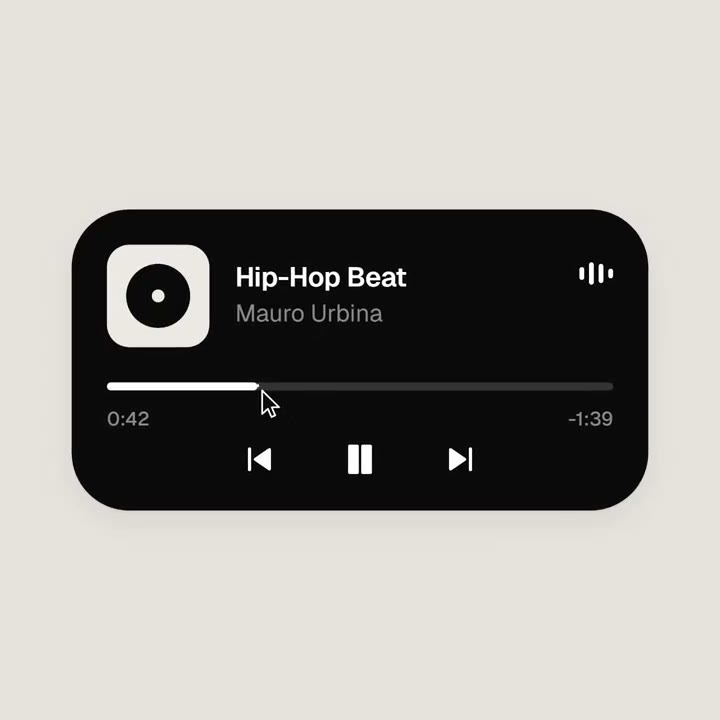
- لمبائی اور تناسب
- 0:14
- 1:1
- اس سے بنا
- HTML
- FFmpeg
پرومپٹ
<inputs> Ask me for: 8 to 12 UI states I want the shape to become (e.g. button, loader, player, slider, toggle, tabs, chart, command palette, toast), pure black and white or one accent color, and a royalty-free song around 120 BPM (e.g. Mixkit, free for commercial use). </inputs> <direction> Dribbble-level UI motion. One shape, never cut: every state is the same element morphing its size, radius and color while its content swaps with a short blur. A cursor drives every change with real clicks and drags. Light warm-gray canvas, black and white components, one clean UI font (Geist). Springs everywhere, a tiny overshoot at most. The camera zooms so each state fills the frame. The last frame is the first frame, so it loops. Banned: bouncy easing, particle bursts, glows, gradients on UI chrome, mismatched icon strokes, dead time, anything that looks like a template. </direction> <structure> 120 BPM, 7 bars, something happens on every beat. Button → loader → check → dynamic island → music player with a play/pause morph → scrub the progress bar → it becomes a volume slider that stretches when dragged past max → a toggle flips on the beat → the knob becomes a liquid tab indicator → the tabs open into a chart that draws itself, with a tooltip on hover → it collapses into ⌘K → type to filter → enter → toast → back to the button. </structure> <build> 1. One HTML file, square 1440x1440. Every style is computed from time inside seek(t): no CSS transitions, no timers, no state carried between frames. 2. Springs are closed-form step responses. A value that changes target many times is the sum of one spring per change, so it stays a pure function of time. 3. The tab indicator's two edges ride different springs, so the leading edge stretches ahead of the trailing one. Same trick for the toggle knob. 4. Drags are direct manipulation: while the cursor is held, the value is computed from its position. On release it springs back from wherever it was. 5. Analyze the song with numpy for the beat grid and start on a downbeat. Place every UI sound by its measured peak. 6. Render with Playwright: 4 subframes per frame, blended with ffmpeg tmix for motion blur at 60fps. 7. Render one frame per beat before the full render. Fix anything off the grid, cramped or hard to read. </build> <gotchas> Never put will-change on anything the camera scales or the text renders blurry. Text that swaps inside a morphing container needs its own enter and exit timing or it overlaps. Make the last frame identical to the first, cursor position and speed included, or the loop stutters. </gotchas> <start> Ask me for the inputs, then show me the state list on the beat grid before you write any code. </start>
ایسی مزید ویڈیوز
سب دیکھیں

اپنا پلان چنیں
اے آئی ویڈیوز اور اے آئی امیجز کے لیے کریڈٹس کا ایک بیلنس۔ ماہانہ یا سالانہ سبسکرائب کریں، یا ایک بار کریڈٹ پیک خریدیں۔
2,000 کریڈٹس
$20ایک بار
ایک بار ادائیگی · سبسکرپشن نہیں
فی پیک ویڈیوز
30 سیکنڈ کی پروڈکٹ ڈیمو ویڈیو13 ویڈیوز
60 سیکنڈ کی ایکسپلینر ویڈیو5 ویڈیوز
- 2,000 کریڈٹس، ایک بار شامل
- 86 تک تیز تصاویر
- Potto واٹر مارک شامل نہیں
- ویڈیو اور امیج ٹولز مشترک استعمال کرتے ہیں
5,000 کریڈٹس
$50ایک بار
ایک بار ادائیگی · سبسکرپشن نہیں
فی پیک ویڈیوز
30 سیکنڈ کی پروڈکٹ ڈیمو ویڈیو33 ویڈیوز
60 سیکنڈ کی ایکسپلینر ویڈیو13 ویڈیوز
- 5,000 کریڈٹس، ایک بار شامل
- 217 تک تیز تصاویر
- Potto واٹر مارک شامل نہیں
- ویڈیو اور امیج ٹولز مشترک استعمال کرتے ہیں
15,000 کریڈٹس
$100ایک بار
ایک بار ادائیگی · سبسکرپشن نہیں
فی پیک ویڈیوز
30 سیکنڈ کی پروڈکٹ ڈیمو ویڈیو100 ویڈیوز
60 سیکنڈ کی ایکسپلینر ویڈیو40 ویڈیوز
- 15,000 کریڈٹس، ایک بار شامل
- 652 تک تیز تصاویر
- Potto واٹر مارک شامل نہیں
- ویڈیو اور امیج ٹولز مشترک استعمال کرتے ہیں
Lite
Lite منتخب کریں$20/ماہماہانہ بل
ہر ماہ ویڈیوز
30 سیکنڈ کی پروڈکٹ ڈیمو ویڈیو13 ویڈیوز60 سیکنڈ کی ایکسپلینر ویڈیو5 ویڈیوز- ماہانہ 2,000 کریڈٹس
- 86 تک تیز تصاویر
- معیاری قطار
- Potto واٹر مارک شامل نہیں
- اے آئی ٹولز کے ساتھ بیچ پروسیسنگ
- عوامی گیلریوں میں درج نہیں
Pro
Pro منتخب کریں$50/ماہماہانہ بل
ہر ماہ ویڈیوز
30 سیکنڈ کی پروڈکٹ ڈیمو ویڈیو33 ویڈیوز60 سیکنڈ کی ایکسپلینر ویڈیو13 ویڈیوز- ماہانہ 5,000 کریڈٹس
- 217 تک تیز تصاویر
- ترجیحی قطار
- Potto واٹر مارک شامل نہیں
- اے آئی ٹولز کے ساتھ بیچ پروسیسنگ
- عوامی گیلریوں میں درج نہیں
- تجویز کردہ
Max
Max منتخب کریں$100/ماہماہانہ بل
ہر ماہ ویڈیوز
30 سیکنڈ کی پروڈکٹ ڈیمو ویڈیو100 ویڈیوز60 سیکنڈ کی ایکسپلینر ویڈیو40 ویڈیوز- ماہانہ 15,000 کریڈٹس
- 652 تک تیز تصاویر
- اعلیٰ ترین ترجیح کی قطار
- Potto واٹر مارک شامل نہیں
- اے آئی ٹولز کے ساتھ بیچ پروسیسنگ
- عوامی گیلریوں میں درج نہیں
Lite
-20%Lite منتخب کریں$20$16/ماہسالانہ بل · $240 ← $192/سال
ہر ماہ ویڈیوز
30 سیکنڈ کی پروڈکٹ ڈیمو ویڈیو13 ویڈیوز60 سیکنڈ کی ایکسپلینر ویڈیو5 ویڈیوز- ماہانہ 2,000 کریڈٹس
- 86 تک تیز تصاویر
- معیاری قطار
- Potto واٹر مارک شامل نہیں
- اے آئی ٹولز کے ساتھ بیچ پروسیسنگ
- عوامی گیلریوں میں درج نہیں
Pro
-20%Pro منتخب کریں$50$40/ماہسالانہ بل · $600 ← $480/سال
ہر ماہ ویڈیوز
30 سیکنڈ کی پروڈکٹ ڈیمو ویڈیو33 ویڈیوز60 سیکنڈ کی ایکسپلینر ویڈیو13 ویڈیوز- ماہانہ 5,000 کریڈٹس
- 217 تک تیز تصاویر
- ترجیحی قطار
- Potto واٹر مارک شامل نہیں
- اے آئی ٹولز کے ساتھ بیچ پروسیسنگ
- عوامی گیلریوں میں درج نہیں
- تجویز کردہ
Max
-20%Max منتخب کریں$100$80/ماہسالانہ بل · $1,200 ← $960/سال
ہر ماہ ویڈیوز
30 سیکنڈ کی پروڈکٹ ڈیمو ویڈیو100 ویڈیوز60 سیکنڈ کی ایکسپلینر ویڈیو40 ویڈیوز- ماہانہ 15,000 کریڈٹس
- 652 تک تیز تصاویر
- اعلیٰ ترین ترجیح کی قطار
- Potto واٹر مارک شامل نہیں
- اے آئی ٹولز کے ساتھ بیچ پروسیسنگ
- عوامی گیلریوں میں درج نہیں
Videos use credits when you export, and starting one needs a balance that covers its export. Counts assume a 30-second product demo and a 60-second explainer with narration and 3 illustrations.
Looping morph from one shape into app UI states کے اکثر پوچھے گئے سوالات
Looping morph from one shape into app UI states کیسے بنا، اس کا پرامپٹ کیا کہتا ہے، اور Potto سے ایسی ہی فیچر لوپ ویڈیو کیسے بنائیں۔
Looping morph from one shape into app UI states کیا ہے؟
Looping morph from one shape into app UI states زمرہ فیچر لوپ کی ایک موشن گرافکس ویڈیو ہے، nezbuilds کی بنائی ہوئی۔ A looping motion graphic that morphs one shape into app UI states.
Looping morph from one shape into app UI states کیسے بنا؟
Looping morph from one shape into app UI states HTML اور FFmpeg سے بنا ہے۔ یہ Potto پر فیچر لوپ کی اے آئی موشن گرافکس ویڈیوز کے مجموعے کا حصہ ہے۔
کیا Looping morph from one shape into app UI states کا پرومپٹ دستیاب ہے؟
ہاں۔ Looping morph from one shape into app UI states کا پورا پرومپٹ اسی صفحے پر ہے۔ اسے کاپی کریں، یا یہ پرومپٹ استعمال کریں پر کلک کر کے Potto کے ورک اسپیس میں کھولیں۔
Looping morph from one shape into app UI states کتنی لمبی ہے، اور اس کا تناسب کیا ہے؟
Looping morph from one shape into app UI states کی مدت 0:14 ہے، فریم 1:1۔
کیا میں Potto سے Looping morph from one shape into app UI states جیسی فیچر لوپ ویڈیو بنا سکتا ہوں؟
ہاں۔ یہ پرومپٹ استعمال کریں پر کلک کریں تاکہ Looping morph from one shape into app UI states کا پرومپٹ Potto کے ورک اسپیس میں لوڈ ہو۔ Potto اپنا ورژن رینڈر کرتا ہے، اور ایکسپورٹ سے پہلے متن اور انداز بدل سکتے ہیں۔
Looping morph from one shape into app UI states کی اصل کہاں دیکھوں؟
Looping morph from one shape into app UI states پہلے اس کے تخلیق کار نے پوسٹ کیا۔ اصل دیکھیں پر کلک کریں تاکہ وہ پوسٹ نئے ٹیب میں کھلے۔
Looping morph from one shape into app UI states جیسی مزید فیچر لوپ ویڈیوز کہاں ملیں گی؟
Potto پر فیچر لوپ کا مجموعہ دیکھیں: 9 ویڈیوز، ہر ایک کے ساتھ پرومپٹ، تفصیل اور ماخذ۔