Productschermen
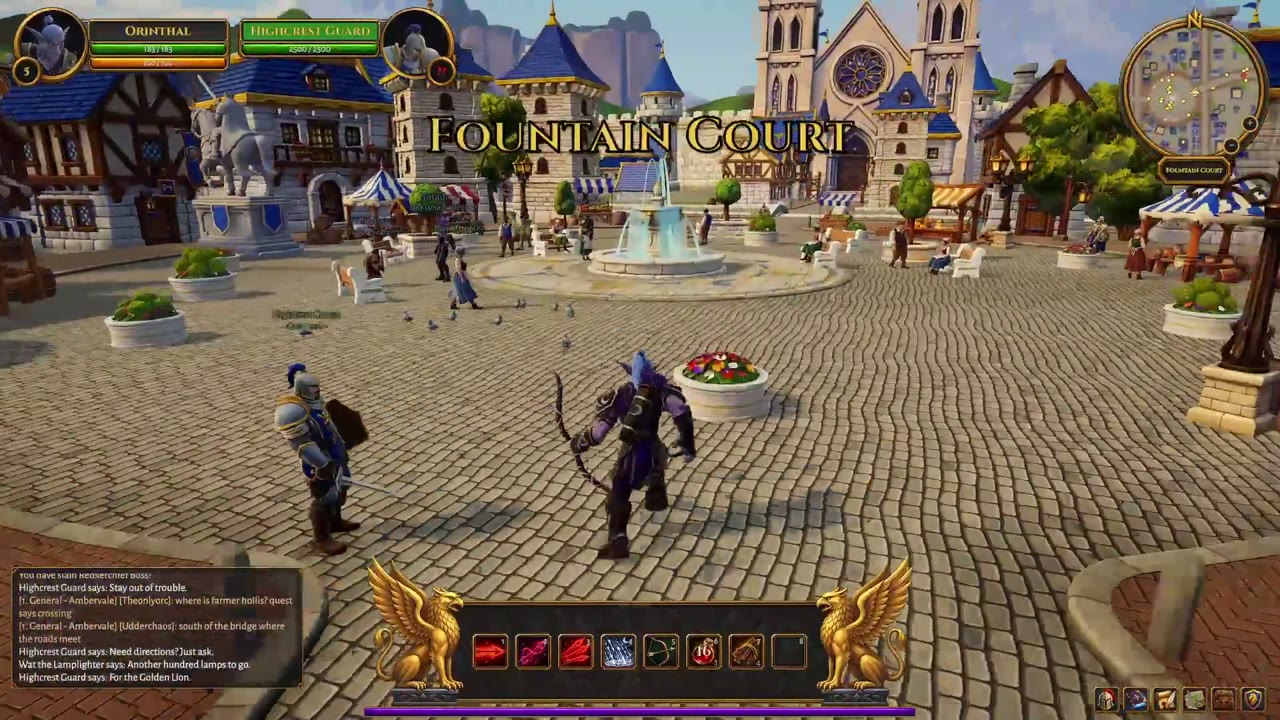
Old-school MMO town square with an elf archer and quest chat
16:9 · 1:17
door Stefan_3D_AI
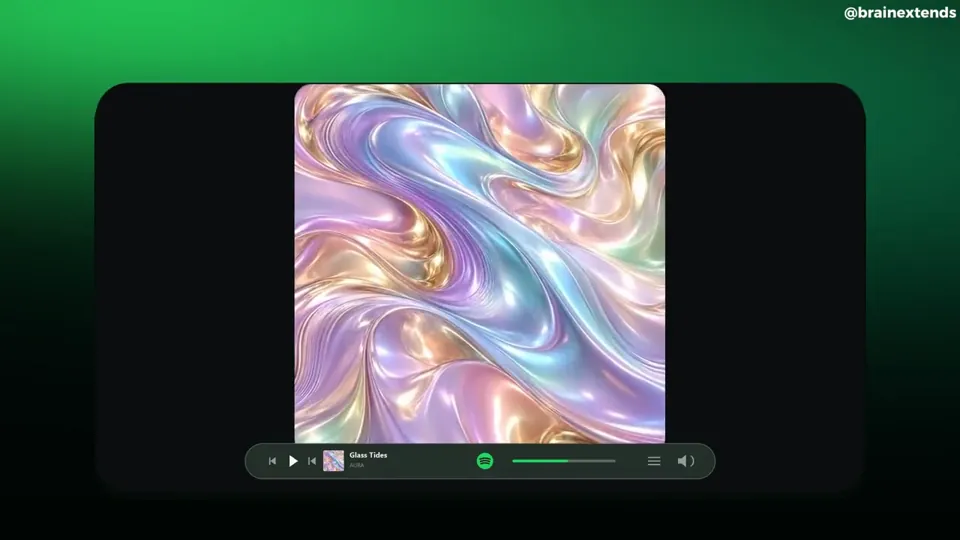
Create a complete, polished Spotify-themed motion graphics video from the following brief. This prompt is self-contained: no reference video or supplied assets are required. <deliverables> An 18-second MP4 at 1920×1080 and true 60 fps, with music and subtle sound effects Complete editable source Build, render, inspect, and refine the animation before delivering it Do not stop at a storyboard, still images, or an implementation plan </deliverables> <art_direction> A premium music-product film presented inside a large, nearly black rounded rectangular stage The stage occupies roughly 80% of the canvas width and 75% of its height, centered horizontally and slightly below the vertical center Outside the stage, use a soft atmospheric green background: luminous emerald near the upper-left corner, deeper forest green toward the sides, fading to near-black at the bottom Inside the stage: Near-black background White primary typography Muted gray secondary text Spotify green # 1ED760 for emphasis and controls One clean sans-serif font, such as Geist or Inter Consistent icon strokes and restrained shadows Keep compositions compact and centered, with substantial negative space Text should feel like music-product advertising, not oversized presentation headings Do not add an outer caption, creator watermark, decorative footer, or progress counter </art_direction> <artwork> Create original square album artwork for a fictional track called “Glass Tides” by “AURA” The hero cover is an abstract macro image of flowing pearlescent liquid silk and molten glass Use pastel lavender, powder cyan, blush pink, champagne gold, and subtle mint Include broad three-dimensional folds, realistic reflective highlights, delicate striations, and a prominent sweeping S-shaped fold Fill the square edge to edge No text, logo, or border on this hero artwork Use this same artwork consistently throughout the film Create additional designed playlist sleeves: “Late Nights” in mustard yellow “Good Energy” in pink “Deep Focus” in blue “Daily Mix 1”, “Daily Mix 2”, and “Daily Mix 3” in complementary colors These should look like finished graphic-design covers, with bold typography and simple geometric motifs </artwork> <timeline> 0.0–0.6 seconds: A green Spotify icon grows smoothly into the center of the dark stage Give it a confident arrival with minimal overshoot 0.6–1.5 seconds: The icon transitions into a small Spotify identity above two centered lines: “Discover” “new music” The first line is white; the second is green Reveal them with short masked vertical movements 1.5–2.4 seconds: A stylized Spotify desktop interface rises into view Show a slim sidebar, “Made for you”, three album cards, and small supporting rows Use a subtle perspective tilt during the entrance, settling toward a frontal view 2.4–3.2 seconds: Move closer to the three featured covers Show “New for you” above them Keep the artwork crisp, with short album titles beneath A narrow rounded player bar now anchors the bottom of the stage 3.2–4.0 seconds: The featured cards withdraw into a compact “Fresh finds” list Reveal four song rows with a slight stagger Each row contains a thumbnail, short track title, artist, and a small menu icon 4.0–4.9 seconds: Transition into a horizontal strip of colorful playlist covers Heading: “Every mood” Supporting line: “Find what moves you” The strip slides smoothly sideways, with edge cards partially cropped by the stage 4.9–5.8 seconds: A compact search field appears Type “Glass Tides” Reveal one selected result beneath it, with the iridescent artwork, “AURA”, and a green play icon 5.8–6.6 seconds: The selected artwork expands into a large centered cover Reveal “Glass Tides” underneath, followed by “AURA” in green Keep the player bar visible 6.6–7.5 seconds: The same cover slides left Track information appears on the right: “Glass Tides” “AURA” “A new frequency” Add a rounded green Play button Coordinate the cover movement and text reveals 7.5–8.3 seconds: A brief brand-color transformation fills the inner stage with green The artwork contracts into a smaller centered tile Place a small dark Spotify identity underneath The player briefly recedes 8.3–9.8 seconds: Return to the dark stage The same artwork expands dramatically toward the camera, becoming oversized and cropped by the rounded stage Restore the player at the bottom Use controlled motion blur during the fastest part of the zoom 9.8–11.2 seconds: The artwork clears into a centered typographic statement: “Find your” “rhythm” Use white for the first line and green for the second The player remains visible and stable beneath it 11.2–12.5 seconds: Show “Made for your every day” Three playlist sleeves enter with gentle perspective and small opposing tilts They spread into six smaller sleeves across the stage Supporting line: “Your sound, always evolving” 12.5–14.0 seconds: The playlist layout transitions into four floating album covers Include the iridescent hero artwork Use restrained rotation, perspective, depth ordering, and overlap Keep their movement coordinated rather than randomly floating 14.0–15.2 seconds: The covers converge toward the center and fold around a green Spotify icon The artwork withdraws as the icon becomes the focal point Fade the player away The Spotify icon must emerge from the same central position as the converging covers 15.2–18.0 seconds: The icon moves slightly left and settles beside a large white “Spotify” wordmark Keep the icon and letters separated throughout the movement Reveal: “Discover new music” “every day” The first line is white; the second is green Hold the finished composition cleanly through the end </timeline> <persistent_player> For most of the middle sequence, keep one narrow rounded player bar near the bottom of the inner stage Include: Small hero-art thumbnail “Glass Tides” and “AURA” Play and skip controls A thin progress track A small volume icon Subdued dark translucent styling with a fine border This recurring player connects the changing shots It must remain visually secondary to the artwork </persistent_player> <motion_quality> Match the energy of a tightly edited premium product film Most visual ideas last approximately one second, but transitions remain smooth Use continuous acceleration and deceleration Favor critically damped springs or carefully tuned smooth easing No repeated bouncing or large elastic overshoots Preserve the hero artwork’s identity and position relationships through search, album detail, brand tile, and zoom Use match-position transitions, coordinated scaling, masked reveals, and perspective Outgoing titles must disappear before incoming titles occupy the same space Avoid overlapping text, sudden camera resets, long blank intervals, and arbitrary full-frame crossfades Clip every oversized cover and camera move cleanly to the rounded stage No particles, shockwave rings, lens flares, camera shake, or unrelated stock footage </motion_quality> <audio> Create or select commercially usable electronic music around 120 BPM Use a clean pulse, warm bass, restrained melodic elements, and subtle transition accents Align important entrances, selections, zooms, and the logo reveal with musical events Keep effects quieter than the music No voiceover Do not use copyrighted commercial tracks without permission </audio> <implementation_and_validation> Build a deterministic animation driven by absolute time through an async window. seek(t) function Every transform, opacity, mask, and UI state must be reproducible when seeking frames in any order Do not depend on live timers, accumulated physics, or CSS transition state during export Render true 60 fps with spatial antialiasing Use 3–5 temporal subframe samples per output frame for restrained motion blur Keep stationary text and artwork sharp Inspect contact sheets and moving playback Check the fast heading changes, artwork handoffs, zoom, cover convergence, and final wordmark spacing Verify evenly spaced frame timestamps and the full 18-second duration Fix visual defects before delivering the final MP4 and editable source </implementation_and_validation>
Productschermen
16:9 · 1:17
door Stefan_3D_AI
Eén credittegoed voor AI-video’s en AI-afbeeldingen. Neem een maand- of jaarabonnement, of koop eenmalig een creditpakket.
Eenmalig betalen · geen abonnement
Video’s per pakket
Eenmalig betalen · geen abonnement
Video’s per pakket
Eenmalig betalen · geen abonnement
Video’s per pakket
Maandelijks gefactureerd
Video’s per maand
Maandelijks gefactureerd
Video’s per maand
Maandelijks gefactureerd
Video’s per maand
Jaarlijks gefactureerd · US$ 240 → US$ 192/jaar
Video’s per maand
Jaarlijks gefactureerd · US$ 600 → US$ 480/jaar
Video’s per maand
Jaarlijks gefactureerd · US$ 1.200 → US$ 960/jaar
Video’s per maand
Videos use credits when you export, and starting one needs a balance that covers its export. Counts assume a 30-second product demo and a 60-second explainer with narration and 3 illustrations.
Hoe Streaming-app tour of a fictional album release is gemaakt, wat de prompt zegt en hoe je met Potto een vergelijkbare Productschermen-video maakt.
Streaming-app tour of a fictional album release is een motion-graphicsvideo in Productschermen van brainextends. An 18-second motion graphics tour of a fictional album release inside a streaming-app interface.
Streaming-app tour of a fictional album release is gemaakt met Shader en SVG. Het hoort bij de Productschermen-collectie AI motion graphics-video’s op Potto.
Ja. De volledige prompt achter Streaming-app tour of a fictional album release staat op deze pagina. Kopieer die, of klik op Deze prompt gebruiken om hem in de werkruimte van Potto te openen.
Streaming-app tour of a fictional album release duurt 0:18 in een 16:9-kader.
Ja. Klik op Deze prompt gebruiken om de prompt achter Streaming-app tour of a fictional album release in de werkruimte van Potto te laden. Potto rendert een eigen versie, en je kunt tekst en stijl wijzigen voordat je exporteert.
Streaming-app tour of a fictional album release is eerst geplaatst door de maker. Klik op Origineel bekijken om die post in een nieuw tabblad te openen.
Bekijk de Productschermen-collectie op Potto: 244 video’s, elk met prompt, specificaties en bron.