Premium00
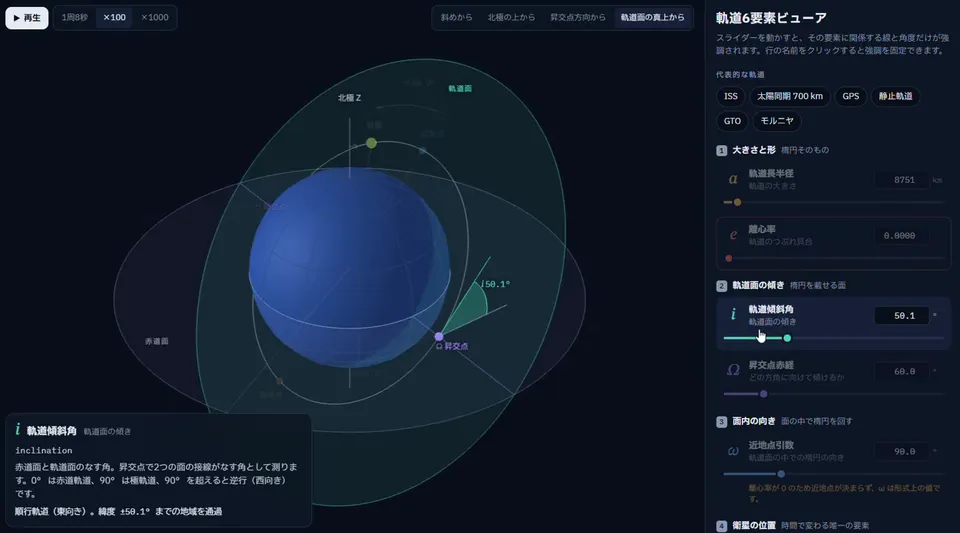
व्हिडिओ 1 / 1Rotatable 3D viewer explains the six orbital elements
व्हिडिओ पेज उघडा
Product ScreensENRemotion
Claude Code · Codex
एआय व्हिडिओ आणि एआय इमेजसाठी क्रेडिटचा एक शिल्लक. मासिक किंवा वार्षिक सदस्यत्व घ्या, किंवा एकदा क्रेडिट पॅक विकत घ्या.
मासिक बिल
दरमहा व्हिडिओ
मासिक बिल
दरमहा व्हिडिओ
मासिक बिल
दरमहा व्हिडिओ
Videos use credits on export. Your balance must cover the export before you start. Counts assume a 30s demo and a 60s explainer with narration and 3 illustrations.
Orbit Element Viewer काय करते, कोणत्या एजंटमध्ये चालते, कोणत्या की लागतात आणि ती कशी इन्स्टॉल करायची.
Orbit Element Viewer ही प्रॉडक्ट स्क्रीन व्हिडिओ बनवण्यासाठी Potto यांनी तयार केलेली एजंट स्किल आहे. Create 20–70-second widescreen explainer videos (default 1298×720) of a rotatable 3D parameter viewer.
Orbit Element Viewer ही Premium स्किल आहे. ती Potto च्या कोणत्याही सशुल्क प्लॅनमध्ये (Lite, Pro किंवा Max) मिळते, किंवा एकदाच $5 देऊन कायमची विकत घेता येते.
Orbit Element Viewer ही स्किल इंग्रजी भाषेत लिहिलेली आहे. तुम्ही दिलेल्या कोणत्याही भाषेत ती स्क्रीनवरील मजकूर तयार करते.
Orbit Element Viewer ही Remotion वर आधारित आहे. ती चालवण्यापूर्वी Bun, Python 3 आणि FFmpeg इन्स्टॉल करा.
Orbit Element Viewer MP4 तयार करतो.
Orbit Element Viewer Claude Code आणि Codex मध्ये चालतो, किंवा SKILL.md वाचू शकणाऱ्या इतर agent मध्ये.
नाही. Orbit Element Viewer अतिरिक्त API की शिवाय चालतो.
या पेजवरील Orbit Element Viewer चा इन्स्टॉल प्रॉम्प्ट कॉपी करून तुमच्या एजंटमध्ये पेस्ट करा किंवा तिची ZIP डाउनलोड करा.
Orbit Element Viewer चा वापर Potto गॅलरीत 1 व्हिडिओ बनवण्यासाठी झाला, जसे Rotatable 3D viewer explains the six orbital elements.
Potto वर Orbit Element Viewer v1.0.0 आहे, 21 ऑक्टो, 2026 रोजी अपडेट. नवीनतम आवृत्तीसाठी इन्स्टॉल प्रॉम्प्ट पुन्हा कॉपी करा.