Premium00
ExplainerENRemotion
Claude Code · Codex
ExplainerENRemotion
Claude Code · Codex

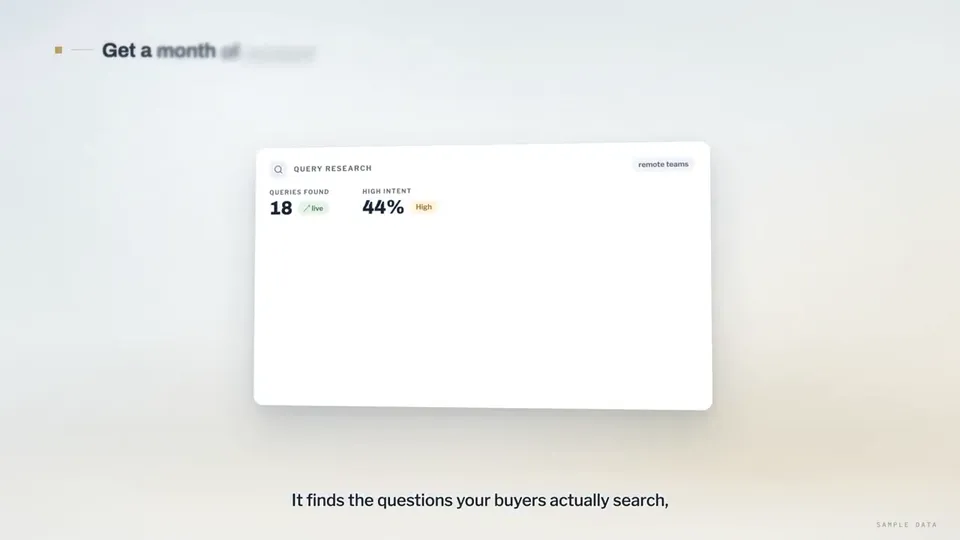
व्हिडिओ 1 / 1Search-ranking dashboards explain the rctrl content tool
व्हिडिओ पेज उघडाएआय व्हिडिओ आणि एआय इमेजसाठी क्रेडिटचा एक शिल्लक. मासिक किंवा वार्षिक सदस्यत्व घ्या, किंवा एकदा क्रेडिट पॅक विकत घ्या.
Videos use credits when you export, and starting one needs a balance that covers its export. Counts assume a 30-second product demo and a 60-second explainer with narration and 3 illustrations.
Product Walkthrough for Silent Viewing (UI Flythrough) काय करते, कोणत्या एजंटमध्ये चालते, कोणत्या की लागतात आणि ती कशी इन्स्टॉल करायची.
Product Walkthrough for Silent Viewing (UI Flythrough) ही एक्सप्लेनर व्हिडिओ बनवण्यासाठी Potto यांनी तयार केलेली एजंट स्किल आहे. Create 60–90-second, 16:9 product walkthroughs in Remotion, designed for silent viewing: a continuous 3D camera flies through code-drawn UI cards on a studio backdrop, with…
Create 60–90-second, 16:9 product walkthroughs in Remotion, designed for silent viewing: a continuous 3D camera flies through code-drawn UI cards on a studio backdrop, with inactive chapters out of focus, gold-square chapter labels, word-by-word bottom captions, zoom-and-blur transitions, and a warm procedural music bed. Use for SaaS or AI product explainers when the user supplies the product name, demo copy, and data for each step. Supports search and AI answers, dashboards, calendars, editors, publishing pages, tables, line charts, matrices, agent rows, and CTAs; excludes live action, people, third-party logos, interfaces requiring live data, and voiceover.
अपडेट 21 ऑक्टो, 2026
Product Walkthrough for Silent Viewing (UI Flythrough) ही Premium स्किल आहे. ती Potto च्या कोणत्याही सशुल्क प्लॅनमध्ये (Lite, Pro किंवा Max) मिळते, किंवा एकदाच $5 देऊन कायमची विकत घेता येते.
Product Walkthrough for Silent Viewing (UI Flythrough) ही स्किल इंग्रजी भाषेत लिहिलेली आहे. तुम्ही दिलेल्या कोणत्याही भाषेत ती स्क्रीनवरील मजकूर तयार करते.
Product Walkthrough for Silent Viewing (UI Flythrough) ही Remotion वर आधारित आहे. ती चालवण्यापूर्वी Bun, Python 3 आणि FFmpeg इन्स्टॉल करा.
Product Walkthrough for Silent Viewing (UI Flythrough) MP4 तयार करतो.
Product Walkthrough for Silent Viewing (UI Flythrough) Claude Code आणि Codex मध्ये चालतो, किंवा SKILL.md वाचू शकणाऱ्या इतर agent मध्ये.
नाही. Product Walkthrough for Silent Viewing (UI Flythrough) अतिरिक्त API की शिवाय चालतो.
या पेजवरील Product Walkthrough for Silent Viewing (UI Flythrough) चा इन्स्टॉल प्रॉम्प्ट कॉपी करून तुमच्या एजंटमध्ये पेस्ट करा किंवा तिची ZIP डाउनलोड करा.
Product Walkthrough for Silent Viewing (UI Flythrough) चा वापर Potto गॅलरीत 1 व्हिडिओ बनवण्यासाठी झाला, जसे Search-ranking dashboards explain the rctrl content tool.
Potto वर Product Walkthrough for Silent Viewing (UI Flythrough) v1.0.0 आहे, 21 ऑक्टो, 2026 रोजी अपडेट. नवीनतम आवृत्तीसाठी इन्स्टॉल प्रॉम्प्ट पुन्हा कॉपी करा.
एकदा पेमेंट · सबस्क्रिप्शन नाही
पॅकमधील व्हिडिओ
एकदा पेमेंट · सबस्क्रिप्शन नाही
पॅकमधील व्हिडिओ
एकदा पेमेंट · सबस्क्रिप्शन नाही
पॅकमधील व्हिडिओ
मासिक बिल
दरमहा व्हिडिओ
मासिक बिल
दरमहा HD मध्ये इमेज
दरमहा व्हिडिओ
मासिक बिल
दरमहा HD मध्ये इमेज
दरमहा व्हिडिओ
वार्षिक बिल · $240 → $192/वर्ष
दरमहा HD मध्ये इमेज
दरमहा व्हिडिओ
वार्षिक बिल · $600 → $480/वर्ष
दरमहा व्हिडिओ
वार्षिक बिल · $1,200 → $960/वर्ष
दरमहा व्हिडिओ