
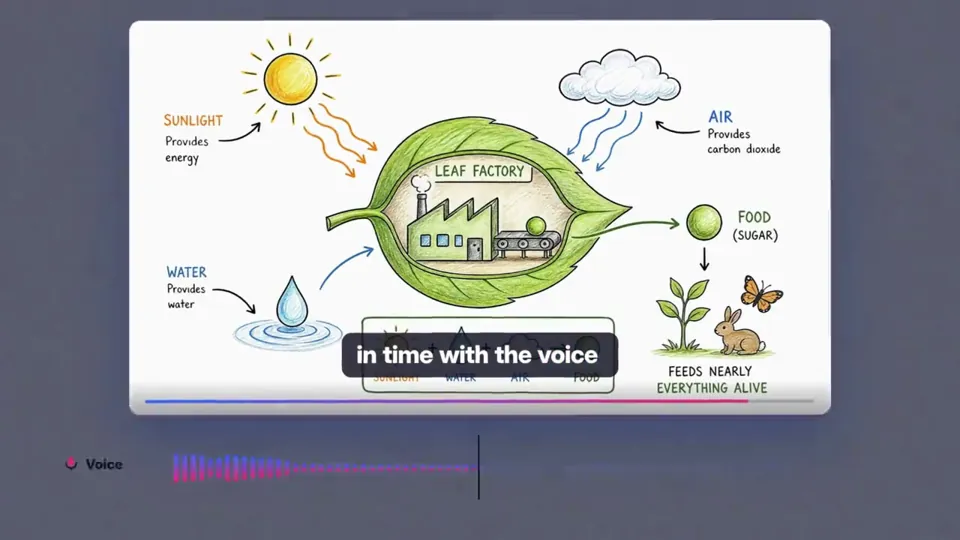
- 길이와 비율
- 0:30
- 16:9
- 제작 도구
- Canvas
- SVG
- GSAP
- CSS
프롬프트
create best motion graphics explainer of the (your product) with very good script and good design colors and good music make sure the video should be incredible and people should feels like watch it many times.. it has to be in 30 seconds good and very intresting, it has to be best of the best of the best of the best video (product link)
비슷한 영상 더 보기
모두 보기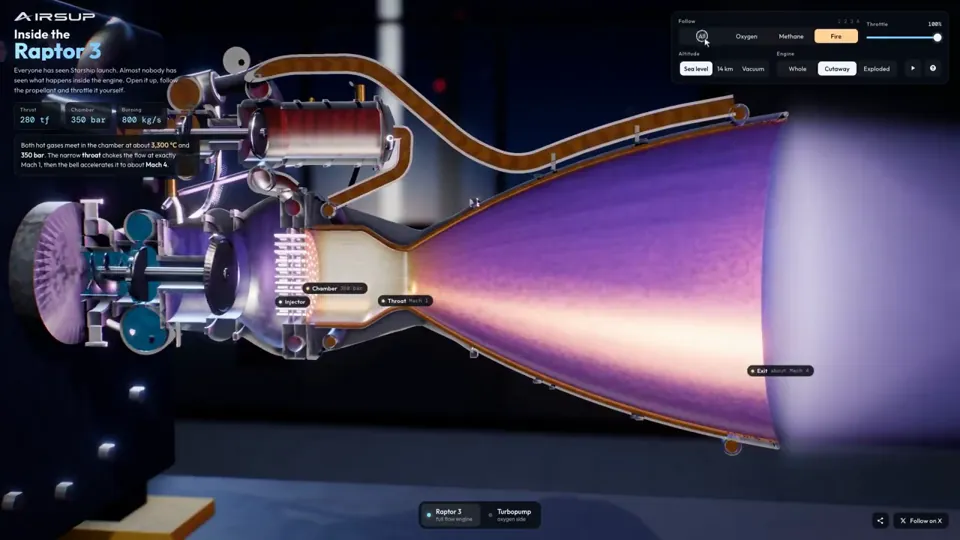
설명 영상
Raptor 3 engine cutaway tracing its turbopumps
three.js, Shader · 16:9 · 0:35
작성자 konstantinsaifo


요금제 선택
AI 영상과 AI 이미지에 함께 쓰는 하나의 크레딧 잔액입니다. 월간 또는 연간으로 구독하거나, 크레딧 팩을 한 번 구매할 수 있습니다.
2,000 크레딧
US$20일회성
한 번 결제 · 구독 없음
팩당 동영상
30초 제품 데모 영상13개
60초 설명 영상5개
- 2,000 크레딧, 한 번만 지급
- 빠른 이미지 최대 86장
- Potto 워터마크 추가 없음
- 동영상과 이미지 도구가 공유
5,000 크레딧
US$50일회성
한 번 결제 · 구독 없음
팩당 동영상
30초 제품 데모 영상33개
60초 설명 영상13개
- 5,000 크레딧, 한 번만 지급
- 빠른 이미지 최대 217장
- Potto 워터마크 추가 없음
- 동영상과 이미지 도구가 공유
15,000 크레딧
US$100일회성
한 번 결제 · 구독 없음
팩당 동영상
30초 제품 데모 영상100개
60초 설명 영상40개
- 15,000 크레딧, 한 번만 지급
- 빠른 이미지 최대 652장
- Potto 워터마크 추가 없음
- 동영상과 이미지 도구가 공유
Lite
Lite 선택US$20/월월 단위 결제
월 영상 수
30초 제품 데모 영상13개60초 설명 영상5개- 매월 2,000크레딧
- 빠른 이미지 최대 86장
- 표준 대기열
- Potto 워터마크 추가 없음
- AI 도구 일괄 처리
- 공개 갤러리에 표시되지 않음
Pro
Pro 선택US$50/월월 단위 결제
월 영상 수
30초 제품 데모 영상33개60초 설명 영상13개- 매월 5,000크레딧
- 빠른 이미지 최대 217장
- 우선 대기열
- Potto 워터마크 추가 없음
- AI 도구 일괄 처리
- 공개 갤러리에 표시되지 않음
- 추천
Max
Max 선택US$100/월월 단위 결제
월 영상 수
30초 제품 데모 영상100개60초 설명 영상40개- 매월 15,000크레딧
- 빠른 이미지 최대 652장
- 최우선 대기열
- Potto 워터마크 추가 없음
- AI 도구 일괄 처리
- 공개 갤러리에 표시되지 않음
Lite
-20%Lite 선택US$20US$16/월연 단위 결제 · 연 US$240 → US$192
월 영상 수
30초 제품 데모 영상13개60초 설명 영상5개- 매월 2,000크레딧
- 빠른 이미지 최대 86장
- 표준 대기열
- Potto 워터마크 추가 없음
- AI 도구 일괄 처리
- 공개 갤러리에 표시되지 않음
Pro
-20%Pro 선택US$50US$40/월연 단위 결제 · 연 US$600 → US$480
월 영상 수
30초 제품 데모 영상33개60초 설명 영상13개- 매월 5,000크레딧
- 빠른 이미지 최대 217장
- 우선 대기열
- Potto 워터마크 추가 없음
- AI 도구 일괄 처리
- 공개 갤러리에 표시되지 않음
- 추천
Max
-20%Max 선택US$100US$80/월연 단위 결제 · 연 US$1,200 → US$960
월 영상 수
30초 제품 데모 영상100개60초 설명 영상40개- 매월 15,000크레딧
- 빠른 이미지 최대 652장
- 최우선 대기열
- Potto 워터마크 추가 없음
- AI 도구 일괄 처리
- 공개 갤러리에 표시되지 않음
Videos use credits when you export, and starting one needs a balance that covers its export. Counts assume a 30-second product demo and a 60-second explainer with narration and 3 illustrations.
30-second product explainer motion graphic 자주 묻는 질문
30-second product explainer motion graphic의 제작 방식, 프롬프트 내용, 그리고 Potto로 비슷한 설명 영상 동영상을 만드는 방법.
30-second product explainer motion graphic이란?
30-second product explainer motion graphic은 sudo_kiran가 만든 설명 영상 모션그래픽 영상입니다. A 30-second product explainer motion graphic built with canvas, SVG, GSAP, and CSS.
30-second product explainer motion graphic은 어떻게 만들었나요?
30-second product explainer motion graphic은 Canvas, SVG, GSAP 및 CSS로 만들었습니다. Potto의 설명 영상 AI 모션그래픽 영상 모음에 포함되어 있습니다.
30-second product explainer motion graphic의 프롬프트를 볼 수 있나요?
네. 30-second product explainer motion graphic의 전체 프롬프트가 이 페이지에 있습니다. 복사하거나, 「이 프롬프트 사용」을 눌러 Potto 작업 공간에서 여세요.
30-second product explainer motion graphic의 길이와 화면 비율은 어떻게 되나요?
30-second product explainer motion graphic의 길이는 0:30이고, 프레임은 16:9입니다.
Potto로 30-second product explainer motion graphic 같은 설명 영상 영상을 만들 수 있나요?
네. 「이 프롬프트 사용」을 누르면 30-second product explainer motion graphic의 프롬프트가 Potto 작업 공간에 불러와집니다. Potto가 자체 버전을 렌더링하며, 내보내기 전에 글과 스타일을 바꿀 수 있습니다.
30-second product explainer motion graphic 원본은 어디서 보나요?
30-second product explainer motion graphic 은 제작자가 처음 게시했습니다. 「원본 보기」를 클릭하면 해당 게시물이 새 탭에서 열립니다.
30-second product explainer motion graphic 같은 설명 영상 영상은 어디서 더 찾나요?
Potto의 설명 영상 모음을 둘러보세요. 영상 264개가 있으며, 각각 프롬프트, 사양, 출처가 있습니다.