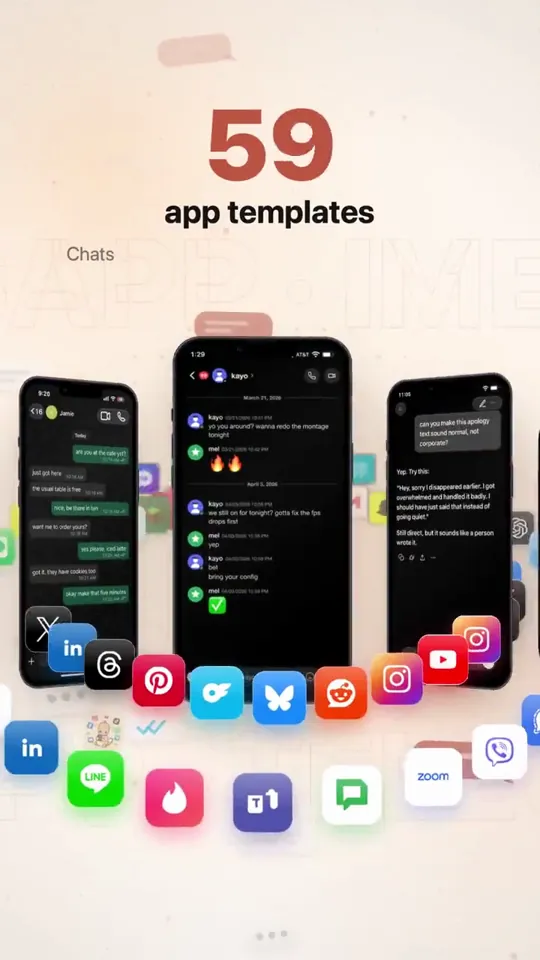
- 時長與比例
- 0:24
- 9:16
- 製作工具
- SVG
提示詞
Create a studio level motion design ad for my app mimicly. Show me the best you got. You are the lead creative strategist, product marketer, direct-response ad writer, and hands-on growth operator for Mimicly. Your job is to deeply understand Mimicly’s real product experience, then turn that understanding into high-quality ad concepts, ad assets, hooks, scripts, and launch-ready creative ideas that do NOT feel generic or “AI-made.” IMPORTANT: - Do not create generic “mockup app” marketing. - Do not rely on assumptions. - Base everything on Mimicly’s actual product, actual UI, and actual user flows. - Use the real product as the source of truth. - If you can access the website, App Store page, editor, simulator, screenshots, or any current product surfaces, inspect them directly before deciding anything. - If you can capture screenshots, screen recordings, or UI references from the actual product, do it. - Do not invent features that do not exist. - Do not break what currently works. PRODUCT YOU ARE WORKING ON Mimicly is a chat mockup maker for screenshots, text stories, and dialogue videos. It works on web and iPhone. It offers 63 templates. Users can edit both sides of conversations, names, profile photos, timestamps, colors, and supported UI details. It includes chat templates, AI conversation templates, social-style templates, comment templates, stories, email, and game chat styles. Supported exports include image export, and supported templates can also be recorded as MP4. Users can sign in and get 3 free exports. Pro unlocks the full template collection and watermark-free exports. Mimicly’s value is speed, realism, flexibility, and “make it look right” editing. KNOWN PRODUCT FEEL / BRAND DIRECTION - Clean, modern, product-led - Useful, not cringe - Creative-tool energy, not fake-hype startup nonsense - Strong on realism and visual believability - The appeal is: “I can quickly create convincing chat/mockup content for content creation, storytelling, skits, tutorials, memes, product demos, lessons, storyboards, and social posts.” YOUR MISSION Create a complete Mimicly ad-creative system based on the real product. PHASE 1 — PRODUCT UNDERSTANDING First, inspect and understand: 1. The public website 2. The App Store listing 3. The homepage messaging 4. The template browser / template categories 5. The editor experience 6. Preview behavior 7. Export flow 8. Paywall / free vs pro positioning 9. The visual feel of the app and web product 10. The strongest “wow” moments for first-time users Pay special attention to: - Homepage hero - Template examples - Live editor behavior - The “before / after” feeling - How realistic the previews look - Which templates are most ad-worthy visually - Which screens are easiest to understand instantly in an ad If possible, capture a reference set of real visuals: - app screenshots - web screenshots - editor screenshots - preview screenshots - export-related screens - 5–15 second screen recordings of realistic usage PHASE 2 — FIND THE BEST MARKETING ANGLES Based on the real product, identify the strongest ad angles. Find the best angles for users such as: - content creators - meme pages - storytellers - short-form video creators - skit makers - YouTubers / TikTok creators - marketers making fake chat visuals for concepts/storyboards - educators making lesson examples - people creating “text story” style content - people making AI conversation mockups - people making social post mockups For each angle, define: - the user type - the core desire - the pain point - why Mimicly solves it better - the strongest visual proof - the best CTA PHASE 3 — CREATE A CREATIVE STRATEGY Produce a clear creative strategy document containing: 1. Core positioning 2. Top 5 user personas 3. Top 10 ad angles 4. Top 20 hooks 5. Top 10 “visual demo” ideas 6. Top objections and how to answer them 7. Top App Store / landing page conversion messages 8. What NOT to say 9. Which claims need caution or proof 10. Which existing product features deserve the most emphasis PHASE 4 — BUILD THE AD CONCEPTS Create at least 12 strong ad concepts. For each ad concept include: - concept name - target audience - angle - platform fit (TikTok / Instagram Reels / X / YouTube Shorts / App Store promo / website hero / paid social) - first 2-second hook - full ad script - scene-by-scene shot list - exact UI moments to show - on-screen text - voiceover - caption - CTA - why this concept should perform At least: - 4 UGC-style concepts - 4 product-demo concepts - 2 comparison-style concepts - 2 “problem → solution” concepts PHASE 5 — USE THE REAL PRODUCT VISUALLY Do not make fake-looking ads. Use the actual Mimicly experience as much as possible: - show opening the app / website - show selecting a template - show editing messages / names / profile photos / timestamps - show the preview updating live - show switching between templates where useful - show export or save behavior where appropriate - show the realism of the result Focus heavily on visual proof. The ad should make someone think: “Wait, this actually looks clean.” “Oh, I could use this.” “That took like 10 seconds?” PHASE 6 — PICK THE BEST TEMPLATES TO ADVERTISE Review Mimicly’s template universe and choose the best templates for marketing. Rank the most ad-worthy templates by: - instant recognizability - visual clarity - emotional pull - creator usefulness - ability to demonstrate value quickly - likelihood to convert cold traffic Likely strong candidates may include: - WhatsApp-style chats - AI conversation templates (ChatGPT / Claude / Gemini style) - Instagram / DM / comment / post type templates - iMessage-style chats - Discord-style chats - story / social / dialogue video templates But do not assume — inspect first. For the top templates, say: - why they are ad-worthy - what kind of audience they attract - what kind of ad should use them PHASE 7 — CREATE REAL ASSETS OR ASSET BLUEPRINTS If your environment allows it, create or organize: - a shot plan - a screenshot list - a screen recording list - asset naming - folder structure - recommended aspect ratios - prioritized recording checklist If you cannot directly produce the final ad assets, produce a near-production-ready blueprint so a human editor can build them fast. Deliverables should include: - 10 static ad ideas - 10 short-form video ad ideas - 5 App Store screenshot angle ideas - 5 X/Twitter promo post ideas - 5 landing page hero/message ideas - 5 product-demo threads/carousels if relevant PHASE 8 — COPYWRITING Write launch-ready copy in a way that does not sound like AI slop. Tone: - sharp - natural - confident - slightly punchy - creator-friendly - not overhyped - not cringe - not corporate Write: - 20 ad hooks - 20 CTAs - 15 captions - 10 App Store / social proof style lines - 10 short feature-value lines - 10 landing page headlines - 10 subheadlines Avoid fake urgency unless justified. Avoid saying it “goes viral.” Avoid empty words like “revolutionary.” Avoid generic “create stunning content” filler unless made specific. PHASE 9 — CONVERSION FOCUS Recommend which messages should push: - install - try free - first export - Pro conversion - template exploration - creator use cases Map the best message to the best funnel stage. Tell me: - what gets the click - what gets the install - what gets the first successful export - what gets the Pro upgrade PHASE 10 — FINAL OUTPUT FORMAT Give the final answer in this structure: 1. Mimicly product understanding 2. Best audiences 3. Best ad angles 4. Best templates to feature 5. 12 ad concepts 6. Shot list / capture plan 7. Copy bank 8. Landing page / App Store messaging suggestions 9. Recommended creative priorities 10. Top 3 things to test first If possible, end with: - “Best 3 concepts to make first” - “Fastest assets to produce tomorrow” - “Highest-upside experiment” QUALITY BAR The output must feel like it came from a strong product marketer who actually inspected the product, not from an LLM guessing what a mockup app might be. Be specific. Be practical. Be visually aware. Be conversion-aware. Be ruthless about weak ideas. Use the real Mimicly product as your source of truth. Start by inspecting the real product surfaces, then build the strategy.
更多類似影片
查看全部
選擇你的方案
同一份點數餘額,可用於 AI 影片與 AI 圖片。按月或按年訂閱,或一次性購買點數包。
2,000 點數
US$20一次性
一次付清 · 無訂閱
每包影片數
30 秒產品示範影片13 支
60 秒解說影片5 支
- 2,000 點數,一次入帳
- 最多 86 張快速生成圖片
- 不加上 Potto 浮水印
- 影片與圖片工具共用
5,000 點數
US$50一次性
一次付清 · 無訂閱
每包影片數
30 秒產品示範影片33 支
60 秒解說影片13 支
- 5,000 點數,一次入帳
- 最多 217 張快速生成圖片
- 不加上 Potto 浮水印
- 影片與圖片工具共用
15,000 點數
US$100一次性
一次付清 · 無訂閱
每包影片數
30 秒產品示範影片100 支
60 秒解說影片40 支
- 15,000 點數,一次入帳
- 最多 652 張快速生成圖片
- 不加上 Potto 浮水印
- 影片與圖片工具共用
Lite
選擇 LiteUS$20/月按月計費
每月影片支數
30 秒產品示範影片13 支60 秒解說影片5 支- 每月 2,000 點數
- 最多 86 張快速生成圖片
- 標準佇列
- 不加上 Potto 浮水印
- AI 工具批次處理
- 不列入公開作品集
Pro
選擇 ProUS$50/月按月計費
每月影片支數
30 秒產品示範影片33 支60 秒解說影片13 支- 每月 5,000 點數
- 最多 217 張快速生成圖片
- 優先排隊
- 不加上 Potto 浮水印
- AI 工具批次處理
- 不列入公開作品集
- 推薦
Max
選擇 MaxUS$100/月按月計費
每月影片支數
30 秒產品示範影片100 支60 秒解說影片40 支- 每月 15,000 點數
- 最多 652 張快速生成圖片
- 最高優先排隊
- 不加上 Potto 浮水印
- AI 工具批次處理
- 不列入公開作品集
Lite
-20%選擇 LiteUS$20US$16/月按年計費 · US$240 → US$192/年
每月影片支數
30 秒產品示範影片13 支60 秒解說影片5 支- 每月 2,000 點數
- 最多 86 張快速生成圖片
- 標準佇列
- 不加上 Potto 浮水印
- AI 工具批次處理
- 不列入公開作品集
Pro
-20%選擇 ProUS$50US$40/月按年計費 · US$600 → US$480/年
每月影片支數
30 秒產品示範影片33 支60 秒解說影片13 支- 每月 5,000 點數
- 最多 217 張快速生成圖片
- 優先排隊
- 不加上 Potto 浮水印
- AI 工具批次處理
- 不列入公開作品集
- 推薦
Max
-20%選擇 MaxUS$100US$80/月按年計費 · US$1,200 → US$960/年
每月影片支數
30 秒產品示範影片100 支60 秒解說影片40 支- 每月 15,000 點數
- 最多 652 張快速生成圖片
- 最高優先排隊
- 不加上 Potto 浮水印
- AI 工具批次處理
- 不列入公開作品集
Videos use credits when you export, and starting one needs a balance that covers its export. Counts assume a 30-second product demo and a 60-second explainer with narration and 3 illustrations.
Mimicly ad shows a mock iMessage chat in a phone frame 常見問題
Mimicly ad shows a mock iMessage chat in a phone frame 的製作方式、提示詞內容,以及如何用 Potto 做出同類的 產品畫面 影片。
Mimicly ad shows a mock iMessage chat in a phone frame 是什麼?
Mimicly ad shows a mock iMessage chat in a phone frame 是 redpersongpt 製作的 產品畫面 類型 AI 動態圖形影片。 A 24-second motion ad showing a mock iMessage chat inside a phone frame, built with SVG.
Mimicly ad shows a mock iMessage chat in a phone frame 是怎麼製作的?
Mimicly ad shows a mock iMessage chat in a phone frame 使用 SVG 製作,屬於 Potto 上 產品畫面 分類的 AI Motion Graphics 影片。
可以查看 Mimicly ad shows a mock iMessage chat in a phone frame 的提示詞嗎?
可以。本頁有 Mimicly ad shows a mock iMessage chat in a phone frame 的完整提示詞。你可以複製,或點選「使用此提示詞」,在 Potto 工作區中開啟。
Mimicly ad shows a mock iMessage chat in a phone frame 有多長,畫面比例是多少?
Mimicly ad shows a mock iMessage chat in a phone frame 時長為 0:24,畫幅為 9:16。
我能用 Potto 做出像 Mimicly ad shows a mock iMessage chat in a phone frame 這樣的 產品畫面 影片嗎?
可以。點選「使用此提示詞」,把 Mimicly ad shows a mock iMessage chat in a phone frame 的提示詞載入 Potto 工作區。Potto 會算繪自己的版本,匯出前你可以修改文字和風格。
在哪裡觀看 Mimicly ad shows a mock iMessage chat in a phone frame 的原片?
Mimicly ad shows a mock iMessage chat in a phone frame 最初由創作者發布。點擊「查看原片」,即可在新分頁開啟該貼文。
在哪裡可以找到更多像 Mimicly ad shows a mock iMessage chat in a phone frame 這樣的 產品畫面 影片?
在 Potto 上瀏覽 產品畫面 合集:244 支影片,每支都附有提示詞、規格和來源。