- 長さと比率
- 1:12
- 16:9
似た動画をもっと見る
すべて見る
プランを選ぶ
AI 動画と AI 画像で使える、一つのクレジット残高です。月額または年額で登録するか、クレジットパックを一度だけ購入できます。
2,000 クレジット
$20一回限り
一回払い · サブスクなし
パックあたりの動画数
30 秒の製品デモ動画13 本
60 秒の解説動画5 本
- 2,000 クレジットを一度だけ追加
- 高速生成は最大 86 枚
- Potto のウォーターマークを追加しません
- 動画と画像ツールで共有
5,000 クレジット
$50一回限り
一回払い · サブスクなし
パックあたりの動画数
30 秒の製品デモ動画33 本
60 秒の解説動画13 本
- 5,000 クレジットを一度だけ追加
- 高速生成は最大 217 枚
- Potto のウォーターマークを追加しません
- 動画と画像ツールで共有
15,000 クレジット
$100一回限り
一回払い · サブスクなし
パックあたりの動画数
30 秒の製品デモ動画100 本
60 秒の解説動画40 本
- 15,000 クレジットを一度だけ追加
- 高速生成は最大 652 枚
- Potto のウォーターマークを追加しません
- 動画と画像ツールで共有
Lite
Lite を選ぶ$20/月月額請求
月あたりの動画本数
30 秒の製品デモ動画13 本60 秒の解説動画5 本- 月 2,000 クレジット
- 高速生成は最大 86 枚
- 標準キュー
- Potto のウォーターマークを追加しません
- AI ツールの一括処理
- 公開ギャラリーには掲載されません
Pro
Pro を選ぶ$50/月月額請求
月あたりの動画本数
30 秒の製品デモ動画33 本60 秒の解説動画13 本- 月 5,000 クレジット
- 高速生成は最大 217 枚
- 優先キュー
- Potto のウォーターマークを追加しません
- AI ツールの一括処理
- 公開ギャラリーには掲載されません
- おすすめ
Max
Max を選ぶ$100/月月額請求
月あたりの動画本数
30 秒の製品デモ動画100 本60 秒の解説動画40 本- 月 15,000 クレジット
- 高速生成は最大 652 枚
- 最優先キュー
- Potto のウォーターマークを追加しません
- AI ツールの一括処理
- 公開ギャラリーには掲載されません
Lite
-20%Lite を選ぶ$20$16/月年額請求 · $240 → $192/年
月あたりの動画本数
30 秒の製品デモ動画13 本60 秒の解説動画5 本- 月 2,000 クレジット
- 高速生成は最大 86 枚
- 標準キュー
- Potto のウォーターマークを追加しません
- AI ツールの一括処理
- 公開ギャラリーには掲載されません
Pro
-20%Pro を選ぶ$50$40/月年額請求 · $600 → $480/年
月あたりの動画本数
30 秒の製品デモ動画33 本60 秒の解説動画13 本- 月 5,000 クレジット
- 高速生成は最大 217 枚
- 優先キュー
- Potto のウォーターマークを追加しません
- AI ツールの一括処理
- 公開ギャラリーには掲載されません
- おすすめ
Max
-20%Max を選ぶ$100$80/月年額請求 · $1,200 → $960/年
月あたりの動画本数
30 秒の製品デモ動画100 本60 秒の解説動画40 本- 月 15,000 クレジット
- 高速生成は最大 652 枚
- 最優先キュー
- Potto のウォーターマークを追加しません
- AI ツールの一括処理
- 公開ギャラリーには掲載されません
Videos use credits when you export, and starting one needs a balance that covers its export. Counts assume a 30-second product demo and a 60-second explainer with narration and 3 illustrations.
Obsidian template tour highlights quick-capture notes のよくある質問
Obsidian template tour highlights quick-capture notes の作り方、プロンプトの内容、そして Potto で同じような 製品画面 動画を作る方法。
Obsidian template tour highlights quick-capture notes とは?
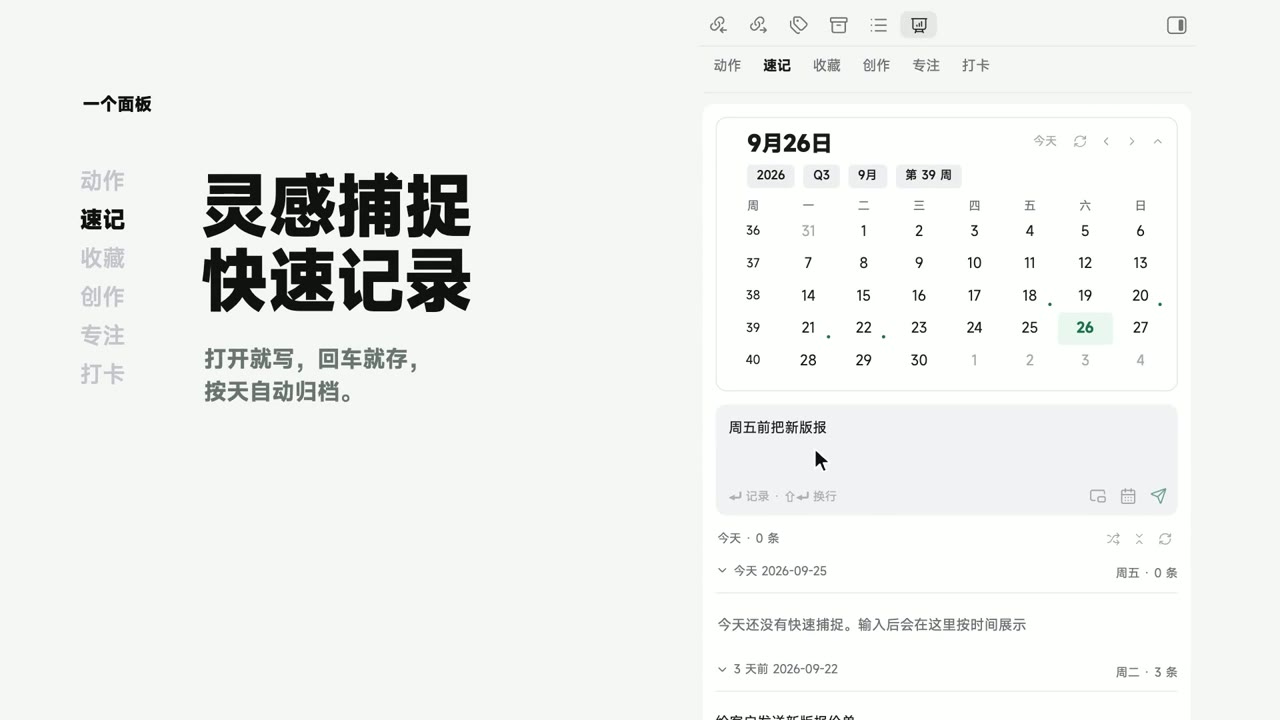
Obsidian template tour highlights quick-capture notes は eryidebiji による 製品画面 のモーショングラフィックス動画です。 A 72-second product UI animation touring an Obsidian template, highlighting quick-capture notes.
Obsidian template tour highlights quick-capture notes はどう作られましたか?
Obsidian template tour highlights quick-capture notes の作者は使用ツールを公開していません。Potto の 製品画面 に含まれる AI モーショングラフィックス動画です。
Obsidian template tour highlights quick-capture notes のプロンプトは見られますか?
作者は Obsidian template tour highlights quick-capture notes のプロンプトを共有していません。Potto のワークスペースで、似た 製品画面 動画を文章で指定することはできます。
Obsidian template tour highlights quick-capture notes の長さとアスペクト比は?
Obsidian template tour highlights quick-capture notes の長さは 1:12、フレームは 16:9 です。
Potto で Obsidian template tour highlights quick-capture notes のような 製品画面 動画を作れますか?
はい。Potto のワークスペースで、Obsidian template tour highlights quick-capture notes のような 製品画面 動画を文章で指定してください。Potto が独自のバージョンをレンダリングし、書き出す前に文字とスタイルを変えられます。
Obsidian template tour highlights quick-capture notes のオリジナルはどこで見られますか?
Obsidian template tour highlights quick-capture notes は作成者が最初に投稿しました。「オリジナルを見る」をクリックすると、その投稿が新しいタブで開きます。
Obsidian template tour highlights quick-capture notes のような 製品画面 動画はどこで見つかりますか?
Potto の 製品画面 コレクションを見てください。244 本あり、それぞれにプロンプト、仕様、出典が付いています。