- 長さと比率
- 0:53
- 16:9
プロンプト
I want you to create a highly professional SaaS product launch video. Go and find some SaaS, preferably just one that people know, so it's easier to identify with it. Pick that, and then make sure to get actual assets and images and all of that stuff from the internet. Turn it into these typical, very professionally edited, motion-graphics-styled product launch videos that you see people making on Twitter when they launch new SaaS products (which are showing off the features, the benefits, and all of these things).
似た動画をもっと見る
すべて見る
プランを選ぶ
AI 動画と AI 画像で使える、一つのクレジット残高です。月額または年額で登録するか、クレジットパックを一度だけ購入できます。
2,000 クレジット
$20一回限り
一回払い · サブスクなし
パックあたりの動画数
30 秒の製品デモ動画13 本
60 秒の解説動画5 本
- 2,000 クレジットを一度だけ追加
- 高速生成は最大 86 枚
- Potto のウォーターマークを追加しません
- 動画と画像ツールで共有
5,000 クレジット
$50一回限り
一回払い · サブスクなし
パックあたりの動画数
30 秒の製品デモ動画33 本
60 秒の解説動画13 本
- 5,000 クレジットを一度だけ追加
- 高速生成は最大 217 枚
- Potto のウォーターマークを追加しません
- 動画と画像ツールで共有
15,000 クレジット
$100一回限り
一回払い · サブスクなし
パックあたりの動画数
30 秒の製品デモ動画100 本
60 秒の解説動画40 本
- 15,000 クレジットを一度だけ追加
- 高速生成は最大 652 枚
- Potto のウォーターマークを追加しません
- 動画と画像ツールで共有
Lite
Lite を選ぶ$20/月月額請求
月あたりの動画本数
30 秒の製品デモ動画13 本60 秒の解説動画5 本- 月 2,000 クレジット
- 高速生成は最大 86 枚
- 標準キュー
- Potto のウォーターマークを追加しません
- AI ツールの一括処理
- 公開ギャラリーには掲載されません
Pro
Pro を選ぶ$50/月月額請求
月あたりの動画本数
30 秒の製品デモ動画33 本60 秒の解説動画13 本- 月 5,000 クレジット
- 高速生成は最大 217 枚
- 優先キュー
- Potto のウォーターマークを追加しません
- AI ツールの一括処理
- 公開ギャラリーには掲載されません
- おすすめ
Max
Max を選ぶ$100/月月額請求
月あたりの動画本数
30 秒の製品デモ動画100 本60 秒の解説動画40 本- 月 15,000 クレジット
- 高速生成は最大 652 枚
- 最優先キュー
- Potto のウォーターマークを追加しません
- AI ツールの一括処理
- 公開ギャラリーには掲載されません
Lite
-20%Lite を選ぶ$20$16/月年額請求 · $240 → $192/年
月あたりの動画本数
30 秒の製品デモ動画13 本60 秒の解説動画5 本- 月 2,000 クレジット
- 高速生成は最大 86 枚
- 標準キュー
- Potto のウォーターマークを追加しません
- AI ツールの一括処理
- 公開ギャラリーには掲載されません
Pro
-20%Pro を選ぶ$50$40/月年額請求 · $600 → $480/年
月あたりの動画本数
30 秒の製品デモ動画33 本60 秒の解説動画13 本- 月 5,000 クレジット
- 高速生成は最大 217 枚
- 優先キュー
- Potto のウォーターマークを追加しません
- AI ツールの一括処理
- 公開ギャラリーには掲載されません
- おすすめ
Max
-20%Max を選ぶ$100$80/月年額請求 · $1,200 → $960/年
月あたりの動画本数
30 秒の製品デモ動画100 本60 秒の解説動画40 本- 月 15,000 クレジット
- 高速生成は最大 652 枚
- 最優先キュー
- Potto のウォーターマークを追加しません
- AI ツールの一括処理
- 公開ギャラリーには掲載されません
Videos use credits when you export, and starting one needs a balance that covers its export. Counts assume a 30-second product demo and a 60-second explainer with narration and 3 illustrations.
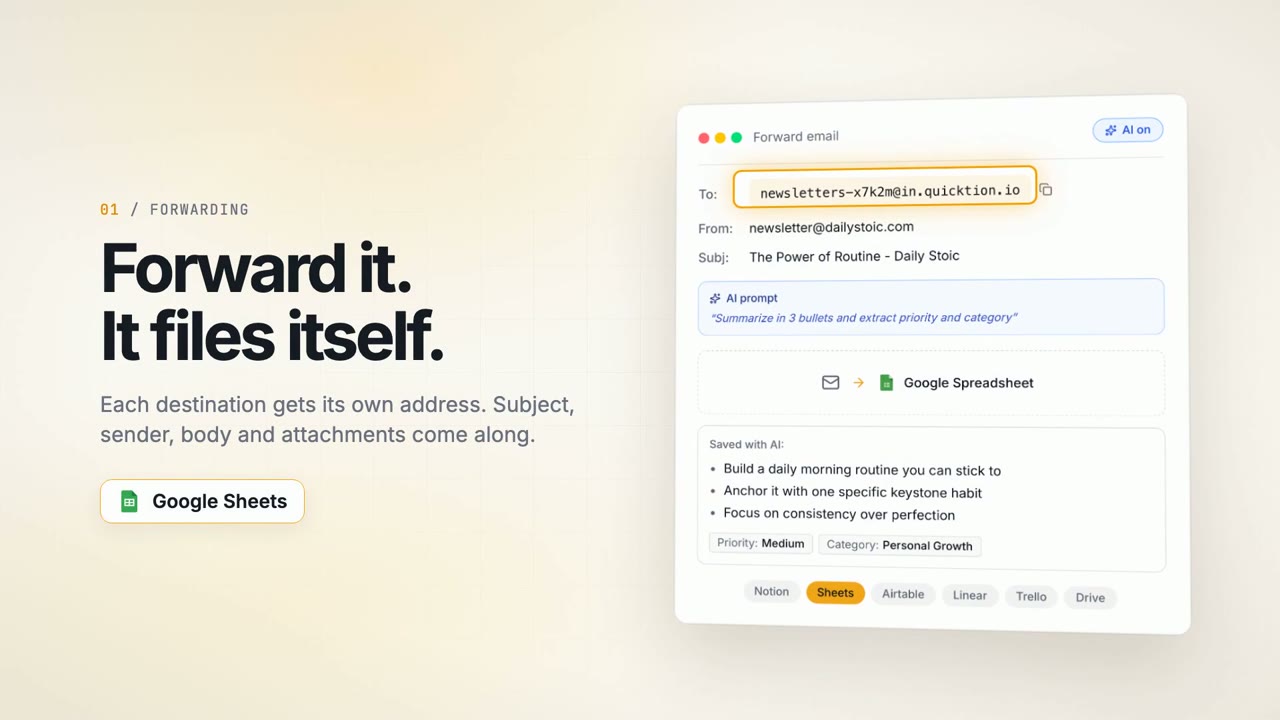
Quicktion demo shows an email filing itself via AI のよくある質問
Quicktion demo shows an email filing itself via AI の作り方、プロンプトの内容、そして Potto で同じような 製品画面 動画を作る方法。
Quicktion demo shows an email filing itself via AI とは?
Quicktion demo shows an email filing itself via AI は LeanZubrezki による 製品画面 のモーショングラフィックス動画です。 A product demo showing an email being filed automatically with AI.
Quicktion demo shows an email filing itself via AI はどう作られましたか?
Quicktion demo shows an email filing itself via AI の作者は使用ツールを公開していません。Potto の 製品画面 に含まれる AI モーショングラフィックス動画です。
Quicktion demo shows an email filing itself via AI のプロンプトは見られますか?
はい。Quicktion demo shows an email filing itself via AI のプロンプト全文がこのページにあります。コピーするか、「このプロンプトを使う」をクリックして Potto のワークスペースで開いてください。
Quicktion demo shows an email filing itself via AI の長さとアスペクト比は?
Quicktion demo shows an email filing itself via AI の長さは 0:53、フレームは 16:9 です。
Potto で Quicktion demo shows an email filing itself via AI のような 製品画面 動画を作れますか?
はい。「このプロンプトを使う」をクリックすると、Quicktion demo shows an email filing itself via AI のプロンプトが Potto のワークスペースに読み込まれます。Potto が独自のバージョンをレンダリングし、書き出す前に文字とスタイルを変えられます。
Quicktion demo shows an email filing itself via AI のオリジナルはどこで見られますか?
Quicktion demo shows an email filing itself via AI は作成者が最初に投稿しました。「オリジナルを見る」をクリックすると、その投稿が新しいタブで開きます。
Quicktion demo shows an email filing itself via AI のような 製品画面 動画はどこで見つかりますか?
Potto の 製品画面 コレクションを見てください。244 本あり、それぞれにプロンプト、仕様、出典が付いています。