Premium00
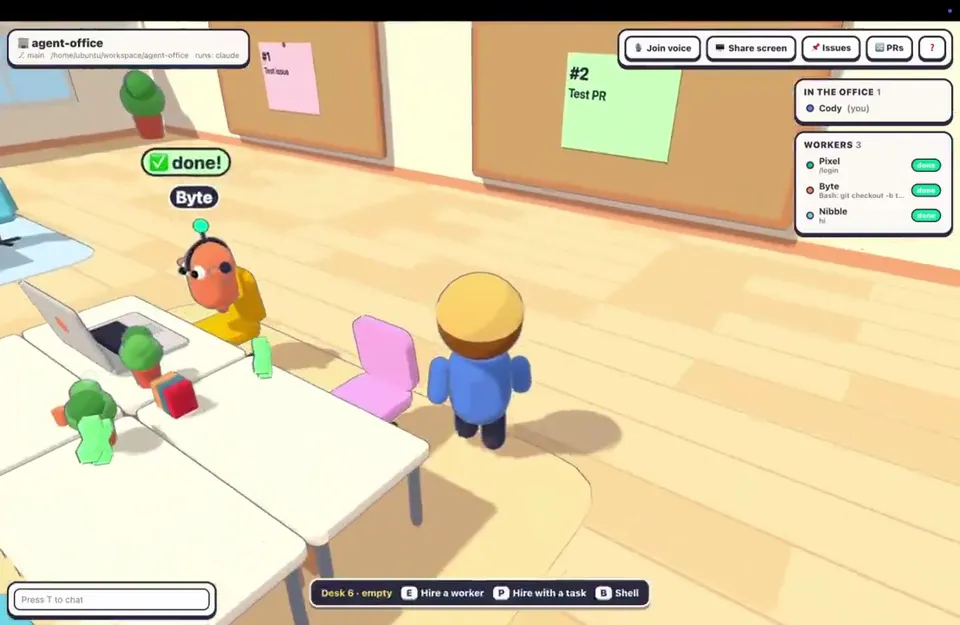
Video 1 von 1Virtual office where agents open GitHub issues and PRs
Videoseite öffnen
Product ScreensENRemotion
Claude Code · Codex
Ein Credit-Guthaben für KI-Videos und KI-Bilder. Monatlich oder jährlich abonnieren oder einmal ein Credit-Paket kaufen.
Einmal zahlen · kein Abo
Videos pro Paket
Einmal zahlen · kein Abo
Videos pro Paket
Einmal zahlen · kein Abo
Videos pro Paket
Monatliche Abrechnung
Videos pro Monat
Monatliche Abrechnung
Videos pro Monat
Monatliche Abrechnung
Videos pro Monat
Jährliche Abrechnung · 240 $ → 192 $/Jahr
Videos pro Monat
Jährliche Abrechnung · 600 $ → 480 $/Jahr
Videos pro Monat
Jährliche Abrechnung · 1.200 $ → 960 $/Jahr
Videos pro Monat
Videos use credits when you export, and starting one needs a balance that covers its export. Counts assume a 30-second product demo and a 60-second explainer with narration and 3 illustrations.
Was Virtual Office Product Demo (3D Room + App UI) bietet, welche Agents ihn ausführen, welche Schlüssel er benötigt und wie Sie ihn installieren.
Virtual Office Product Demo (3D Room + App UI) ist ein Agent-Skill von Potto zum Erstellen von Produktansichten-Videos. Create product demos of AI agents working in a virtual office, using Remotion and Three.js to generate a seeded low-poly 3D room, capsule characters, an app HUD, a shared…
Virtual Office Product Demo (3D Room + App UI) ist ein Premium-Skill. Er ist in jedem kostenpflichtigen Potto-Abo (Lite, Pro oder Max) enthalten. Alternativ können Sie ihn einmalig für 5 $ kaufen und dauerhaft behalten.
Der Skill Virtual Office Product Demo (3D Room + App UI) ist auf Englisch verfasst. Er erstellt Texte im Video in jeder von Ihnen vorgegebenen Sprache.
Virtual Office Product Demo (3D Room + App UI) basiert auf Remotion. Installieren Sie Bun, Python 3 und FFmpeg, bevor Sie den Skill ausführen.
Virtual Office Product Demo (3D Room + App UI) erzeugt MP4.
Virtual Office Product Demo (3D Room + App UI) läuft in Claude Code und Codex und in jedem anderen Agent, der SKILL.md liest.
Nein. Virtual Office Product Demo (3D Room + App UI) funktioniert ohne zusätzlichen API-Schlüssel.
Kopieren Sie den Installationsprompt für Virtual Office Product Demo (3D Room + App UI) von dieser Seite und fügen Sie ihn in Ihren Agent ein, oder laden Sie die ZIP herunter.
Virtual Office Product Demo (3D Room + App UI) wurde verwendet, um 1 Video in der Potto-Galerie zu erstellen, etwa Virtual office where agents open GitHub issues and PRs.
Auf Potto liegt Virtual Office Product Demo (3D Room + App UI) v1.0.0, aktualisiert am 21.10.2026. Kopieren Sie den Installationsprompt erneut, um die neueste Version zu erhalten.