Make an AI dance video from one photo with motion transfer. Pick a library dance or your own clip, compare Dance and Character swap, and check credit prices.
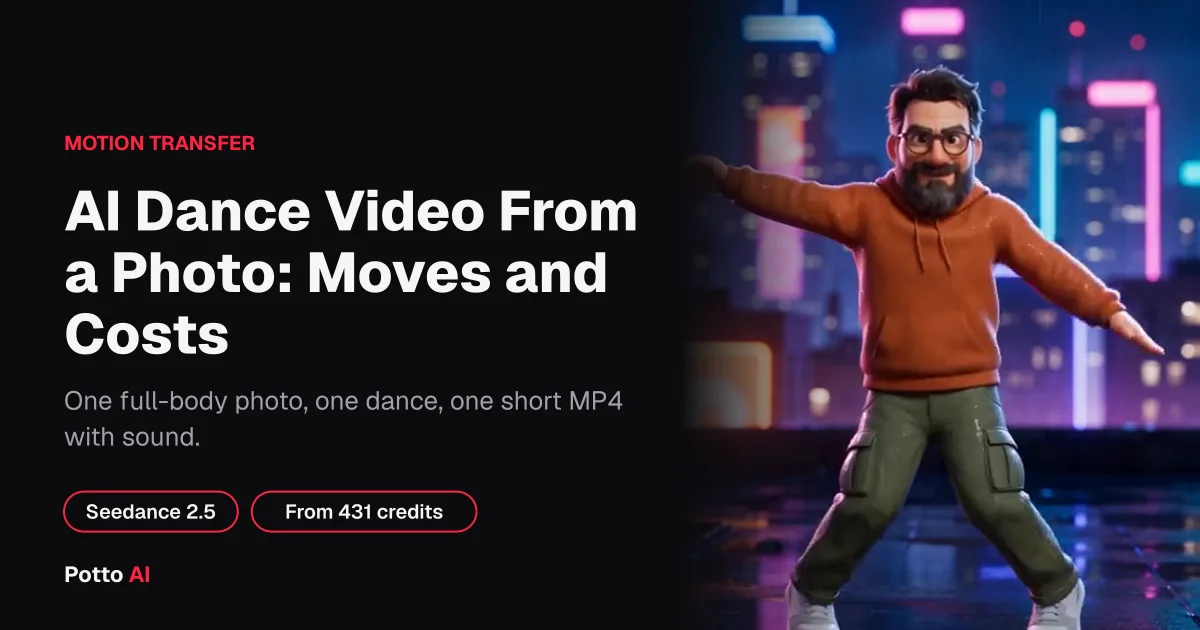
An AI dance video from a photo works by motion transfer: you add one full-body photo, pick a dance, and Potto copies the moves onto your character in a short MP4 with sound. A 10-second library dance costs 431 credits at 480p. The photo can show a person, a 3D figure, an anime character or a pet. The clip is rendered with Seedance 2.5.
This guide explains how motion transfer AI works, how Dance differs from Character swap, which photos pass the check, how to use your own dance clip and what each AI dance video costs. Every example below was made on Potto from an AI-generated character photo. No real person appears in them.
Key facts (checked November 2026):
ByteDance Seed introduced Seedance 2.5 on July 31, 2026, with reference inputs of up to 30 images, 10 video clips and 10 audio clips.
ByteDance Seed says Seedance 2.5 makes audio-video clips of up to 30 seconds in a single pass.
ByteDance Seed lists motion among the things Seedance 2.5 can take from a reference video.
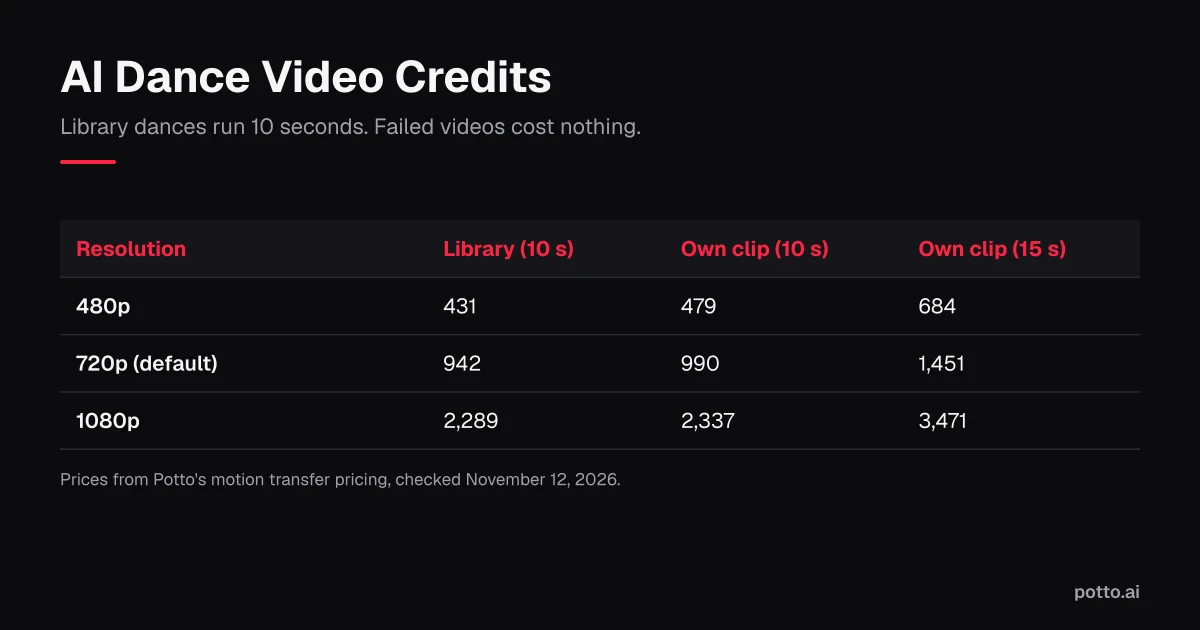
Potto's AI dance generator has four 10-second library dances; a 10-second library dance costs 431 credits at 480p, 942 at 720p and 2,289 at 1080p.
How Motion Transfer Works
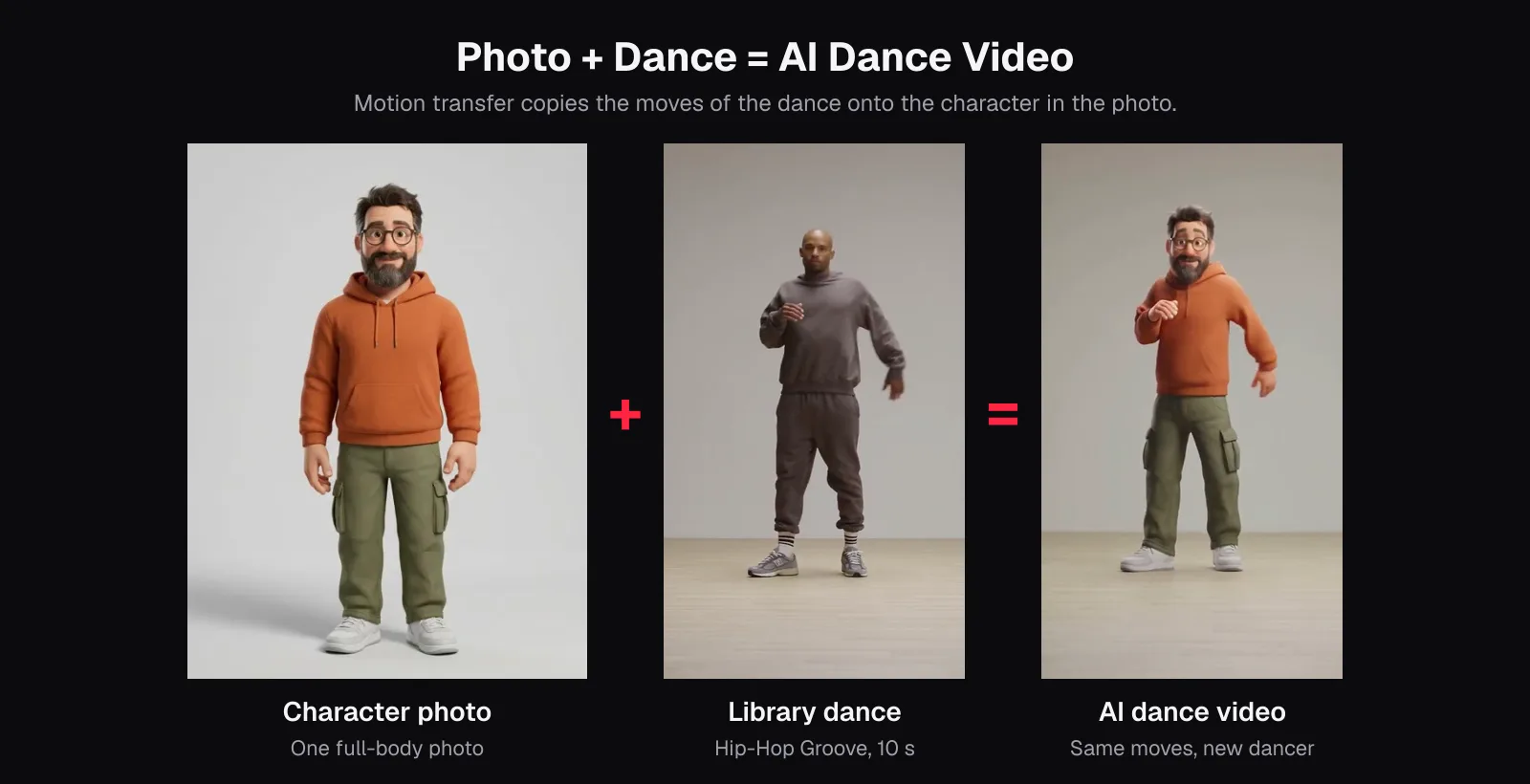
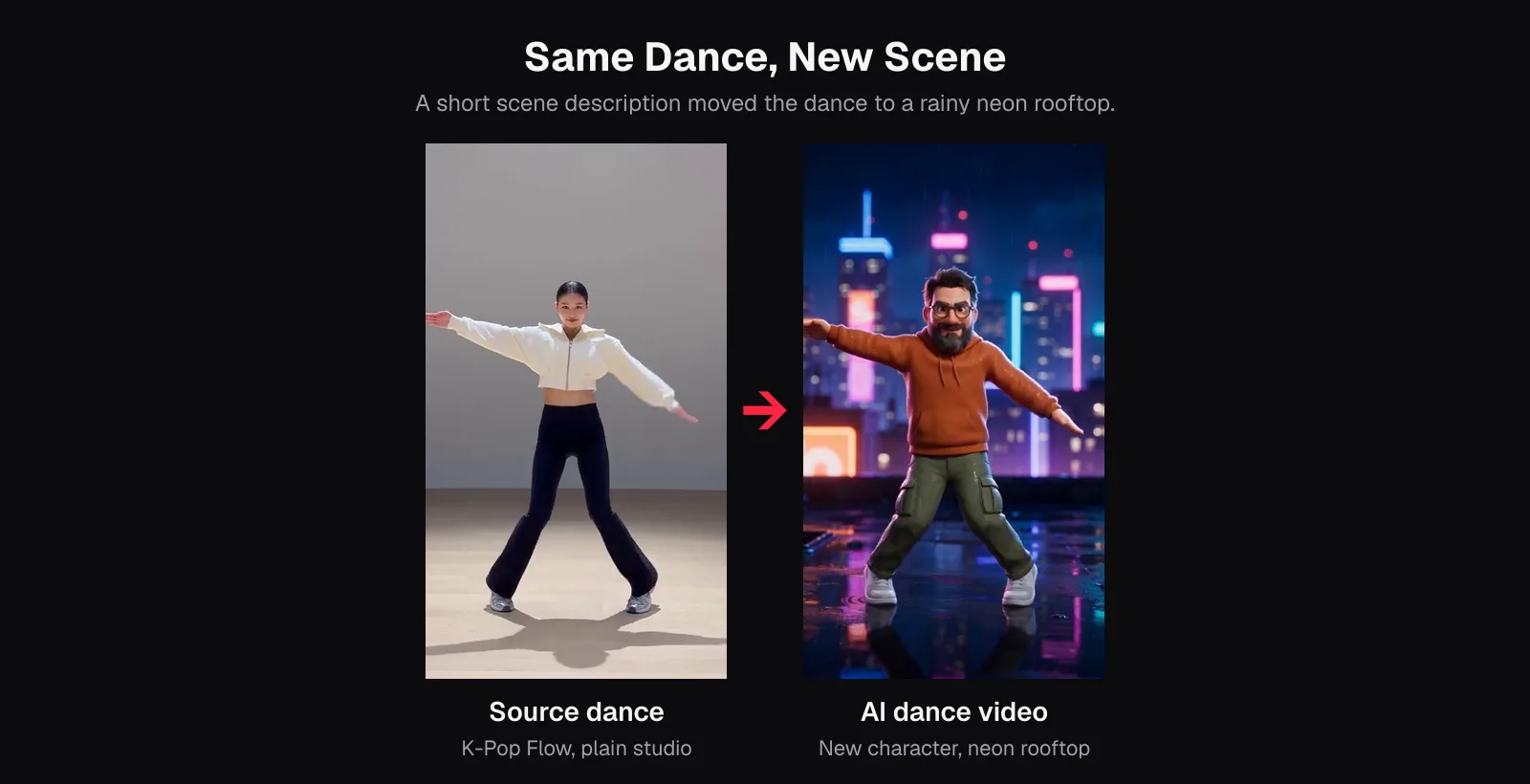
Motion transfer AI takes the moves from one video and gives them to a new character. The source clip supplies the motion. Your photo supplies the character. The result is a new clip, not an edit of the old one.
The camera angle, the rhythm and the timing stay as they were in the source. Every step lands on the same beat. What changes is the character, and the scene if you write a new one. If you leave the scene empty, the original setting stays.
Before the clip is rendered, Potto prepares a few things. It reads the source clip to understand the moves and the camera. It builds a character sheet from your photo. It writes the shot for the video model. Then Seedance 2.5 renders the clip. You can see these steps as a progress list while the video is made.
The sound comes from the source clip. Keep original audio is on by default, so your AI dance video plays with the same music as the dance. You get an AI dance video with sound unless you turn it off.
How to Make an AI Dance Video From a Photo
You can make an AI dance video in three steps on the AI dance generator. The credit price shows on the button before you start.
Upload one full-body photo. Use a photo of one character, head to feet. Potto checks it before it charges any credits.
Pick a library dance or your own clip. Choose any of the four dances, or upload a short clip with one person dancing.
Describe a scene and generate. Add a scene if you want a new setting. Then generate and download your AI dance video with sound as an MP4.
Most videos take a few minutes. You can leave the page while it renders. The finished clip is saved to My Creations, and you can download it from there.
The four library dances
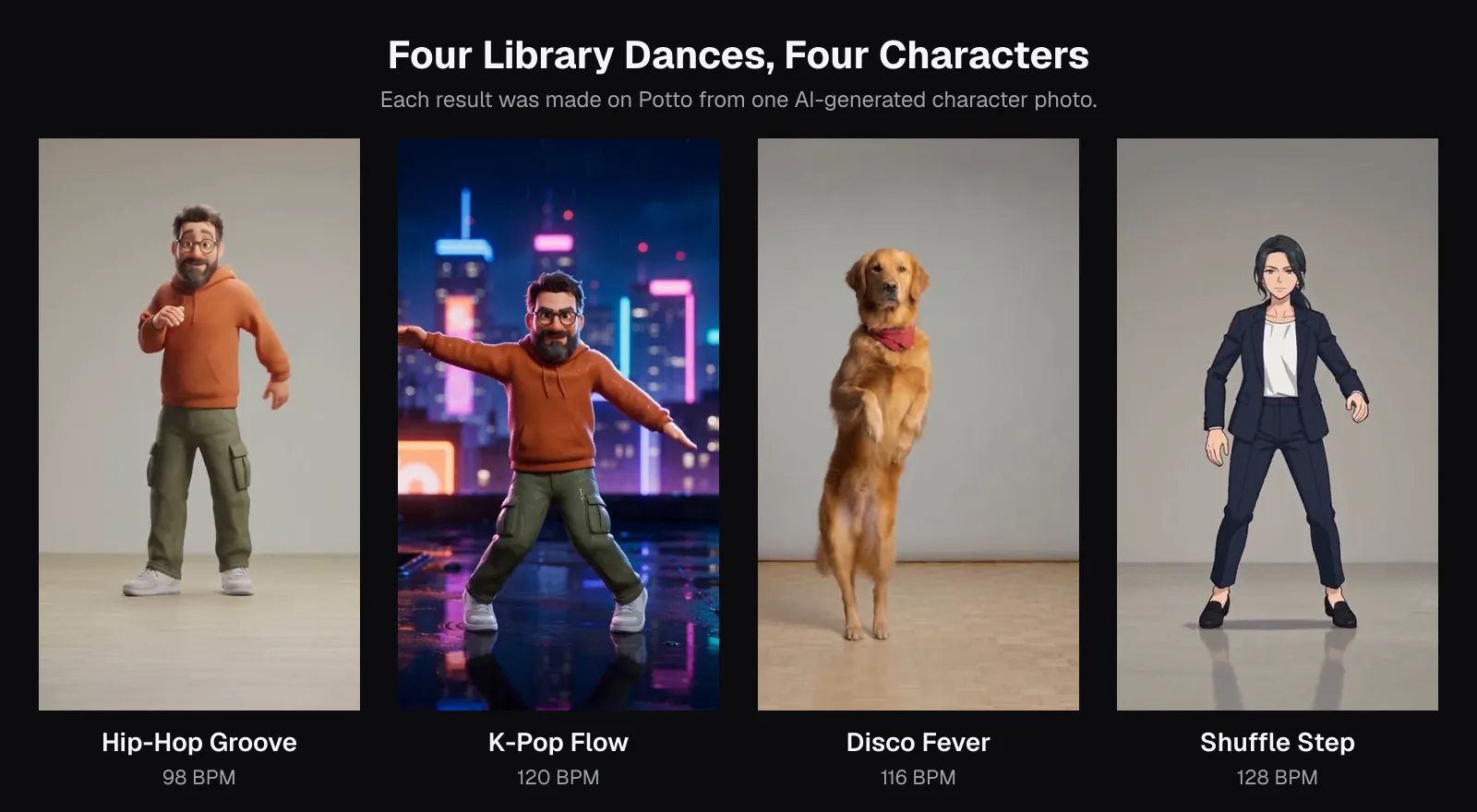
The library has four dances, each 10 seconds long and vertical. Each has a different feel. Pick a library dance that matches your character's style.
Hip-Hop Groove, 98 BPM. Loose shoulders, bounce and big arm swings.
K-Pop Flow, 120 BPM. Sharp choreography with clean pose changes.
Disco Fever, 116 BPM. Pointing, hip sways and side steps on the beat.
Shuffle Step, 128 BPM. Footwork with a low, gliding shuffle.
The dancers in the library clips are AI-generated too. Potto made them with Seedance 2.5, so every library dance is free of real performers.
Dance or Character Swap
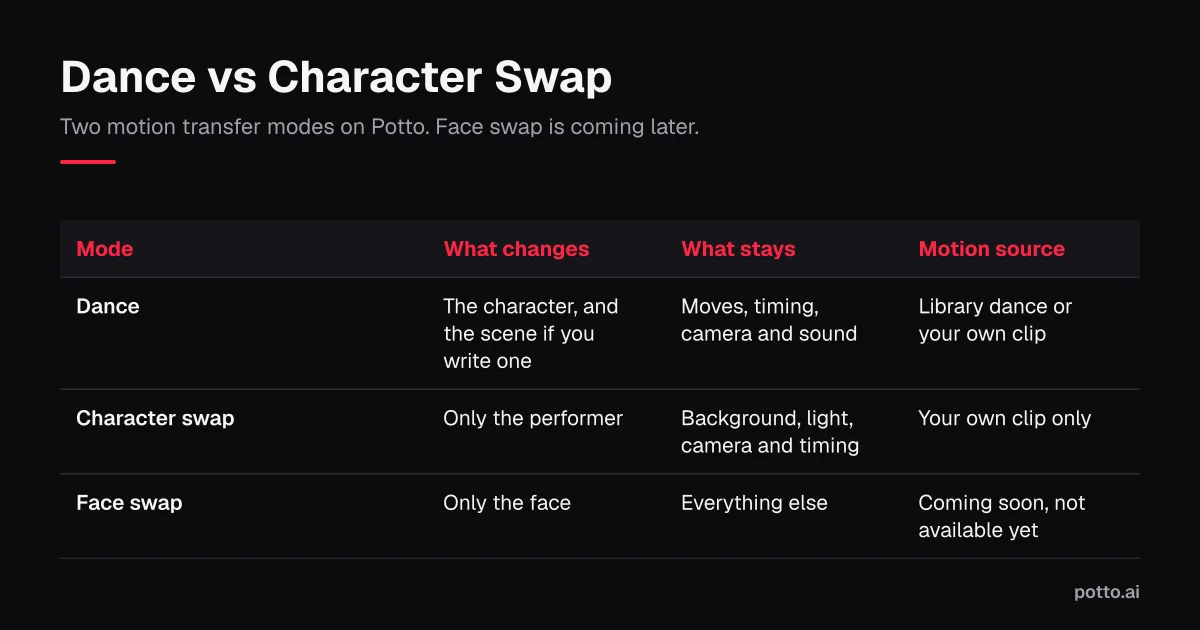
Potto has two motion transfer modes. Both put your character into a new clip: a dance video or a character swap video. They differ in what they keep.
Dance mode
Dance gives your character the moves of a clip. The motion, timing, camera and sound stay. You can keep the original scene or write a new one. Dance works with a library dance or with your own clip. It is the mode most people use for an AI dance video from a photo.
Character swap video
Character swap keeps the scene and only replaces the performer. The background, the light, the camera and the timing all stay. Character swap keeps the scene you filmed, so a character swap video fits clips you already shot in a place you like. A character swap video always needs your own clip, because there is no library scene to keep. You cannot write a new scene in this mode.
Pick a Photo That Passes the Check
Potto checks every photo before it charges credits. A photo that fails costs nothing. The check looks for one clear subject, a visible face and an adult if the photo shows a real person.
Use: one person or character, head to feet, with the feet in view and a clear pose.
Use: even light and a plain background.
Use: a style close to the dance you want, whether real, 3D or anime.
Avoid: group shots and crowds.
Avoid: photos cropped at the waist or knees.
Avoid: heavy shadows, masks or sunglasses.
Photos can be JPG, PNG or WebP, up to 20 MB each. Upload one full-body photo of the character, not a portrait. A full-body photo gives the model the legs and feet it needs for the steps.
Pets and characters work as well. In the examples above, a golden retriever stands up for Disco Fever and an anime character keeps its cel-shaded look for Shuffle Step. Real people must be adults who agreed to take part.
Use Your Own Dance Clip
Motion transfer also works with your own dance clip instead of a library dance. The clip must be an MP4 or MOV, 4 to 15 seconds long and up to 100 MB. It must show one adult. Potto checks the clip before it charges credits.
One person only. Clips with more than one dancer are rejected.
Adults only. A clip that may show someone under 18 is rejected.
No public figures. A clip that looks like a public figure is rejected.
Consent. You confirm that the person in the clip agreed to be replaced.
The AI dance video is as long as your clip. A 6-second clip makes a 6-second video. The shape follows the motion video by default, or you can match it to your photo. Your own clips cost a little more than library dances, because Potto prepares them first.
Write a New Scene
In Dance mode, motion transfer can also move the dance to a new place. Describe the new setting in up to 1,000 characters. Write the place, the light and the mood. Keep it short. Leave it empty to keep the scene of the source clip.
The creator offers a few starting points. "A rainy neon rooftop at night, with glowing signs and wet floors" is a good example. "A dark stage with a bright spotlight and soft haze" is another. You can also ask for a style, like keeping an anime cel-shaded look, or a camera move, like a slow push-in. The moves and the timing stay the same in every case.
What It Costs
What an AI dance video costs depends on the resolution and the source. You pick 480p, 720p or 1080p. 720p is the default. The price covers the preparation steps and the render. You see the exact price before you generate.
Resolution
Library dance (10 s)
Your clip (10 s)
Your clip (15 s)
480p
431
479
684
720p (default)
942
990
1,451
1080p
2,289
2,337
3,471
A 10-second library dance costs 431 at 480p. No AI dance video costs less on Potto. Failed videos cost nothing. Potto releases all reserved credits when a video fails, times out or is canceled. Your photo and settings stay, so you can try again.
Is there an AI dance generator free of charge? Not for the render itself. New accounts get 100 credits, which is less than one 480p dance. Potto is not an AI dance generator free of cost, but the photo check, the clip check and a failed render are all free. For the render, plans and credit packs are on the pricing page. The guide is Seedance 2.5 free explains how the model is priced in other clips.
Tips for a Better Result
Motion transfer works best when the character matches the dance. A 3D figure suits Hip-Hop Groove, and an anime character keeps its look in Shuffle Step. Pick a photo where the character stands in a pose close to the first move. Loose clothes show motion well, while long coats can hide the legs. If a first try looks off, change a single thing at a time: the photo, the dance or the scene text. Start at 480p to test a new character, then render the version you keep at 720p or 1080p.
Face Swap Is Coming Later
Face swap changes only the face in a video and keeps everything else. It is not available on Potto yet. It is coming later. Today, Dance and Character swap are the two live modes. Character swap keeps the scene and replaces the whole performer, not just the face.
If you want a laugh from a single photo instead of a dance, the AI video effects list has fixed meme templates. Those use a set script and shots, not a motion source. To write your own prompt and get a clip with generated sound, try Seedance 2.5 directly in Create Video.
FAQs
How do I make an AI dance video from a photo?
To make an AI dance video from a photo, upload one full-body photo, pick a library dance or your own clip, and generate. Potto checks the photo first and shows the price before you start. The result is a short MP4 with the sound of the dance.
How does motion transfer AI work?
Motion transfer AI reads the moves, timing and camera of a source clip and renders a new clip where your character performs them. On Potto, Seedance 2.5 renders the clip from your photo, a character sheet and a written shot. Only your character appears in the result.
Can I upload my own dance clip?
Your own dance clip works if it is an MP4 or MOV of 4 to 15 seconds, up to 100 MB, with one adult in it. You confirm that the person agreed to be replaced. The result is as long as your clip.
Is there music in the AI dance video?
The music of the source clip plays in the AI dance video by default. Keep original audio is on unless you turn it off. Library dances come with their own music, so a library dance gives you an AI dance video with sound unless you switch it off.
Can I make a celebrity dance with AI?
A celebrity or other public figure cannot be used on Potto. Clips that look like a public figure are blocked, and photos must show adults who agreed to take part. Use your own photo, a friend who said yes, a pet or an original character.
Is there a free AI dance generator?
An AI dance generator free of all cost does not exist on Potto, because each render uses Seedance 2.5. The checks are free and failed videos cost nothing. The lowest price is 431 credits for a 10-second library dance at 480p.
Sources
All sources were read on 2026-11-12. Model details are ByteDance's and may change.