Set up Blender MCP with Claude Code: requirements, install steps, safety limits, and two alternatives for Claude 3D animation without Blender.
Blender MCP is an add-on and a server that let Claude control Blender. Claude writes Blender Python and runs it in your open file. It can model, light, animate and look at the scene, then fix what it sees. You still render the final animation in Blender on your own computer. This guide covers what Blender MCP is, how to set up Blender MCP with Claude Code, the safety limits, and two routes to Claude 3D animation without Blender.
Key facts (checked November 12, 2026):
Blender MCP needs Blender 3.0 or newer, Python 3.10 or newer and the uv package manager, per its README.
The PyPI package blender-mcp is now named mcp-for-blender, and old setups keep working.
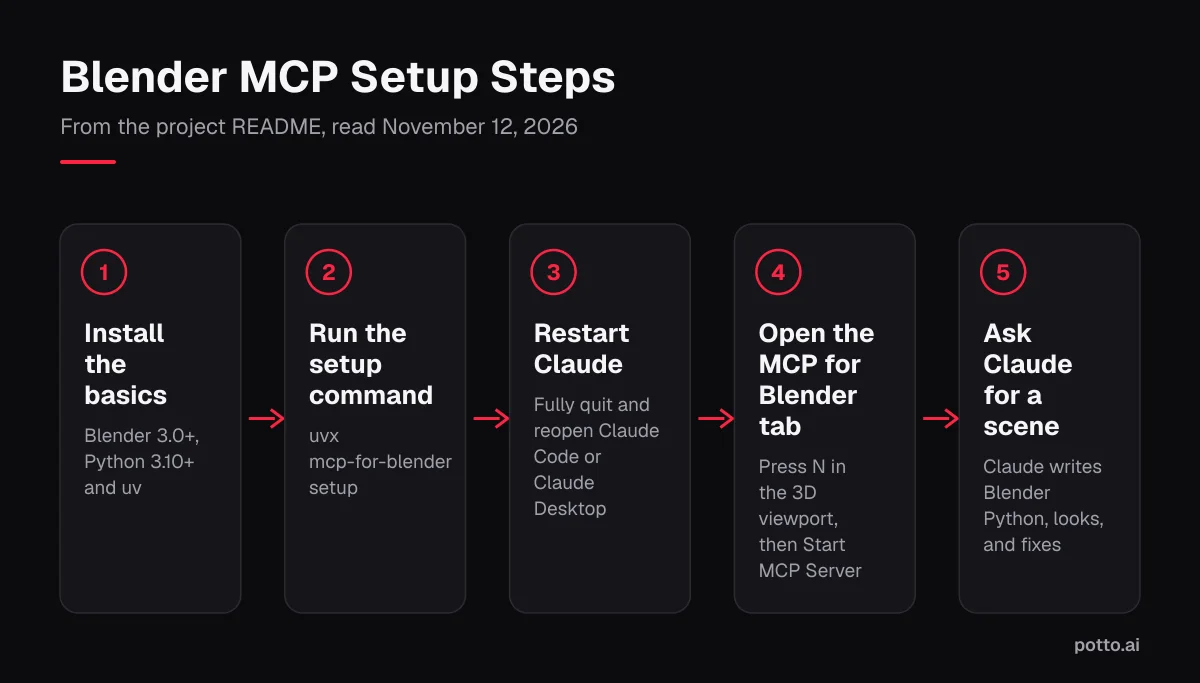
The Blender MCP setup command uvx mcp-for-blender setup installs the add-on and adds the server to Claude Code and other MCP clients.
The add-on listens on localhost port 9876 by default, with no authentication or encryption.
On Potto, a Claude Fable 5.2 video can use up to 3 template 3D scenes and up to 4 custom 3D scenes, and you export an MP4.
What Blender MCP Is
Blender MCP connects Claude to Blender through the Model Context Protocol. MCP is an open standard that lets an AI app call tools on your machine. The project lives on GitHub in the Blender MCP repository, and the Python package is now called MCP for Blender. Its README calls it a third-party integration, not a Blender product.
The system has two parts. The first is a Blender add-on. It starts a socket server inside Blender that receives commands and runs them. The second is the Blender MCP server. The MCP server speaks MCP to Claude and passes each request to the add-on. Claude never touches Blender directly. Every action goes through that local socket.
So what does Claude actually do? Claude writes Blender Python itself for modeling, layout, materials, animation, rigging and retopology. The MCP adds the parts Python cannot do alone, as nine tools. The main ones are below.
Tool
What it does
execute_blender_code
Runs Python in your live Blender file
look
Shows the viewport, the camera, several angles, an animation strip or a render
get_scene_info
Returns a short summary of every object in the scene
search_assets / import_asset
Finds and imports Poly Haven, Sketchfab and Poly Pizza assets
generate_3d
Generates a 3D model with an outside service and imports it
The look tool matters most for quality. Claude can render a view, see the result and correct the scene. That loop is why Blender MCP with Claude can build a room, a product shot or a short 3D animation from a plain request. The README also lists a paid Premium option for AI model generation. You do not need it for the core workflow.
The frame above comes from a Blender animation by JaydenDavisNC, an independent creator who made it with Claude. It is not a Potto video. It shows the kind of soft, lit 3D animation that Blender and Claude can reach in skilled hands.
How to Set Up Blender MCP With Claude Code
This Blender MCP setup follows the README as read on November 12, 2026. Commands change between releases, so check the repository before you set up Blender MCP.
What you need
You need three things on your computer before the Blender MCP setup:
Blender 3.0 or newer.
Python 3.10 or newer.
uv, the Python package manager. Use its official installer, not pip install uv.
You also need an MCP client. Claude Code and Claude Desktop both work. The setup command also finds Codex, Cursor, VS Code and a few other clients.
Install steps
There are two ways to set up Blender MCP. The setup command does everything. The manual route lets you see each step.
Install uv. On macOS, brew install uv works. On Linux, use the uv install script.
Run uvx mcp-for-blender setup. It finds your MCP clients and asks which to set up.
The command installs the Blender add-on and enables it. It adds a blender entry to each client config and keeps a .bak copy of every file it changes.
Fully quit your AI app and open it again.
Open Blender. The add-on starts its server when Blender opens.
The manual route has the same pieces. Add the Blender MCP server to Claude Code with claude mcp add blender uvx mcp-for-blender. Then install the add-on with uvx mcp-for-blender install-addon. In Blender, open Edit, then Preferences, then Add-ons, and enable "Interface: MCP for Blender". The README also gives a one-line install script for macOS, Linux and Windows. Read any script before you pipe it into a shell.
Check the connection
Open Blender and press N in the 3D viewport. Then open the MCP for Blender tab in the sidebar. If the MCP server is not running, click Start MCP Server in the MCP for Blender tab. In Claude Code, the Blender tools should now appear in the tool list.
Start with a small request. Ask Claude to add a cube, then a sphere above it. If that works, your Blender MCP setup is complete. If it fails, open the MCP for Blender tab again and check that the server shows as running. If the client cannot start uvx, the README says to use the full path to uvx in the config. GUI apps often do not see your terminal's PATH.
The same Blender MCP setup works for Claude Desktop. Do not run two copies of the Blender MCP server at once. The README warns against running the MCP server from two clients together.
How Claude Builds a Scene in Blender
Once connected, a Blender MCP with Claude Code session works like a loop. You describe the scene. Claude writes Blender Python and runs it. Claude looks at the viewport. Claude fixes what is wrong. You ask for the next change.
A good first prompt names the subject, the camera and the length. For example: "A low-poly desk lamp on a dark table. The camera orbits once over 5 seconds. Warm light from the lamp." Claude writes Blender Python to build the lamp and the table. It sets keyframes for the camera. Then it checks the camera view and adjusts the framing.
You stay in charge of the final render. Claude can start a render through Python, but the render runs in Blender on your machine. Render time depends on your hardware, the render engine and the sample count. Many people let Claude block out the scene, then polish materials and lighting by hand.
In Claude Code, you can pick the model with /model. Claude Fable 5.2 and Claude Opus 5.5 can both drive the same tools. The model choice changes the reasoning and the Claude bill, not the Blender MCP server. Our Fable 5.2 vs Opus 5.5 comparison covers prices and which model fits which animation job.
Limits and Safety Notes
Blender MCP is powerful because it runs arbitrary Blender Python. That is also its main risk. Read these points before you install Blender MCP for Claude on a work machine.
Code runs in your open file
The execute_blender_code tool runs any Python that Claude writes. The README says to always save your work first. A wrong script can delete objects or change many settings at once. Keep a saved copy of your file before each session.
The local server has no login
The add-on's socket server has no authentication or encryption, and the Blender MCP server adds none. Anyone who can reach the port can run Python inside Blender. The README says to keep it on localhost. For remote use, it suggests an SSH tunnel over a direct remote host. Never expose the port to the public internet.
Safe mode blocks risky code
You can set BLENDER_MCP_SAFE_MODE=1. Safe mode checks every script before it runs. It blocks file access, other programs, network calls and code that keeps running after the script ends. Normal Blender work still runs, such as modeling, materials, rendering, saving and import or export. Blocked scripts go back to Claude with the reason.
Telemetry and assets
The README says a minimal anonymous usage record is sent by default. You can turn it off with DISABLE_TELEMETRY=true. Prompts, code and screenshots are only collected if you opt in. Asset sources have their own terms. Poly Haven assets are CC0. Many Poly Pizza models need a credit, and the add-on writes that credit into the file.
What you get at the end
You get a Blender file and your own render. That is the main strength of this route. You can open the file, move a light, edit a mesh or hand it to a 3D artist. The cost is setup time, a local install and render time on your machine.
Blender MCP Alternatives
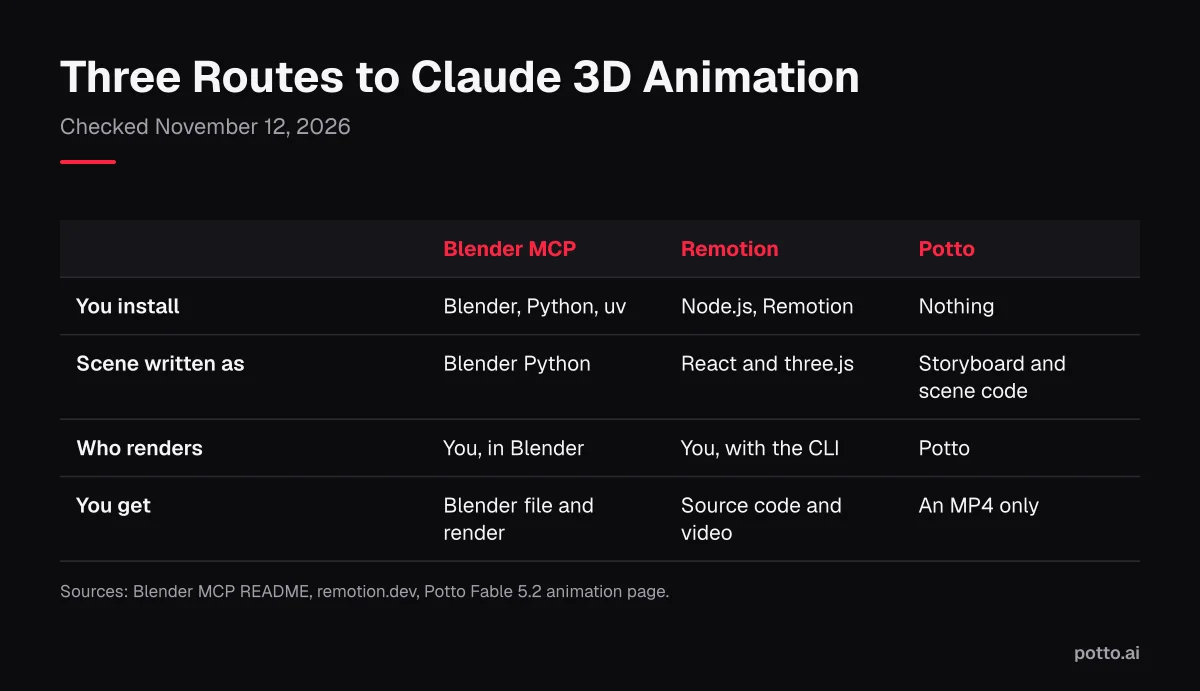
Not everyone wants Blender on their machine. Two other routes give you Claude 3D animation without Blender. One still needs a code project. The other is a Blender MCP alternative without installing anything. Both work well alongside Blender MCP.
Remotion with @remotion/three
Remotion is the code route to Claude 3D animation. It makes videos from React code. Its @remotion/three package connects React Three Fiber to Remotion. You write a three.js scene in React, and Remotion renders each frame to a video file. Claude Code can write that code for you.
This route suits developers who want 3D animation in code. You install Node.js and a Remotion project, then render with the Remotion CLI. Remotion's pricing page says it is free for individuals and companies of up to 3 people. Larger companies need a company license. The output is a video, a GIF or an image sequence, and you keep the full source code.
A no-install route with Potto
Potto is a Blender MCP alternative without installing anything. You describe the video, or add a reference clip. Claude writes the storyboard. Potto renders the scenes and exports an MP4. You install nothing and write no code. The full workflow is on the Fable 5.2 animation guide.
Potto has two kinds of 3D scenes. Template 3D scenes are a 3D device that shows a screenshot, 3D text and a 3D bar chart. Both Claude models can use them, up to 3 per video. Custom 3D scenes are different. Claude Fable 5.2 writes each one as three.js code, and Potto renders it in an isolated sandbox. A video can have up to 4 custom 3D scenes. If a custom scene cannot render, a template scene takes its place.
The frame above is from a 10-second teaser for a made-up desk lamp called Lumen. Claude Fable 5.2 wrote two custom 3D scenes, and Potto rendered them. It was made on Potto on November 11, 2026.
You also get the parts of a finished video in the same project: captions, voiceover and music. For flat scenes with titles, product screens and charts, see Claude motion graphics and AI motion graphics. The trade-off is control. You get the finished MP4 only, with no Blender file and no scene code. You change a scene by asking in the chat.
The cost is credits. A Fable 5.2 project bills 3 times the usual credit rates. A 15-second export costs 225 credits, plus the model's work after each message. To start a 15-second project, your balance must cover 1,425 credits.
Which Route to Pick
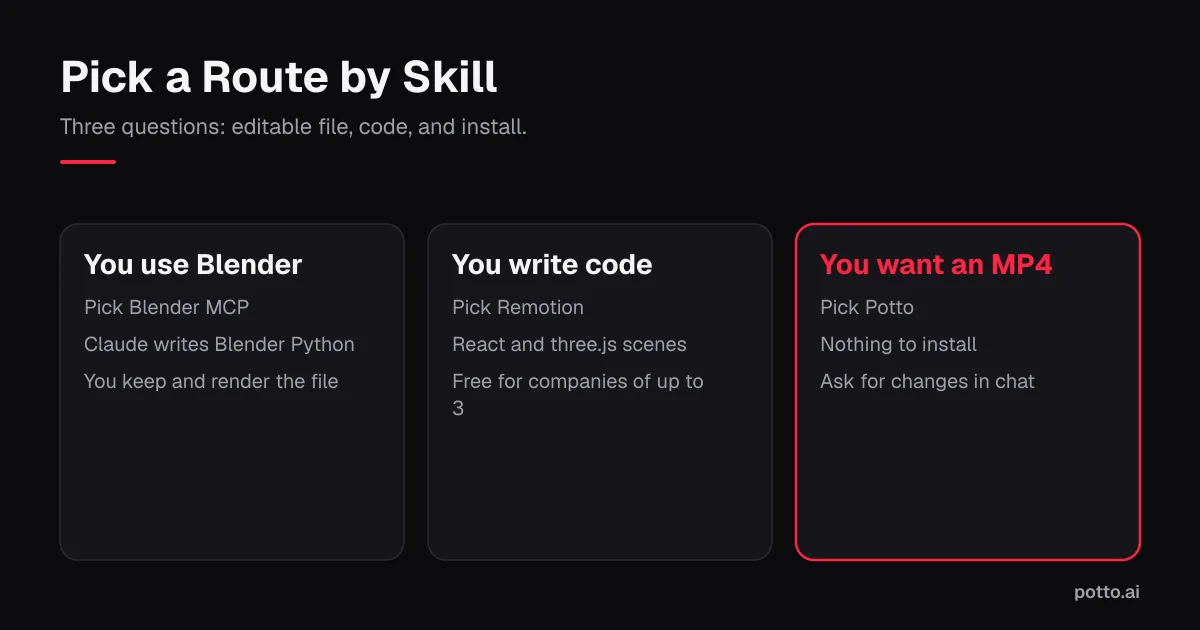
Three questions decide your route to Claude 3D animation. Do you need an editable scene file? Can you write or read code? Can you install software on this computer?
Question
Blender MCP
Remotion
Potto
Do you need a file you can edit?
Yes, a Blender file
Yes, React source code
No, an MP4 only
Do you write code?
No, Claude writes Blender Python
Yes, React and three.js
No, you ask in chat
Can you install software?
Blender, Python and uv
Node.js and Remotion
Nothing
Who renders?
You, in Blender
You, with the Remotion CLI
Potto
Pick Blender MCP if you already use Blender or want a scene you can keep editing. It gives you the most control over meshes, materials and rigs. Pick Remotion if you are a developer and want video as code in a repo. Pick Potto if you want a finished 3D animation without code and without a local install.
The routes also mix well. You can sketch an idea on Potto to agree on the story and the camera moves. Then you can rebuild the hero shot in Blender with Claude. You can also browse motion graphics examples from independent creators to see what each route has produced.
Blender MCP Skills for Claude Code
A skill is a folder with a SKILL.md file that teaches Claude Code one kind of job. Skills pair well with Blender MCP. The skill holds the plan, and the MCP server gives Claude its hands in Blender. On Potto's skills marketplace, the Make Blender Education Video Skill guides Claude through a fact-checked educational animation built in Blender, and it is free with a Potto account. Read any skill and its scripts before you run them, the same way you would read an install script.
FAQs
What is Blender MCP?
Blender MCP is an open-source add-on and server that connect Claude to Blender through the Model Context Protocol. The add-on starts a local socket server inside Blender. Claude can then run Blender Python, read the scene, import assets and look at the viewport. The package is now named mcp-for-blender.
How do I install Blender MCP for Claude?
To install Blender MCP for Claude, first install Blender 3.0 or newer, Python 3.10 or newer and uv. Then run uvx mcp-for-blender setup. It installs the add-on and adds the server to your MCP clients. Restart your AI app, open Blender, and check the MCP for Blender tab.
Does Blender MCP work with Claude Code?
Yes. Blender MCP works with Claude Code as well as Claude Desktop. The setup command finds Claude Code and adds the server for you. You can also add it by hand with claude mcp add blender uvx mcp-for-blender.
Is Blender MCP safe to use?
Blender MCP is safe enough on your own computer if you follow the README's limits. It can run any Python in your open file, so save your work first. The local server has no login, so keep it on localhost. Safe mode blocks file, network and process access in scripts.
Can Claude make 3D animation without Blender?
Yes. Claude 3D animation works without Blender in two ways. With Remotion, Claude Code writes three.js scenes in React that you render to video. On Potto, Claude Fable 5.2 writes custom 3D scenes, and you export an MP4 without installing anything.
Does Blender MCP render the animation for me?
No. Blender MCP lets Claude build the scene and start renders, but the render runs in Blender on your computer. Render time depends on your hardware and settings. You keep the Blender file and the frames.