A free AI photo editor with 100 sign-up credits: up to 20 HD edits, 10 models from GPT Image to Nano Banana Pro, and the price shown before you generate.
Potto's free AI photo editor runs on sign-up credits: a new account gets 100 credits, and at 5 credits per HD edit that is up to 20 edited photos before you pay anything. You upload a photo, write what to change and see the price on the Generate button. Credits are spent only when you generate, so uploading and writing cost nothing.
This guide shows what the free AI photo editor can change, what the credits buy on each model, and how to write an instruction that changes one thing and leaves the rest alone. It also covers the new part: you can edit photos with GPT Image, edit photos with Nano Banana or try MiniMax H3 Image from the same panel, with the same instruction. "Free" here means the sign-up credits. You can use this AI photo editor online free until they run out; there is no unlimited free plan.
Key facts (checked November 2026):
A new Potto account gets 100 credits, and the AI photo editor charges from 5 credits per HD edit.
Potto's AI photo editor offers 10 image models, priced from 5 to 45 credits per edit at HD.
One instruction can run on any of the 10 models, with 1, 2 or 4 results per run.
The source photo is a JPG or PNG of up to 20 MB, and the instruction can be up to 4,000 characters.
Photos stay in private storage and are not used to train models.
What You Can Edit for Free
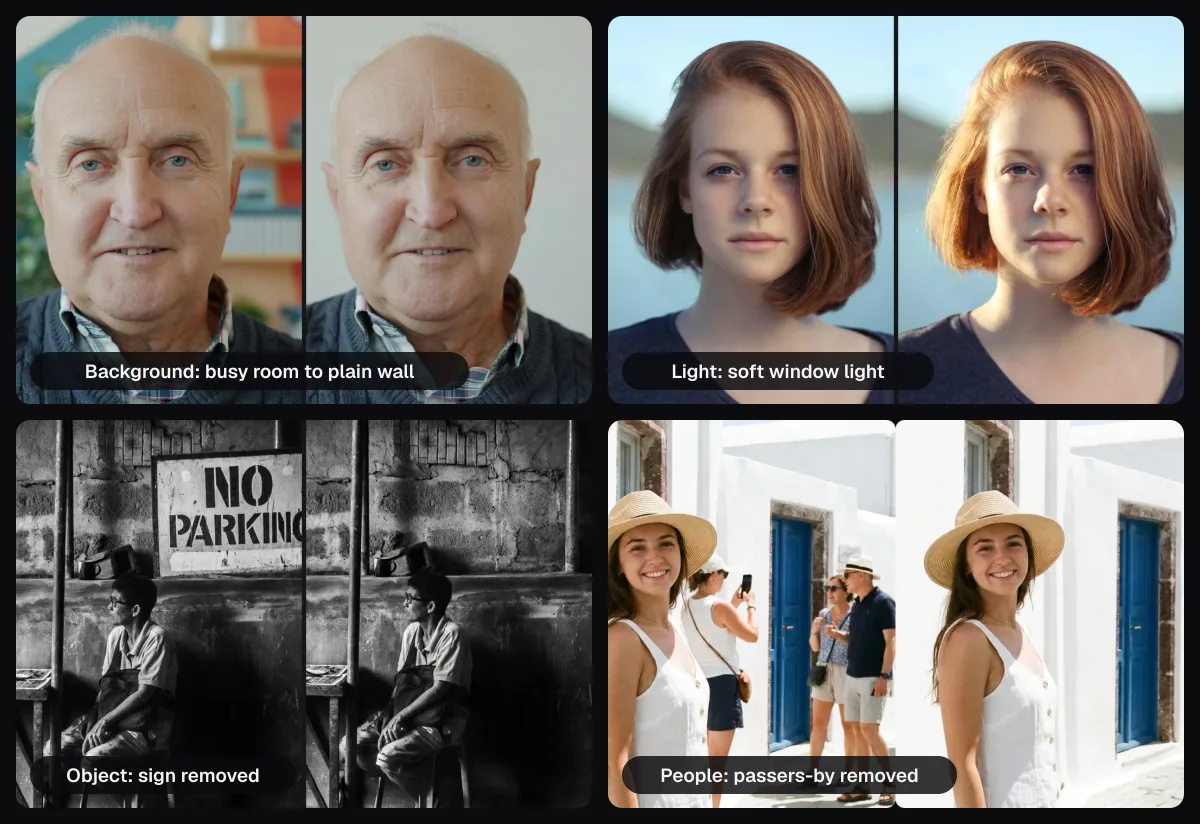
A free AI photo editor changes a photo from a written instruction. There are no layers, brushes or masks. You describe the change the way you would brief a retoucher, and the editor redraws the photo with that change. Open the AI photo editor, upload a photo, and try one of the four jobs below. Each one is a single instruction.
Backgrounds
A busy room behind a headshot is the most common reason to open a free AI photo editor, and a good way to try the AI photo editor free. Ask for a plain light wall, a studio backdrop or a beach. Name the person as something to keep. The editor swaps what is behind them and leaves the face, hair and clothing alone. If you only need the subject on transparency, a cutout tool is a better fit; our guide on how to remove background from image files covers that job.
Remove people and objects
Name the sign, the tourist or the wire you want gone, and say what should fill the gap. The AI photo editor continues the wall, the sky or the floor behind it. That area was never in the photo, so the editor draws it. Remove one thing per edit. A small filled area is easy to check for seams and repeated patterns.
Light and color
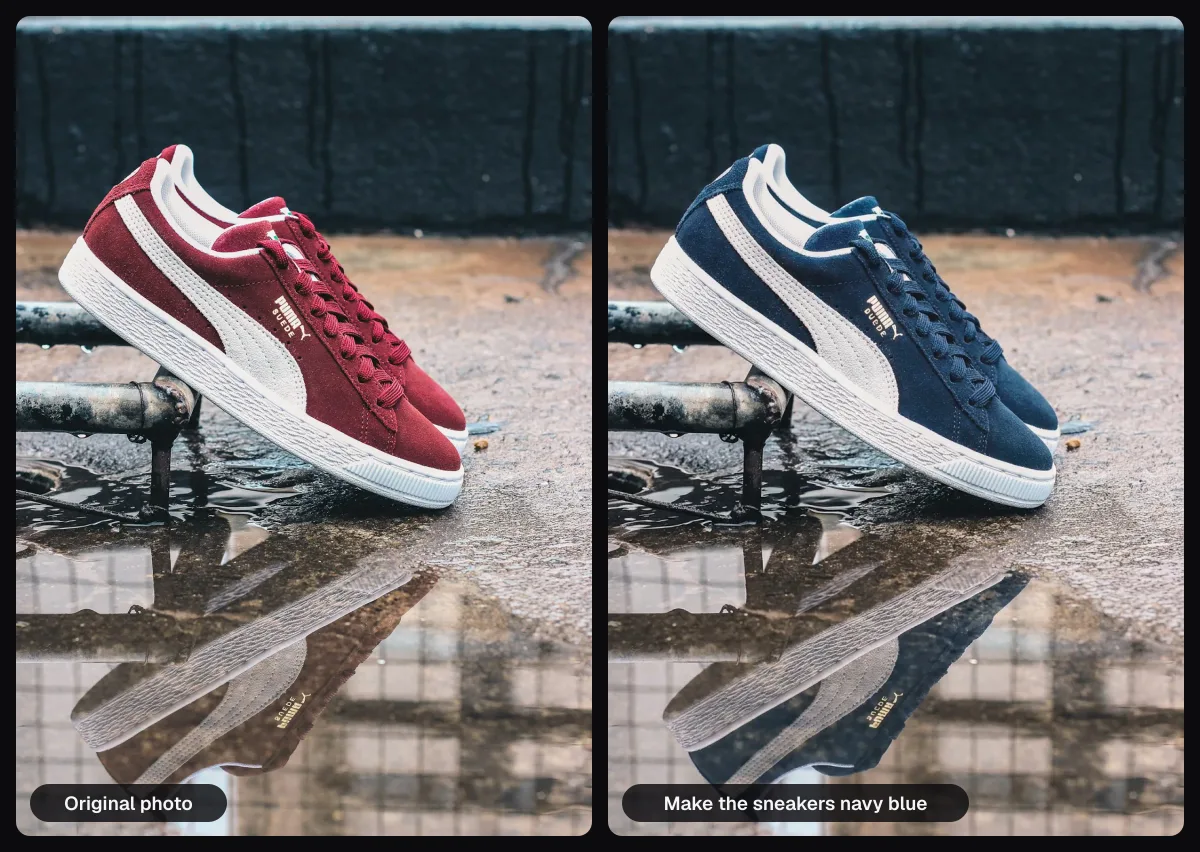
Flat light can be fixed with words. Describe the light you want, such as soft window light from the left or warm evening light. The pose and framing stay the same. Color works the same way: "make the sneakers navy blue" changes the shoes and keeps the street.
Look at the puddle in the example above. The reflection changed color with the shoes. That is a good result, because a real color change would show in the reflection too. The white stripe, the sole and the laces kept their look.
Portraits
A free AI photo editor can change the background, outfit, light or style of a portrait and keep the person recognizable. Keeping a face exactly the same is a request, not a promise. Compare the eyes, the mouth, the hairline and any glasses with the original. Reject a result that changes who the person looks like, and run it again with the face named as something to keep.
What 100 Credits Buy
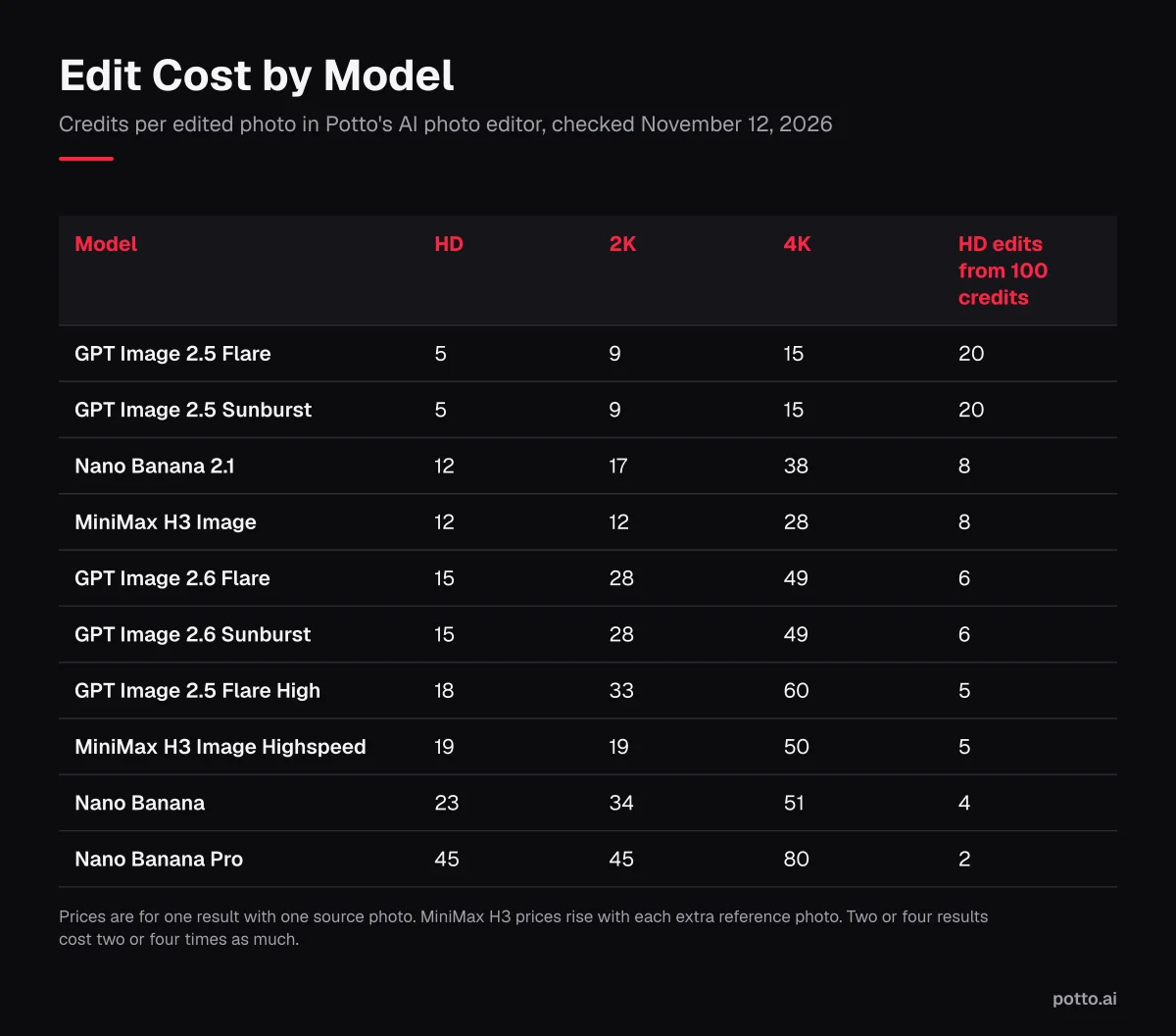
The price of an edit depends on the model and the resolution. HD is the base tier, and 2K and 4K cost more. The total shows on the Generate button before you start, and credits held for a failed edit are released.
At HD, a new account gets 100 credits, and the cheapest models make that 20 edits. The table above lists every model. The short version: 5 credits on GPT Image 2.5, 12 on Nano Banana 2.1 and MiniMax H3 Image, 15 on GPT Image 2.6, 23 on Nano Banana and 45 on Nano Banana Pro.
MiniMax H3 Image prices count the photo you edit as one reference image. Each extra reference photo adds credits on the two MiniMax models. On the other eight models, reference photos add nothing.
Ask for more than one result
You can ask for 1, 2 or 4 results per run. Each result is priced as one edit. Four HD results on the 23-credit model cost 92 credits, which uses almost the whole free balance on one photo. Four results on a 5-credit model cost 20. For a first test, pick a low-cost option in the editor and ask for two results. Then compare them side by side.
When the free credits run out
You can use the free AI photo editor until the sign-up credits are gone. After that, pick a plan or a one-time credit pack. The Lite plan is $20 a month for 2,000 credits. At 5 credits an edit, that is 400 edits on GPT Image 2.5. Images made on free credits are for personal use. Paid plans include commercial use. Potto adds no visible watermark to downloads.
Edit Photos With GPT Image, Nano Banana or MiniMax
Potto's free AI photo editor puts 10 models in one menu. You keep the same photo and the same words in the editor and only switch the model. The best choice is the one that makes your change and leaves the rest alone. That depends on the photo, so a side-by-side test is the honest way to choose.
Edit photos with GPT Image
You can edit photos with GPT Image 2.5 or 2.6, each in Flare and Sunburst versions. GPT Image 2.5 Sunburst is built for precise editing with strong instruction following. At 5 credits per HD edit, GPT Image 2.5 makes the free credits go furthest. The 2.6 Sunburst model targets detail and consistent multi-step edits at 15 credits, and 2.6 Flare costs the same for drafts and variations. To edit photos with GPT Image on a tight budget, start with 2.5 Sunburst and move up to 2.6 when a detail does not hold.
Edit photos with Nano Banana
You can edit photos with Nano Banana in three versions. Version 2.1 costs 12 credits at HD and is the newest of the three, with sharper text and stronger character consistency. The standard model costs 23 credits. Nano Banana Pro costs 45 credits at HD and is built for reasoning-guided quality up to 4K. Pick Nano Banana Pro when the edit has many parts, small text or a final 4K file. To edit photos with Nano Banana on the free credits, 2.1 gives you 8 HD edits and Pro gives you 2.
Edit photos with MiniMax H3 Image
MiniMax H3 Image costs 12 credits per HD edit with one photo, and its 2K edit costs the same. The Highspeed version costs 19. Both offer 4K. Remember that every extra reference photo raises the price on these two models.
A simple model test
Upload one photo. Write one instruction. Run it on a 5-credit model, then a 12-credit model, then a 15-credit model. That costs 32 credits and leaves 68 for the rest of your edits. Keep the one that held the most of what you named, and use it for the rest of that photo set.
How to Write an Edit Instruction
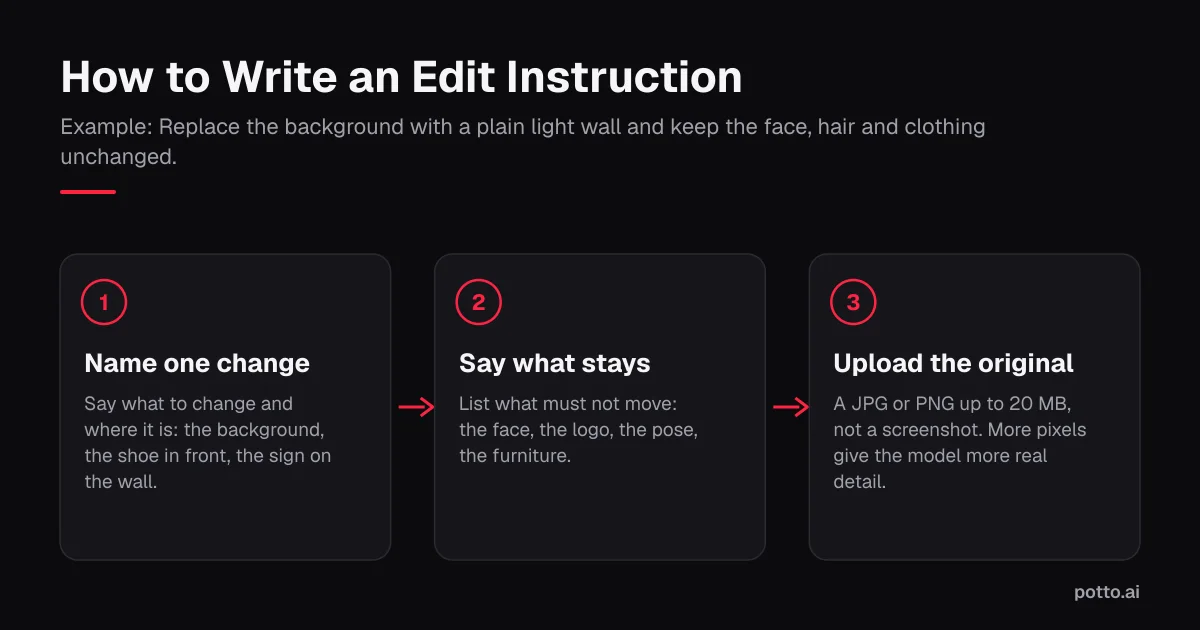
The instruction decides most of the result. A clear one changes one thing, names what must stay and works on the original file. The instruction can be up to 4,000 characters, but most good ones are a single sentence.
Change one thing at a time
Ask for one change per run. "Replace the background with a plain light wall" is one change. "New background, warmer light, remove the sign and add a hat" is four. When several things change at once, it is hard to tell which part drifted. Run four edits in a row instead, and check each one.
Say what stays the same
Any AI photo editor redraws the whole photo. Anything you do not name can shift a little. So name what must not change: the face, the logo, the pose, the furniture. This instruction works well: "Replace the background with a plain light wall and keep the face, hair and clothing unchanged." If several objects look alike, point to the one you mean by its position, such as "the shoe in front".
Upload the original
Use a JPG or PNG of up to 20 MB. Upload the original file, not a screenshot or a copy from a chat app. More pixels give the editor more real detail to keep. To show an outfit, a product or a style, add reference photos. Most models take up to 14 in total, and Nano Banana 2.1 takes up to 10.
Pick the shape and size
After the instruction, pick a model, one of 10 aspect ratios from 1:1 to 21:9, the resolution and the number of results. Keep the source ratio for a plain edit. Change the ratio only when you need a new crop, such as a square profile picture. For more picture area around the subject instead of a crop, an image expander adds new area on each side.
Check the Result Before You Download
A free AI edit still deserves a full check, because a good edit can hide a small problem. Check it at the size you will use it. A small preview hides errors that a product listing or a print will show.
Faces
Compare the eyes, the mouth, the hairline and glasses with the original. Look at teeth and ears. A face that looks slightly different is a reason to run the edit again, with the face named as something to keep.
Hands, edges and straight lines
Count fingers. Check hair edges against the new background. Look at door frames, shelves and horizons. A filled area after an object removal can repeat a pattern or bend a straight line.
Text and logos
Small text and logos are hard for every model. Check the logo on a shirt, a label on a bottle and a sign in the background. If the edit touched them, name them as something to keep, or try Nano Banana Pro, which handles small text well.
Then download the result as PNG or JPEG. PNG keeps every pixel. JPEG gives a smaller file for the web. If you also need the subject on transparency, use remove bg on the edited photo for 4 credits.
Is It Private?
Yes. Privacy works the same in the free AI photo editor as on a paid plan. Photos you upload to the free AI photo editor stay in private storage. Potto does not train models on your photos. You can ask Potto to delete your account and its photos at any time. Edit only photos you own or have the right to change.
FAQs
Is the AI photo editor free for every edit?
The AI photo editor free part is the 100 sign-up credits. Every edit spends credits, and the price shows before you generate. When the credits run out, you buy a plan or a pack to keep editing.
How many free edits do I get with 100 credits?
You get up to 20 free HD edits, because a new account gets 100 credits and the cheapest models cost 5 credits each. On other models the number is lower: 8, 6, 4 or 2 edits. You can mix models until the credits are used.
Can I use the AI photo editor free without a watermark?
Yes. Potto adds no visible watermark to downloads, whether you edit on free credits or on a plan. Images made on free credits are for personal use, and paid plans include commercial use.
Can the AI photo editor remove people from a photo?
Yes. Name the people you want gone and say what should fill the gap, such as the wall or the street behind them. The editor draws that area, because it was never in the photo. Check the filled area for repeated patterns and bent lines.
Do I need to install anything to edit photos?
No. The AI photo editor online free version runs in a browser on a phone or a computer. You open the page, upload a photo from your camera roll or your files, and the result downloads to your device.
Which model should I pick for photo edits?
Start with GPT Image 2.5 Sunburst at 5 credits per HD edit for a plain background, color or light edit. Move to GPT Image 2.6 Sunburst or Nano Banana 2.1 when a detail does not hold. Use Nano Banana Pro for edits with many parts, small text or a 4K result. When in doubt, run the same instruction on two models and compare.
Sources
Potto AI, AI photo editor page, model registry and pricing page (checked November 12, 2026).
Potto AI
Make your next launch video.
Take what sparked your interest and turn it into a video or an image of your own. Bring screenshots, a topic or a prompt.