Nano Banana 2 vs Pro: Gemini 3.1 Flash Image against Nano Banana Pro on price, references and text, with Potto credits and a fair way to test both.
Nano Banana 2 is Google's name for Gemini 3.1 Flash Image, and Nano Banana Pro is the higher-priced model in the same family. On Potto, a Nano Banana 2 image costs 23 credits at HD, 34 at 2K and 51 at 4K. A Nano Banana Pro image costs 45, 45 and 80. So the Nano Banana 2 vs Pro choice comes down to one question: does this brief need the extra detail and reasoning that Pro is built for?
This guide covers what each model is, what each one costs at every size, how they differ on detail, text and references, and a simple way to run one brief on both. It also explains when Nano Banana 2.1 is the better pick, because the names are easy to mix up. Google's facts below come from Google's own model pages, guide, pricing page and blog, all read on November 12, 2026.
Key facts (checked November 2026):
Google announced Nano Banana 2, officially Gemini 3.1 Flash Image, on February 26, 2026.
Google's API model ID for Nano Banana 2 is gemini-3.1-flash-image, and for Nano Banana Pro it is gemini-3-pro-image.
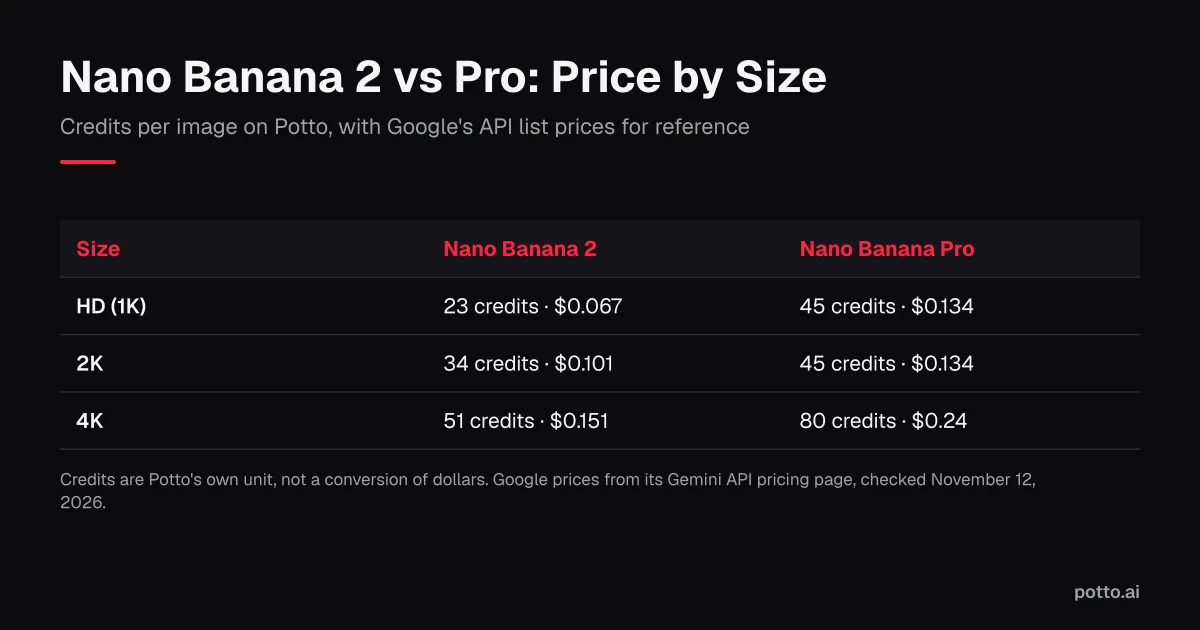
Google lists Gemini 3.1 Flash Image (Nano Banana 2) at $0.067 per 1K image, $0.101 per 2K image and $0.151 per 4K image.
Google lists Nano Banana Pro at $0.134 per 1K or 2K image and $0.24 per 4K image.
Google's image guide allows up to 14 reference images in one request across its Nano Banana models.
On Potto, Nano Banana 2 costs 23, 34 and 51 credits per image at HD, 2K and 4K, and Nano Banana Pro costs 45, 45 and 80.
What Nano Banana 2 is
Nano Banana 2 is an image generation and editing model from Google. Its official name is Gemini 3.1 Flash Image. Google introduced it in a blog post on February 26, 2026, and the post uses both names side by side. The model makes new images from text and edits images you supply.
Google's model page describes the Gemini 3.1 Flash Image model as "high-quality image generation and conversational editing at a mainstream price point." It also calls it the high-efficiency counterpart to Gemini 3 Pro Image. In plain terms, Nano Banana 2 is the everyday model, and Nano Banana Pro is the premium one.
A few specs from Google's documentation are worth knowing:
Inputs: text, image, video and PDF. Outputs are image and text.
API sizes: 0.5K, 1K (the default), 2K and 4K.
Thinking: two levels, minimal and high, with minimal as the default.
Grounding: Google Search grounding, including an image search option.
Watermark: every generated image carries a SynthID watermark.
What Nano Banana Pro is
Nano Banana Pro is Google's Gemini 3 Pro Image model. Google calls it "a sophisticated reasoning-driven engine for professional-grade image editing and generation." Its model page names complex graphic design, high-fidelity product mockups and factual data visualizations as its best uses. Google announced it in November 2025, so it is older than Nano Banana 2 but sits above it in price. On Potto, Nano Banana Pro has its own model page with example images and their prompts.
Pro takes text and image input and returns image and text. It is reasoning-driven: it plans the image before it draws. That planning step is part of why each Nano Banana Pro image costs more to make.
Where the names get confusing
Google now uses the Nano Banana name for several models. Nano Banana 2.1 is an update to Nano Banana 2, not the same model. Google's image guide calls Nano Banana 2 the previous-generation workhorse and recommends 2.1 for new projects. There is also a Lite model, and the original Nano Banana from 2025.
On Potto, the creator's model menu lists the Gemini 3.1 Flash Image model under the name Nano Banana. The Nano Banana 2 model page opens that same Google model. Nano Banana 2.1 and Nano Banana Pro each have their own entry and their own price.
Price by size
Price is the clearest difference between Nano Banana 2 and Pro. Below are both price lists side by side. Google's figures are API list prices in US dollars. Potto's figures are credits, Potto's own unit, so do not read the two columns as the same currency.
Size
Nano Banana 2 (Google API)
Nano Banana Pro (Google API)
Nano Banana 2 on Potto
Nano Banana Pro on Potto
1K / HD
$0.067
$0.134
23 credits
45 credits
2K
$0.101
$0.134
34 credits
45 credits
4K
$0.151
$0.24
51 credits
80 credits
Nano Banana 2 at HD costs 23 credits, and Pro costs about twice that. The gap shrinks at 2K, because Pro charges the same for 1K and 2K. At 4K, Pro costs about 1.6 times as much. Google's API also has a 0.5K tier for Nano Banana 2 at $0.045. Neither model has a free tier for image output in the API.
What a batch costs on Potto
The Generate button shows the total before you confirm. One request can make one, two or four images, and the price multiplies. Four Nano Banana 2 images at HD cost 92 credits. Four Nano Banana Pro images at HD cost 180 credits. A failed request releases its credits.
A sensible budget pattern mixes the two models. Make four drafts with Nano Banana 2 at HD for 92 credits. Pick the best layout. Then render one final with Nano Banana Pro at 4K for 80 credits. The whole job costs 172 credits. Four Pro drafts alone would cost 180 credits before any final.
Is Nano Banana 2 free anywhere?
Google's API has no Nano Banana 2 free tier for image output. On Potto, a new account gets 100 credits. That covers four Nano Banana 2 images at HD, with 8 credits left over. After that, credits come from a plan or a credit pack on the pricing page.
Detail, text and references
The two models share a lot. Both make and edit images. Both offer HD, 2K and 4K on Potto. Both take up to 14 reference images. The differences show up in fine detail, in dense lettering and in how reference slots are split.
Detail
Google positions Pro for professional asset work: product mockups, complex layouts and data visuals. Its reasoning step helps it follow long briefs with many parts. Nano Banana 2 handles everyday photos, illustrations and edits well. Google built it as the high-efficiency counterpart to Pro, priced for everyday volume. If your brief is one subject, one setting and one light, Nano Banana 2 is usually enough. If your brief has many parts that must all land, try Pro.
Text in the image
Both models can put words in a picture. Google's Nano Banana 2 post says it can "generate accurate, legible text for marketing mockups or greeting cards." Google also says it can translate and localize text inside an image. Pro was launched with legible text as its headline claim.
Neither model guarantees correct spelling. Short labels and headlines are the safest test. Long paragraphs, menus and price lists are the hard case. Read every letter in the result, and keep final copy such as prices and legal lines in your layout tool.
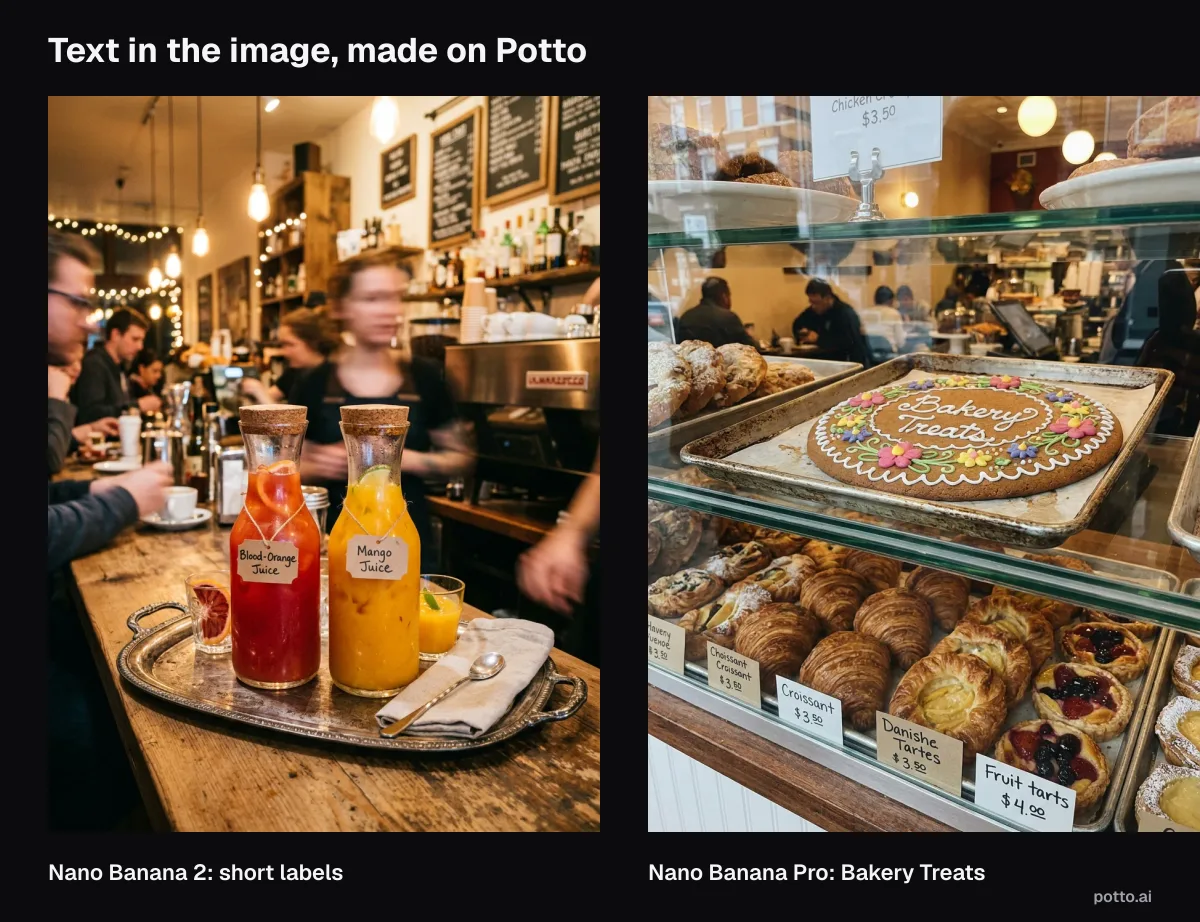
The labels on the left came from Nano Banana 2 on Potto. The cookie on the right came from Nano Banana Pro. The two images came from different prompts, so this is not a head-to-head test. The large words are right in both. Now look at the small price tags in the Pro image: one reads "Danishe Tartes". Small print is where spelling slips hide, on either model.
Reference images
Google's image guide splits reference slots differently for each model. In that guide, Gemini 3.1 Flash Image takes up to 10 object images and up to 4 character images. Nano Banana Pro takes up to 6 object images, up to 5 character images and up to 3 style references. Both cap the total at 14.
In practice, Nano Banana 2 suits briefs with many products or props. Pro suits briefs with a cast of characters, or a separate style reference that sets the look. On Potto, both models accept up to 14 reference images. Give each reference one job, such as subject, palette or layout, and say that job in the prompt.
Run one brief on both
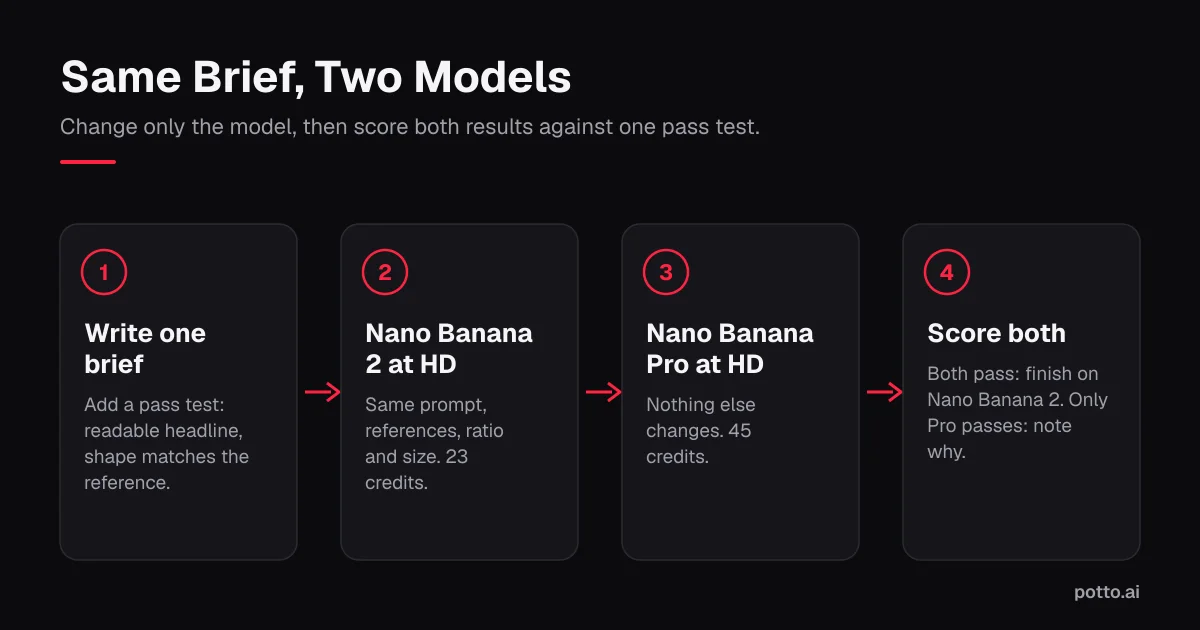
A fair Nano Banana 2 vs Pro test changes one thing only: the model. Everything else stays the same. That way, any difference in the result comes from the model, not from the prompt.
Write one brief with a pass test. For example: headline readable, product shape matches the reference, empty space on the right.
Fix every setting. Use the same prompt, references, aspect ratio and size for both.
Run Nano Banana 2 at HD. It costs 23 credits.
Run Nano Banana Pro at HD. It costs 45 credits.
Score both against the pass test. Ignore which one looks nicer at a glance.
Repeat once with a harder brief. One result is not a pattern.
If both pass, finish the job on Nano Banana 2 and save credits. If only Pro passes, note what failed: lettering, detail or reference handling. That tells you which kind of brief needs Pro next time. You can run both inside the AI image generator by switching the model in the menu.
Nano Banana 2 prompts that work on both models
Good Nano Banana 2 prompts are specific. Google's image guide says the more specific a prompt is, the more control you get. Name the subject, the setting, the light, the camera angle and the style. Put exact words in quotation marks and say where they sit. A prompt on Potto can run to 4,000 characters, but a clear short prompt is easier to debug.
Here are two Nano Banana 2 prompts to paste into both models. The first tests detail. The second tests text.
A young red fox lying on a gravel forest path, lush green ferns behind it, golden hour, wildlife photography.
A small bakery window poster with the headline "FRESH TODAY" in bold capital letters centered at the top, a flat illustration of three loaves below it, cream background with warm brown accents, wide margins around the text.
The first prompt is the one behind the fox example on the Nano Banana 2 model page, so you can compare your result with ours. For the second, count the letters in "FRESH TODAY" in both results. A missing or doubled letter is easy to spot at HD, so you do not need 4K to judge spelling. Save the Nano Banana 2 prompts that pass, and reuse them as a baseline for the next test.
When you edit an image
Both models edit as well as generate. Name one change per request and keep the rest of the brief as it was. If you change three things at once, you cannot tell which change caused which result. To change one area only, the AI Image Editor is the better route. Check the rest of the picture after every edit.
Is there a Nano Banana 2 API?
Yes, from Google. The Nano Banana 2 API is Google's Gemini API. Developers call the Gemini 3.1 Flash Image model with the model ID gemini-3.1-flash-image. Pro uses gemini-3-pro-image. Google's Gemini 3.1 Flash Image model page lists the inputs, sizes and token limits, and its pricing page lists the rates shown above.
Potto does not offer a public API. You use Nano Banana 2 and Nano Banana Pro in the browser, through the creator. If you are building an app, call Google's Gemini API directly and read the current model page first, because limits and prices can change.
When to pick Nano Banana 2.1 instead
Nano Banana 2.1 is Google's update to Nano Banana 2, and it is the lowest-priced Nano Banana model on Potto. A Nano Banana 2.1 image costs 12 credits at HD, 17 at 2K and 38 at 4K. It takes up to 10 reference images on Potto, against 14 for Nano Banana 2 and Pro.
Pick 2.1 when price matters most and your brief needs ten references or fewer. Google's guide recommends it for new projects and lists improved text rendering among its changes. Pick Nano Banana 2 on Potto when you need more than ten references. Pick Pro when the brief has dense text or many parts. Our guide to Nano Banana 2.1 vs Nano Banana Pro covers that pair in detail.
Which model for which job
Job
Start with
Why
Drafts and variations
Nano Banana 2.1
Lowest credits per image
Briefs with 11 to 14 references
Nano Banana 2
Takes 14 references at a lower price than Pro
Dense text, menus, price lists
Nano Banana Pro
Google's premium choice for complex visual tasks
Product mockups for a final asset
Nano Banana Pro
Google names high-fidelity mockups as a Pro use
A cast of up to 5 characters
Nano Banana Pro
Google lists 5 character slots, against 4
Everyday photos and illustrations
Nano Banana 2 or 2.1
Run both at HD and compare
These Nano Banana 2 vs Pro picks are starting points, not rankings. The only result that counts is yours, on your brief. The AI models comparison lists every image model in the creator with its price.
FAQs
Is Nano Banana 2 the same as Gemini 3.1 Flash Image?
Yes, Nano Banana 2 is Google's popular name for Gemini 3.1 Flash Image, and Google's own blog and model page use both names. The API model ID is gemini-3.1-flash-image. On Potto, the model menu lists it as Nano Banana, and the Nano Banana 2 model page opens the same Google model.
Is Nano Banana 2 newer than Nano Banana 2.1?
No, Nano Banana 2.1 is the newer model and is Google's update to Nano Banana 2. Google's image guide calls Nano Banana 2 the previous-generation workhorse and recommends 2.1 for new projects. On Potto, 2.1 costs 12, 17 and 38 credits per image and takes up to 10 references.
Should I use Nano Banana 2 or Nano Banana Pro for a final image?
Use Nano Banana Pro for a final image with dense text, many parts or a product mockup, and use Nano Banana 2 when the brief is simple. A fair test is to run the same brief on both. Nano Banana 2 at HD costs 23 credits, and Pro at HD costs 45. If both pass your test, finish on Nano Banana 2.
Is Nano Banana 2 free?
No, Google's API lists no Nano Banana 2 free tier for image output, and Potto charges credits per image. On Potto, a new account gets 100 credits, enough for four Nano Banana 2 images at HD. Each HD image after that costs 23 credits.
Is there a Nano Banana 2 API on Potto?
No, Potto does not offer a public API. Developers can call Nano Banana 2 through Google's Gemini API with the model ID gemini-3.1-flash-image. The Nano Banana 2 API costs $0.067 per 1K image on Google's pricing page. On Potto, you use the model in the browser through the creator.
Which model handles text in images better?
Google positions Nano Banana Pro as its premium choice for complex visual tasks, and says Nano Banana 2 can also render accurate, legible text. Neither model guarantees correct spelling. Test your exact words on both, keep them short, and read every letter before you publish.
Sources
All sources were read on November 12, 2026. Prices and limits are Google's and may change.