Fable 5.2 animation prompts for 3D videos: a five-part formula, copy-ready prompts for template and custom 3D scenes, reference videos and fixes.
A good Fable 5.2 animation prompt names the subject, the camera, the motion, the colors and the length in plain sentences, and it asks for a scene Potto can build: a template 3D scene or a custom one. That is the whole formula. This guide shows how each part reads in a real prompt. You get copy-ready Fable 5.2 animation prompts for 3D titles, 3D bar charts, device mockups, custom 3D scenes and reference videos. Each one is written for a Claude Fable 5.2 project on Potto.
We also ran one prompt end to end. On November 12, 2026, we gave Claude Fable 5.2 a 15-second prompt for a budgeting app called Ledgerly. The result, the credits and the one detail it missed are below. Claude 3D animation prompts work best when they are short and exact, and that test shows why.
Key facts (checked November 2026):
Anthropic released Claude Fable 5.2 on November 9, 2026, at $8 per million input tokens and $40 per million output tokens.
Claude Fable 5.2 takes text and images as input and returns text, per Anthropic's model page, so it writes scenes instead of drawing frames.
Anthropic's Prompting Claude Fable 5.2 guide says the model treats an instruction that contains "never" as absolute.
The same Anthropic guide advises saying exactly what you want when you ask the model to keep going, instead of a plain "continue."
On Potto, a Claude Fable 5.2 video can hold up to 3 template 3D scenes plus up to 4 custom 3D scenes written as code.
The Prompt Formula
Claude Fable 5.2 does not draw video frames on Potto. It writes a brief, an outline and a storyboard. Our Remotion scenes and an isolated 3D sandbox render that plan into an MP4. So a prompt is really a shot list. Each sentence should tell Fable what one shot shows and how it moves.
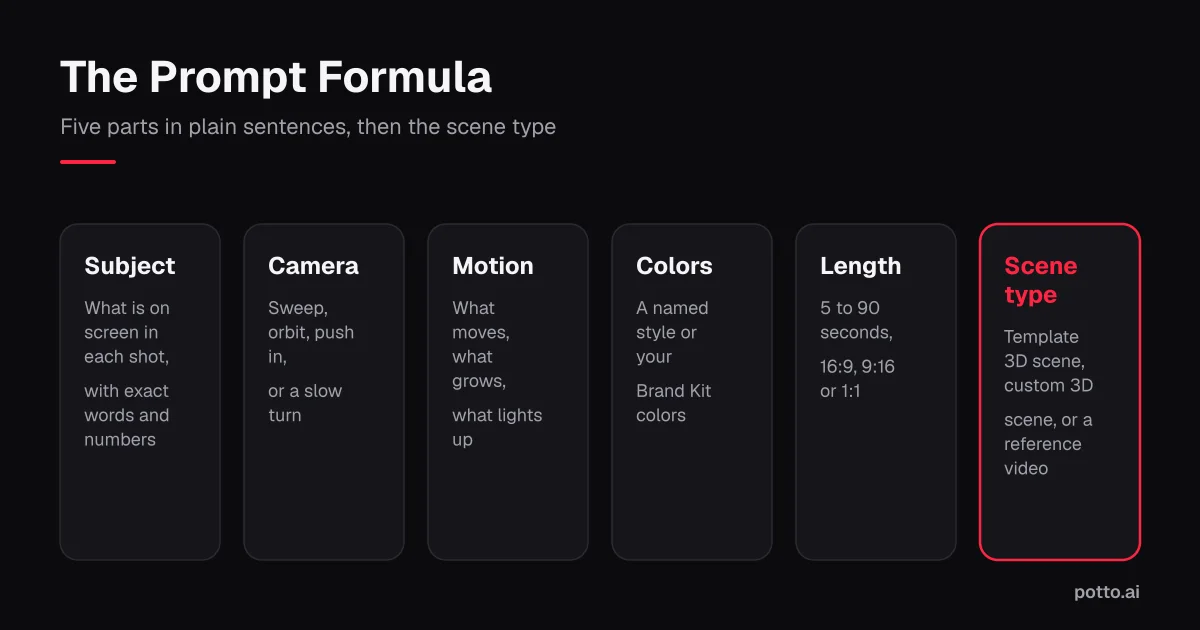
Write the five parts in this order:
Subject. What is on screen in each shot. Put the exact words in the prompt, such as the headline or the product name.
Camera. How the view moves: a sweep past the subject, a slow orbit, a push in or a half turn.
Motion. What changes inside the shot: bars grow, a lamp glows, rings orbit a sphere.
Colors. A named style or exact brand colors. The Ledgerly test below shows why this part needs care.
Length. The total length and the format. Potto offers 5 to 90 seconds, in 16:9, 9:16 or 1:1.
Then add the scene type. Say "use 3D template scenes" when a 3D title, a 3D bar chart or a device mockup is enough. Ask for "a custom 3D scene" when the shot needs a new object or a new space. Say "rebuild my reference video" when you upload a clip. One line like this saves Fable from guessing, and it keeps your credits on the shots you want.
Keep it to a few sentences
Most Fable 5.2 animation prompts need three to six sentences: one per scene, plus one line for colors and pace. Long prompts are fine when they carry facts, such as chart values or a product name. They hurt when they stack moods that no scene can show.
Write each rule as a plain request with its scope. The Prompting Claude Fable 5.2 guide warns that the model reads "never" as absolute. So "never show the logo" holds even in a shot where you later want it. Write "show the logo only in the last scene" instead.
Fable 5.2 Prompts for 3D Template Scenes
Potto has three 3D template scenes. A 3D device puts your screenshot on a rotating phone or browser window. A 3D title turns a short line into lit 3D letters. A 3D bar chart grows a row of bars on a floor. Fable only picks the scene and fills in its fields, and our own components draw the 3D. A video can hold up to 3 of these 3D template scenes.
Each template has limits worth writing around. A 3D title holds up to 28 characters. A 3D bar chart takes 3 to 6 bars, with labels of up to 24 characters. A 3D device needs a real screenshot that you upload with the prompt, and a logo does not work as the screen. A tall screenshot goes on a phone, and a wide one goes in a browser window.
Copy the Fable 5.2 prompts for 3D template scenes below. Replace every bracketed part with your own details before you send.
Device mockup prompt
Upload one app screenshot first. Then paste this prompt:
Make a 10-second 9:16 video for [app name]. Scene 1: my uploaded app screenshot on a 3D phone that flips to face the camera. Scene 2: the 3D title "[short headline]" as the camera moves past it. Calm pace, dark background. Use 3D template scenes only.
The device scene can tilt and sway, orbit slowly or flip from back to front. Name the move you want, or let Fable choose.
3D title prompt
Make a 5-second 16:9 opener. The words "[up to 28 characters]" appear in bold 3D letters while the camera sweeps past them. Subtitle: "[one short line]". Colors: [your colors]. Use a 3D template scene.
The 3D title has two moves: the camera sweeps in from the side, or the letters turn half a circle and settle. It works in any script, including Chinese and Arabic.
3D bar chart prompt
Make a 10-second 1:1 video. Scene 1: a 3D bar chart grows to show [metric] for [3 to 6 labels with values]. Caption: "[one line]". Scene 2: the name "[brand]" in 3D letters. Colors: [your colors]. Use 3D template scenes, no custom code.
Give real numbers in the prompt. Fable copies them into the chart and its legend, so check them before you send.
A tested prompt: the Ledgerly launch video
This is the prompt we ran on Potto on November 12, 2026, with Claude Fable 5.2, at 15 seconds and 16:9, with no voiceover and no captions:
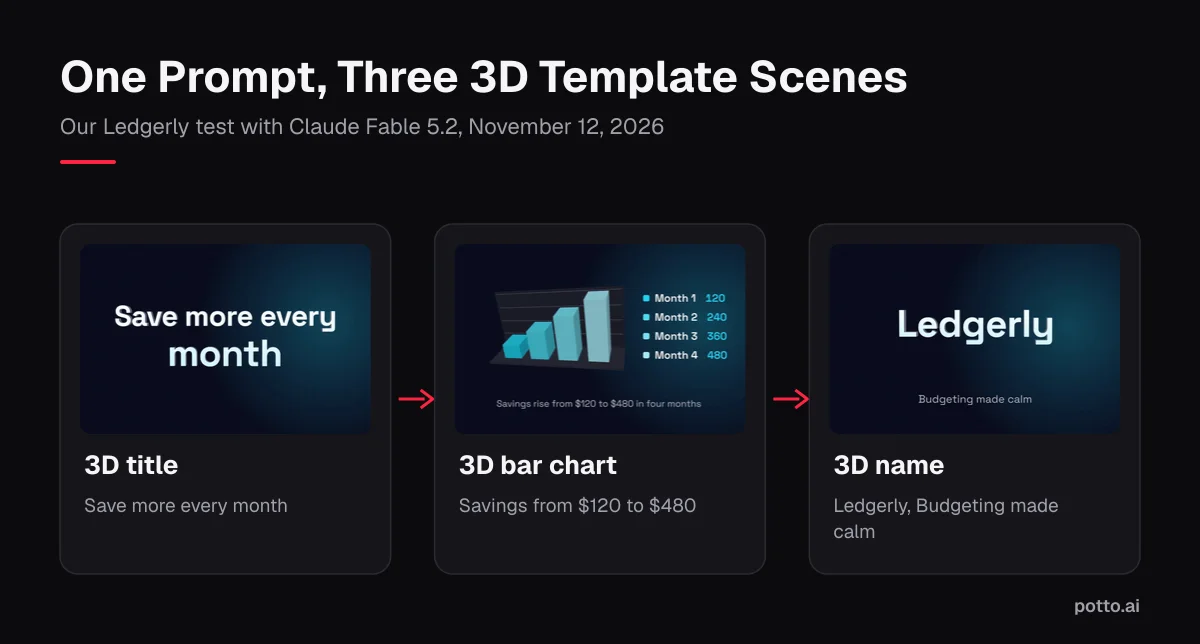
Make a 15-second 3D launch video for a budgeting app called Ledgerly. Scene 1: the words Save more every month appear in bold 3D letters while the camera sweeps past them. Scene 2: a 3D bar chart grows to show savings rising from 120 to 480 dollars over four months. Scene 3: the name Ledgerly in 3D letters with the line Budgeting made calm. Colors: deep navy, mint green and white. Calm, confident pace. Use 3D template scenes, no custom code.
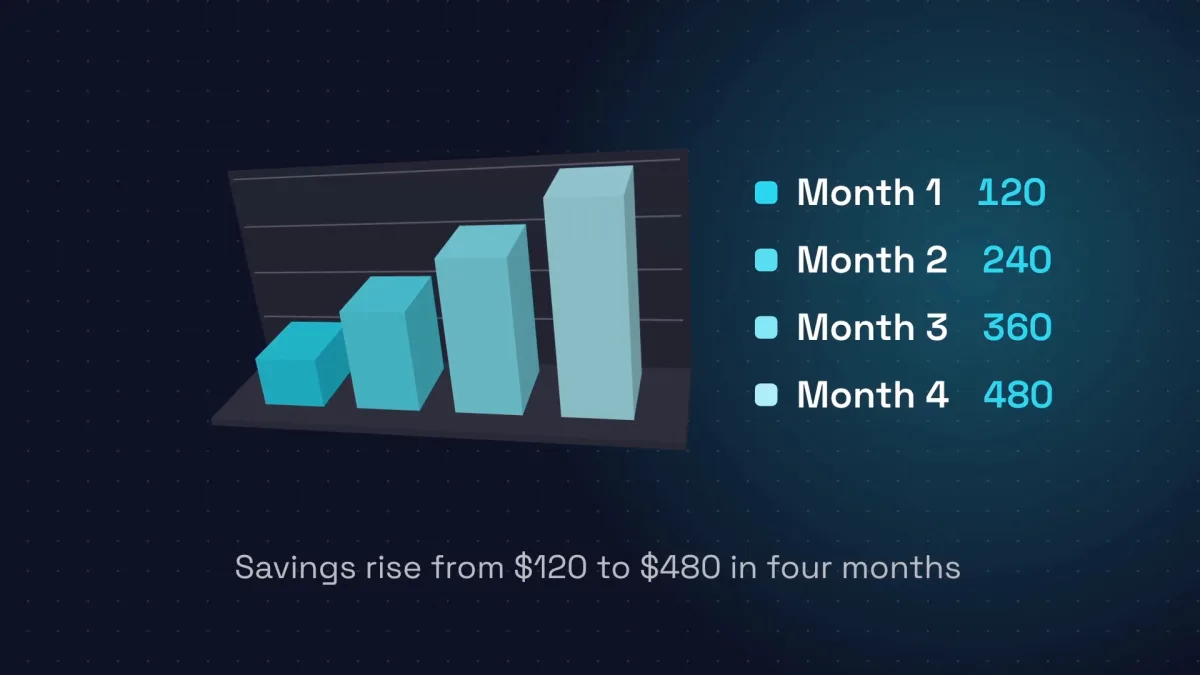
Fable followed the shot list. It wrote three 3D template scenes in order: a 3D title, a 3D bar chart and a second 3D title. Every word and number in the prompt came through as written. The chart shows Month 1 to Month 4 at 120, 240, 360 and 480, with the caption "Savings rise from $120 to $480 in four months." The last scene shows Ledgerly with "Budgeting made calm" under it.
The colors were the miss. We asked for deep navy, mint green and white. The result came out deep navy with a cyan accent and white text, and mint green never showed. Color words are loose, so give the model something exact. Potto has 12 named styles, including Fresh Mint and Midnight Tech, and you can name one in the prompt. For exact brand colors, save them in a Brand Kit and pick it under Brand style before you send.
The cost is easy to read. Fable made three model calls over two turns, and the model work came to 483 credits (180 for the brief, 303 for the outline and storyboard). The 15-second export was 225 credits, because a Claude Fable 5.2 project bills at three times the usual credit rates. In a Claude Opus 5.5 project, the same 15 seconds exports for 75 credits, and model work is free. All three scenes here are templates, so Opus 5.5 could have made it too. Our Fable 5.2 vs Opus 5.5 comparison explains when the extra cost buys something.
Prompts for Custom 3D Scenes
Custom 3D scenes written as code are the Fable-only part. When a shot needs something no template draws, Fable 5.2 writes the scene as three.js code. Potto checks the code and renders it in an isolated sandbox into a short clip. The final cut plays that clip in place of a template scene. A video can hold up to 4 custom 3D scenes, on top of its 3D template scenes.
Describe a custom 3D scene as objects, light and motion. Name each shape in two or three parts, such as "a cone shade on a thin pole with a round base." We suggest 3 to 8 seconds per custom 3D scene. A custom scene cannot show your screenshots or your logo, because the sandbox has no image files. Put those in template scenes. 3D words inside a custom scene cover basic Latin letters, so use the 3D title template for other scripts.
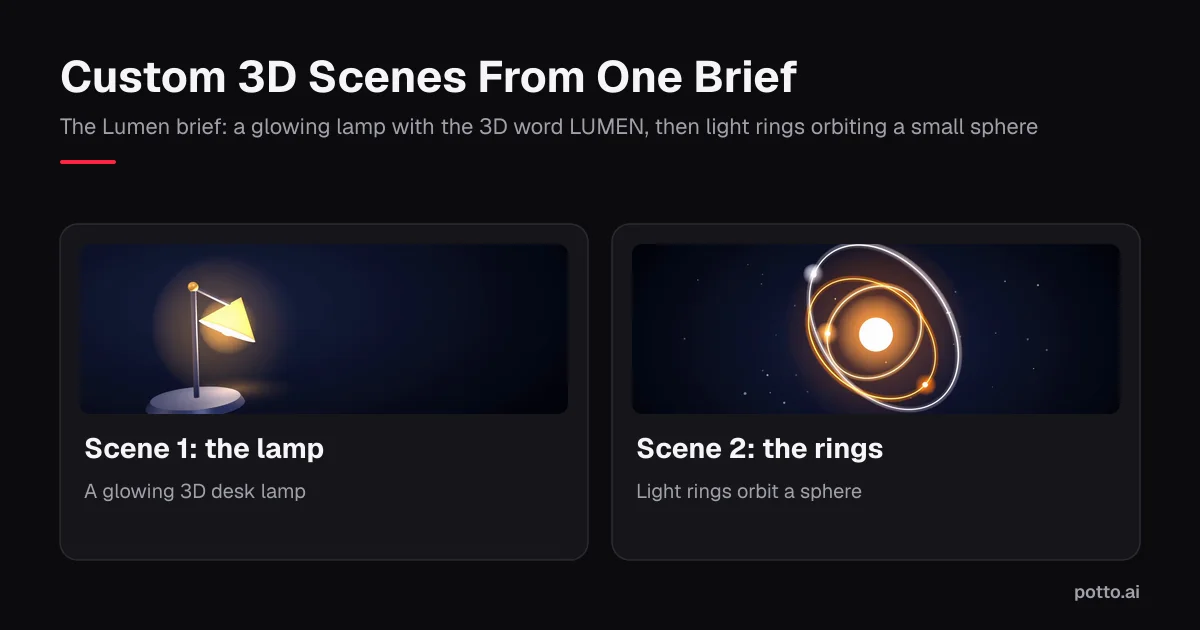
Here is the brief behind the desk lamp video on our Fable 5.2 animation page, made on November 11, 2026:
A 10-second teaser for a fictional smart desk lamp called Lumen: a glowing lamp with the 3D word LUMEN, then light rings orbiting a small sphere.
Fable 5.2 turned that one line into two custom 3D scenes. The first is a glowing desk lamp beside the 3D word LUMEN. The second is a set of light rings orbiting a bright sphere, with the name Lumen under it. Fable wrote the code for both scenes, and Potto rendered them.
The next two Fable 5.2 prompts for 3D custom shots follow the Lumen pattern. They are starting points to adapt, not outputs we show here.
Product turntable prompt
Make a 10-second 16:9 teaser for [product]. Write a custom 3D scene: a simple 3D model of [shape in two or three parts] turns slowly on a round platform as the camera circles it once. Soft studio light, [your colors]. End with the 3D title "[product name]".
Abstract loop prompt
Make a 10-second 1:1 background loop. Write a custom 3D scene: three glowing rings orbit a bright sphere, with small particles drifting behind them. The camera pushes in slowly. Colors: [your colors] on a dark background. No text in the scene.
Prompts for a Reference Video
Video to 3D animation starts from a clip instead of a shot list. Choose Claude Fable 5.2, then upload an MP4 or WebM of up to 180 seconds and 20 MB. Reference video upload is only open when Fable 5.2 is selected. Potto reads the clip shot by shot, including on-screen text and speech. Fable then rebuilds each shot in 3D with simple shapes, the same camera moves and the same pace. It copies the motion, not the footage.
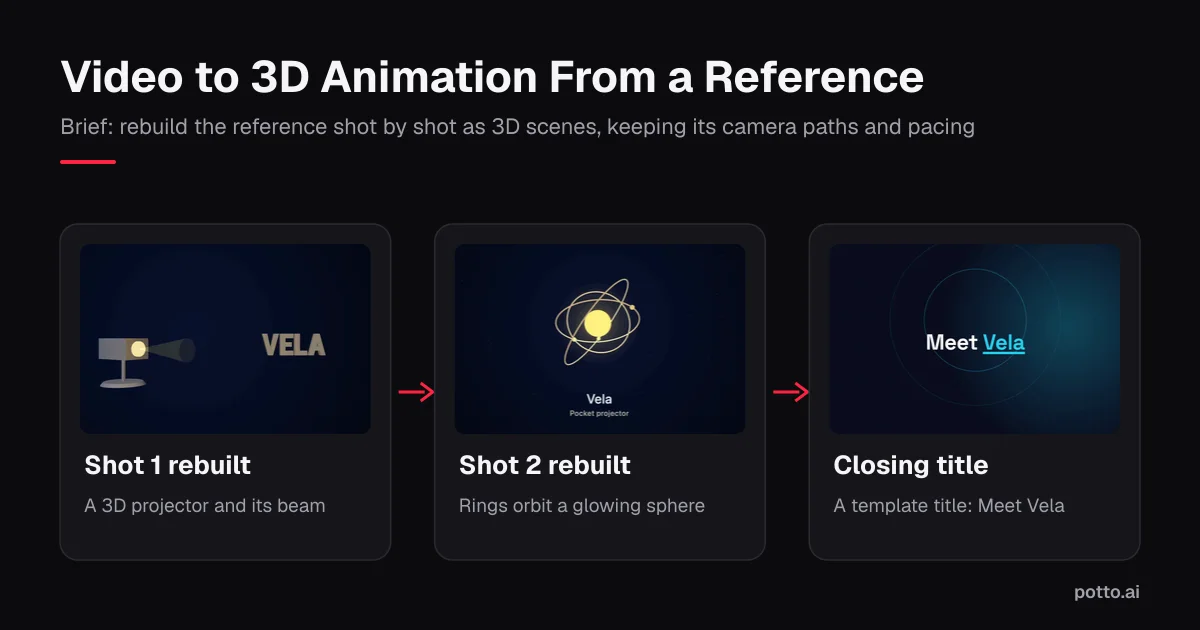
A video to 3D animation prompt needs three things. Say what to keep, which is usually the camera paths and the pacing. Say what to change: the product, the words and the colors. Say the length you want. Here is the brief behind the second video on the same page:
Rebuild the attached reference video shot by shot as 3D scenes for a fictional product, keeping its camera paths and pacing.
The reference was a 10-second clip with two shots, and the result runs 15 seconds. Shot one became a 3D projector beaming light onto the 3D word VELA. Shot two became glowing rings orbiting a sphere, labeled Vela, Pocket projector. A template title, "Meet Vela," closes it. The brief named no product, so Fable invented one. Name your own product and it will use that.
A fuller video to 3D animation prompt looks like this:
Rebuild the attached reference video shot by shot as 3D scenes for [product]. Keep its camera paths and pacing. Replace every word with: [your words]. Colors: [your colors]. Make it [length] seconds, 16:9.
Fixing a Scene That Misses
Most misses are fixed in the chat. Name the scene and the change in one message, such as "In scene 2, change the caption to Saved $480 by April." That follows Anthropic's own advice for Fable 5.2: say exactly what you want, not just "try again." Each message is a new turn, and each turn bills its model work.
Sometimes a custom 3D scene comes back as something else. That is by design. Each custom scene carries a template scene as a backup. If the code fails Potto's checks after several rewrites, or the sandbox cannot render it, the backup takes its place. A 3D lamp might come back as a plain title with the same words. Your export still finishes.
The editor shows each custom scene as a one-line description, not as code. You cannot move its shapes by hand. Ask Fable to rewrite it, or delete it. Narration, captions and timing still edit as usual. If a 3D scene preview could not be rendered, the editor shows a placeholder, and the export renders the scene again.
One more cause is the project's model. A Claude Opus 5.5 project cannot write custom scenes, so it uses template scenes instead. The model is set when you create the project. If a prompt needs custom 3D, start a new Claude Fable 5.2 project.
What Not to Ask For
Claude 3D animation prompts work only for what this route makes. Leave these requests out:
A Blender file or the scene code. You get a 1080p MP4. Potto does not hand over .blend files or the code Fable wrote.
Live-action or photoreal footage. These 3D scenes are built from shapes, light and text.
The pictures from your reference clip. Fable copies the camera and the pace, not the footage.
Very detailed models. Ask for simple shapes in two or three parts.
More 3D than a video holds. The cap is 3 template 3D scenes and 4 custom 3D scenes written as code.
If you would rather edit a real 3D file, Blender MCP with Claude is the local route, and you render on your own machine. If your video needs no 3D at all, a Claude video on Claude Opus 5.5 is the lighter choice. For pacing ideas, browse our motion graphics examples before you write your next prompt.
FAQs
What is a good Fable 5.2 animation prompt?
A good Fable 5.2 animation prompt is a short shot list. It names the subject, the camera move, the motion, the colors and the length, one scene per sentence. It also says which kind of scene to build: a 3D template scene, a custom 3D scene or a rebuild of a reference video. Put exact words and numbers in quotes so they appear as written.
How long should the prompt be?
Three to six sentences is enough for most short 3D videos. Our tested Ledgerly prompt was 81 words for three scenes. Add length only for facts that change the video, such as chart values, product names or what to keep from a reference clip. Moods and adjectives without a matching scene add little.
Can I use the same prompt in Blender MCP?
Claude 3D animation prompts work in Blender MCP only in part. The subject, camera, motion, colors and length carry over, because any 3D tool needs them. The scene-type line does not, since template names and custom 3D scenes exist only on Potto. In Blender MCP, Claude writes Blender Python in your own file, and you render the result yourself.
How do I animate from a reference video?
Start a Claude Fable 5.2 project and upload an MP4 or WebM of up to 180 seconds and 20 MB. A video to 3D animation prompt then says what to keep, usually the camera paths and the pacing, and what to change, such as the product, the words and the colors. Fable rebuilds each shot in 3D with simple shapes. The result copies the motion of the clip, not its pictures.
Why did my 3D scene change?
A custom 3D scene changes when its code fails Potto's checks or its render fails. Each custom scene has a template backup, and the backup takes its place so the export can finish. A scene can also change when a later chat message edits it. Ask Fable to rewrite the scene, and name what it should show.
Sources
All sources were read on November 12, 2026. Model specs and prices are Anthropic's and may change.