Turn a news link or story text into a narrated MP4. How URL to video works, what the scenes look like, why there is no fixed news video template, and the cost.
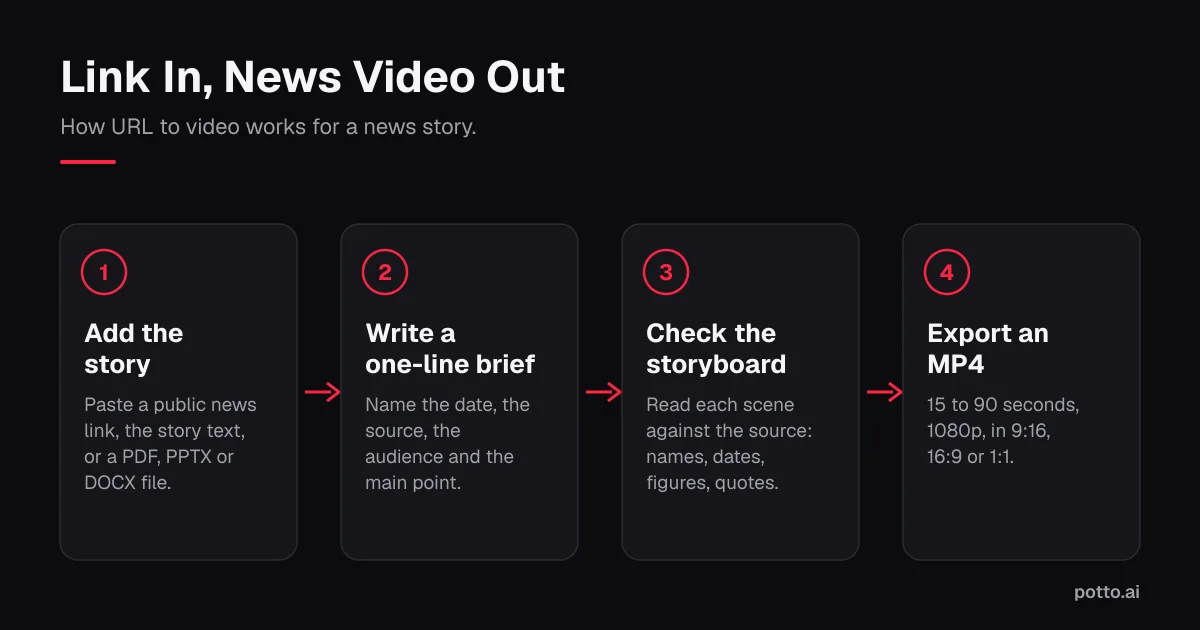
Short answer: to turn a news story into a video, paste its link or text into Potto and name the date, source and audience. Potto drafts the script and storyboard. You edit the scenes and export an MP4 of 15 to 90 seconds.
A news video is a short, narrated version of a story. It shows the headline, the key facts, the numbers and a quote, with captions for people who watch on mute. Newsrooms, newsletters, local groups and comms teams make them for feeds and websites. A news story told this way fits a phone screen and a news page alike. This guide shows how URL to video works, step by step, and how to turn a news story into a video with narration. It uses a made-up local story so you can see each scene.
Key facts (checked November 2026):
Potto's news to video accepts a public web link, pasted story text, or a PDF, PowerPoint or Word file up to 20 MB and 100 pages.
Claude Opus 5.5 drafts the outline, storyboard and narration script, and Remotion renders the scenes.
A news video runs 15, 30, 45, 60 or 90 seconds and exports as a 1080p MP4 at 30 fps.
Export costs 5 credits per second, and a 30-second news video with English narration and no illustrations costs 153 credits.
Potto does not check facts, watch news feeds or publish videos for you.
What URL to Video Means for News
URL to video means you give a tool a web address, and it builds a video from that page. For news, the page is usually an article, a press release or a local report. The tool reads the story, picks what matters and turns it into scenes. You still decide what the video says.
Potto's news to video is a URL to video tool built for this. It does not read the page aloud over stock clips. It rewrites the story for viewing: a headline scene, a short fact list, a number, a chart and a quote. Narration and captions carry the rest. The result plays like a short news brief, not a recording of a web page.
Paste a News Link or the Story Text
You can turn a news link into a video, or paste the text yourself. Both routes end in the same storyboard. Pick the one that matches where your story lives.
Use a public news link
Paste the address of a public http or https page. The creator reads that page. It may also read up to 2 more pages on the same site for context. This is the simplest way to turn a news link into a video when the story is open to everyone.
Paste the story text for blocked pages
A page behind a login cannot be read. That includes paywalls and member-only intranets. For those, use pasted text instead, and paste a news link only when the page is public. Pasted text also helps when a page is cluttered with menus and ads. Article to video works the same way for a blog post. You choose exactly what feeds the script.
Upload a press release or report
You can also upload a PDF, PowerPoint (.pptx) or Word (.docx) file. A file can hold up to 20 MB and 100 pages of text. Only the opening part feeds the script, so put the main news on the first page. This suits press kits and short reports.
Use only text and images you have the right to use. A news video built from another outlet's story should credit that outlet. Name the source in your brief so the script can do that.
Write a One-Line Brief
The news link or the story text is the raw material. The brief says what to do with it. Write one line with the date, the source, the audience and the one thing viewers should remember.
Here is a brief for our made-up story: "Local news for Maple Falls residents, dated March 1. Source: Maple Falls Library press release. Viewers should remember that the library now opens until 9 p.m. on weekdays." That line sets the tone, the date and the main point. Without it, the script has to guess what matters.
Set the video type to Article to Video, or leave it on Auto, for any news story. Auto reads your brief and picks a type. The article to video route covers blog posts and guides the same way.
What the Scenes Look Like
Every news story becomes its own set of scenes, not a copy of a news video template. Each scene has one job. The table below lists the scene kinds a news video uses most.
Scene
What it shows
Headline
The story in one line, set large
Fact list
Three short facts, each with an icon
Stat
One number with its unit and label
Chart
3 to 6 values as bars or a donut
Pull quote
Up to 160 characters, with the speaker's name and role
Illustration
An AI image for a scene with no photo, if you want one
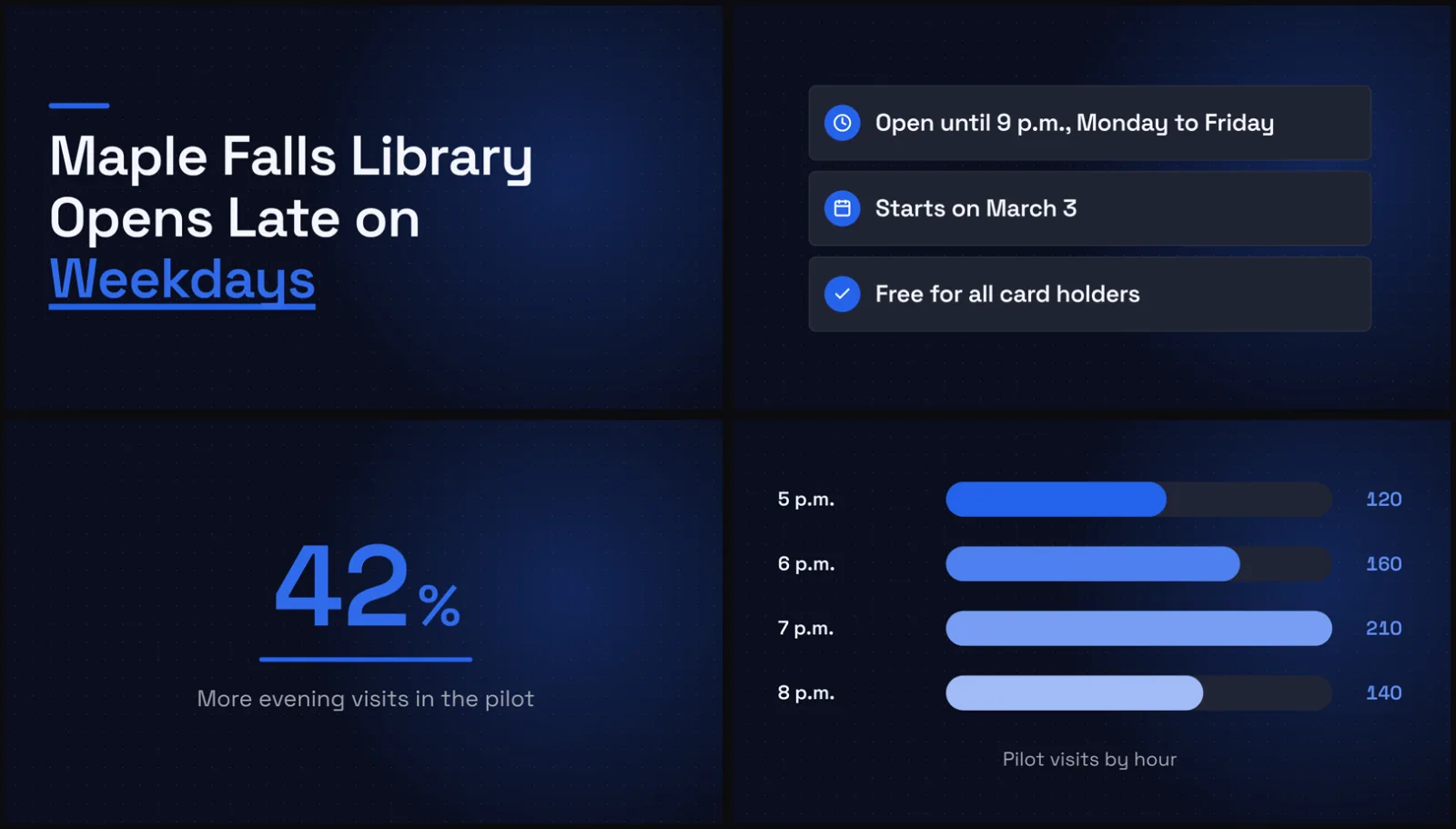
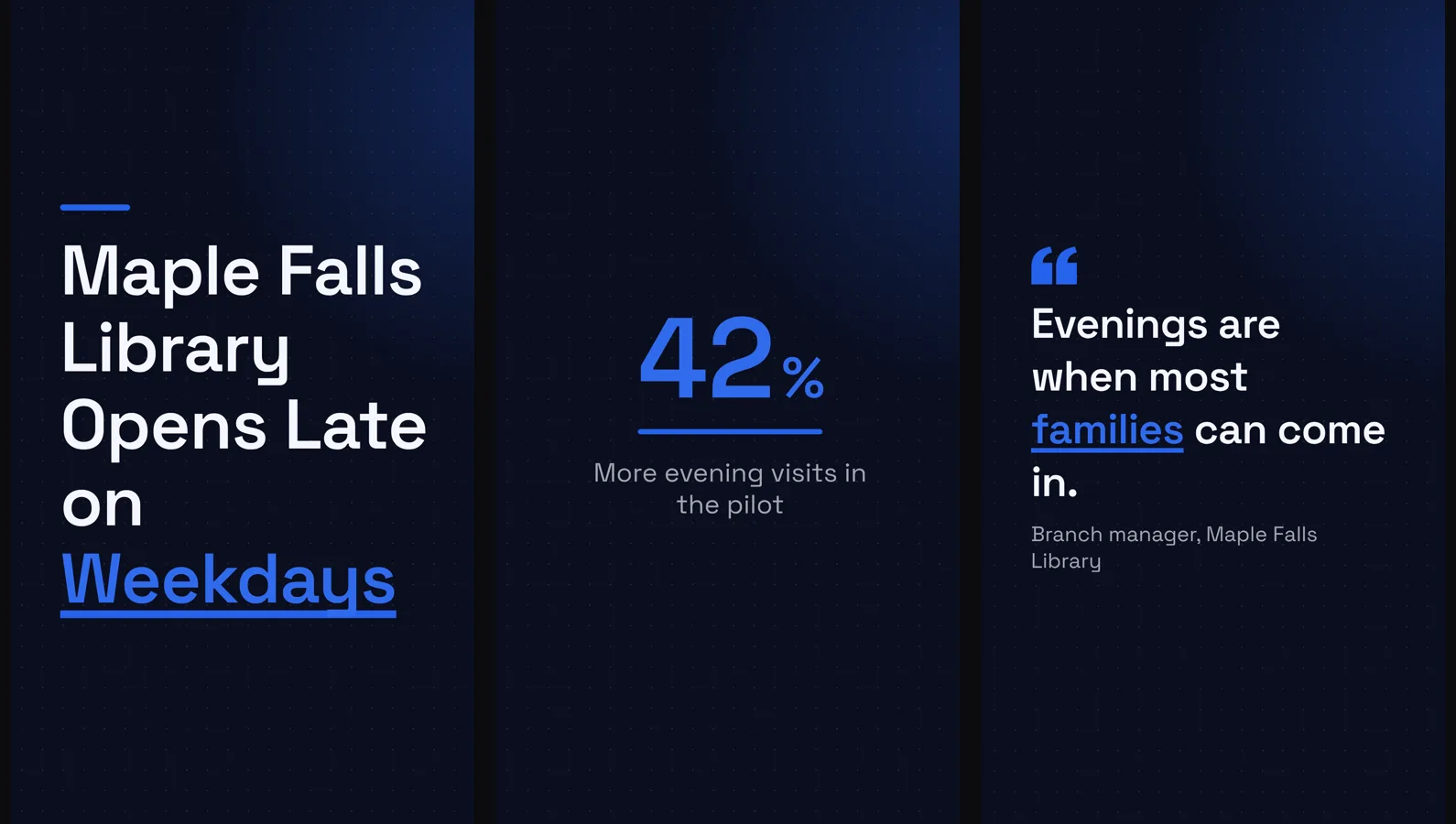
Here is how the made-up library story looks as scenes. These frames were rendered with Potto's own scene components from a fictional brief. The town, the library and the numbers are invented for this guide.
A news video made this way adds no filmed footage. It has no ticker, no studio set and no presenter. That keeps it clear about what it is: an animated summary of a story you supplied.
Is there a news video template?
There is no fixed news video template here. The scenes are built from your story, so two stories never share the same layout. A story with many figures gets stat and chart scenes. A story built on one statement gets a pull quote. You can edit any scene, change its text or timing, and return to an earlier version.
That said, the structure repeats in a useful way. Most news videos open on the headline, list the facts, show one number and close on a quote or a next step. If you want the same structure every week, write it into the brief. A fixed news video template is not needed when the brief does that job.
Pick a Length
You can pick five lengths, from 15 seconds up to a minute and a half. Shorter is usually better for news. Pick the length from the story, not the other way round.
15 seconds: a headline and two facts.
30 seconds: a short recap with one number.
45 seconds: a story that needs a cause or some context.
60 to 90 seconds: a fuller brief with a chart and a quote.
A 30-second news video with narration suits most feed posts. Narration runs in 32 languages, or the language is detected for you. Pick the narration voice once and keep it for a series. Captions follow the voice, so the video reads on mute. Listen once for names and place names before you export.
Pick a Size
Pick the frame for where the video will play. The frame never changes the price.
Frame
Pixels
Best for
9:16
1080×1920
Phones and short-video feeds
16:9
1920×1080
Websites and news pages
1:1
1080×1080
Square feed posts
Can Potto Be a Breaking News Video Maker?
Yes, as long as you start each video yourself. A breaking news video maker here starts from a story you paste. You turn a news link into a video, or paste the story text, the moment you have it. Put the headline and the time of the event first in the brief. Pick 15 or 30 seconds and the vertical frame. A breaking news video should carry the time of the update in its first scene.
A breaking news video maker still needs a person in charge, so there are limits to state plainly. It does not watch news feeds or send alerts. It does not post videos to any channel. You make the video, check it and publish it yourself. For a developing story, make a new short video when the facts change, rather than editing the old one silently.
Check the Facts Yourself
Potto does not check the facts in your story. The script is built from the source you give it. Names, dates, figures and quotes are only as accurate as that source.
Read each scene next to the story before you export. Check every name and title. Check every date and number, including its unit. Keep each qualifier, such as "about" or "so far", next to its claim. Watch the final MP4 once at the size your audience will see.
A news video can travel further than the story it came from. That is a reason to slow down at this step. If a figure is uncertain, leave it out or say it is an estimate.
What It Costs
Drafting and previewing in news to video take no credits. You pay when you export, at 5 credits per second. Voiceover and AI illustrations add to the price. The quote shows before you export, so you see the total first.
News video
Credits
15 seconds, no narration
75
30 seconds, no narration
150
30 seconds, English narration, no illustrations
153
30 seconds, English narration, two illustrations
199
60 seconds, no narration
300
Each account can start 30 video projects a day. New accounts get 100 credits, which covers a 15-second news video without narration. Plans and credit packs cover more. If you are comparing AI video tools on price, our guide on whether EveryGen AI is free explains how to read free credits and plan prices.
News Videos and Explainer Videos
A news video and an explainer are close relatives. Both use scenes, narration and captions. The difference is the job. A news video reports what happened and when. An explainer teaches how something works, often without a date.
A news story often needs a bit of both. Open with the news, then explain the cause in one or two scenes. If the explanation grows longer than the news, make two videos. Our guide to what an explainer video is covers that format in depth. For a long feature, article to video gives the same scenes with more room. For other sources, such as a product page or a topic, start from the AI video generator.
A Worked Example: The Library Story
Here is the full plan for the fictional story above, as a 30-second news video with narration. Treat it as a news video template you can copy into a brief.
Headline (4 seconds): "Maple Falls Library Opens Late on Weekdays."
Fact list (6 seconds): open until 9 p.m., Monday to Friday; starts on March 3; free for all card holders.
Stat (5 seconds): 42% more evening visits in the pilot.
Chart (7 seconds): pilot visits by hour, from 5 p.m. to 8 p.m.
Pull quote (5 seconds): "Evenings are when most families can come in." Branch manager, Maple Falls Library.
Close (3 seconds): where to find the new hours.
Before export, we would check three things against the press release. Is March 3 the start date? Is 42% the pilot figure, and for which months? Is the quote word for word? Then we would export a 9:16 cut for phones and a 16:9 cut for the library's website.
FAQs
How do I turn a news article into a video?
Paste a news link or the story text into the creator. That is the whole first step to turn a news story into a video. Add a one-line brief with the date, the source and the audience. Potto drafts the script, storyboard, narration and captions. Edit each scene, preview the video, then export an MP4.
Can I use a URL instead of pasting the text?
Yes, if the story is on a public http or https page. The creator reads that page and may read up to 2 more pages on the same site. A page behind a login or a paywall cannot be read. Paste the story text in that case.
Is there a news video template?
No. The scenes are built from your story, so there is no fixed news video template. A news video usually includes a headline, a fact list, a stat, a chart and a pull quote. You choose the length and the frame, and you can edit any scene.
Does Potto check the facts?
No. The script comes from the source you give it, and nothing verifies it for you. Names, dates, figures and quotes are only as accurate as your story. Check each scene against the source, and credit the outlet you used.
How long should a news video be?
Most news videos work best at 15 to 30 seconds. Use 15 seconds for a headline and two facts, and 30 seconds for a short recap. Use 45 seconds or more when a story needs context, a chart or a quote. A news video with narration can run up to a minute and a half.
Sources
Product details were checked on Potto's news to video and pricing pages on November 12, 2026. The Maple Falls story is fictional.