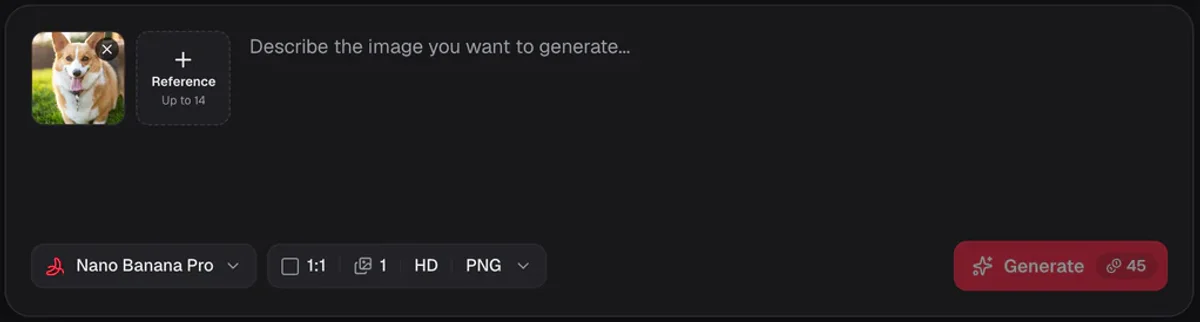
How far a free AI picture generator goes on 100 sign-up credits: up to 20 HD pictures, 10 shapes, 4K, up to 14 reference photos, priced before you confirm.
Potto's free AI picture generator runs on sign-up credits. A new account gets 100 credits, which buys up to 20 HD pictures at 5 credits each, or four HD pictures with Nano Banana at 23 credits per HD picture. The total shows before you confirm, so you always know what a picture costs. "Free" here means those sign-up credits. It is not an unlimited free plan.
This guide shows what 100 credits make on each model, how to write a prompt that the AI picture generator follows, and how to pick a shape and a size. It also covers the newer options: a 4K picture with Nano Banana Pro or MiniMax H3 Image, GPT Image 2.6 for detail, and up to 14 reference photos when you want to start from a picture you already have. The last section shows how to make an AI profile picture that still reads in a small circle.
Key facts (checked November 2026):
A new Potto account gets 100 free credits, and HD pictures start at 5 credits each.
Potto's AI picture generator offers 10 image models and 10 aspect ratios, from 1:1 to 21:9.
Each picture comes in HD, 2K or 4K, and a 4K picture with Nano Banana Pro costs 80 credits.
A prompt can run up to 4,000 characters, and most models accept up to 14 reference photos.
Credits reserved for a picture that fails to generate come back to the account.
What 100 Credits Make
The price of a picture depends on the model and the size. HD is the base size. 2K and 4K cost more on most models. You can ask for one, two or four pictures per run, and each picture is priced on its own.
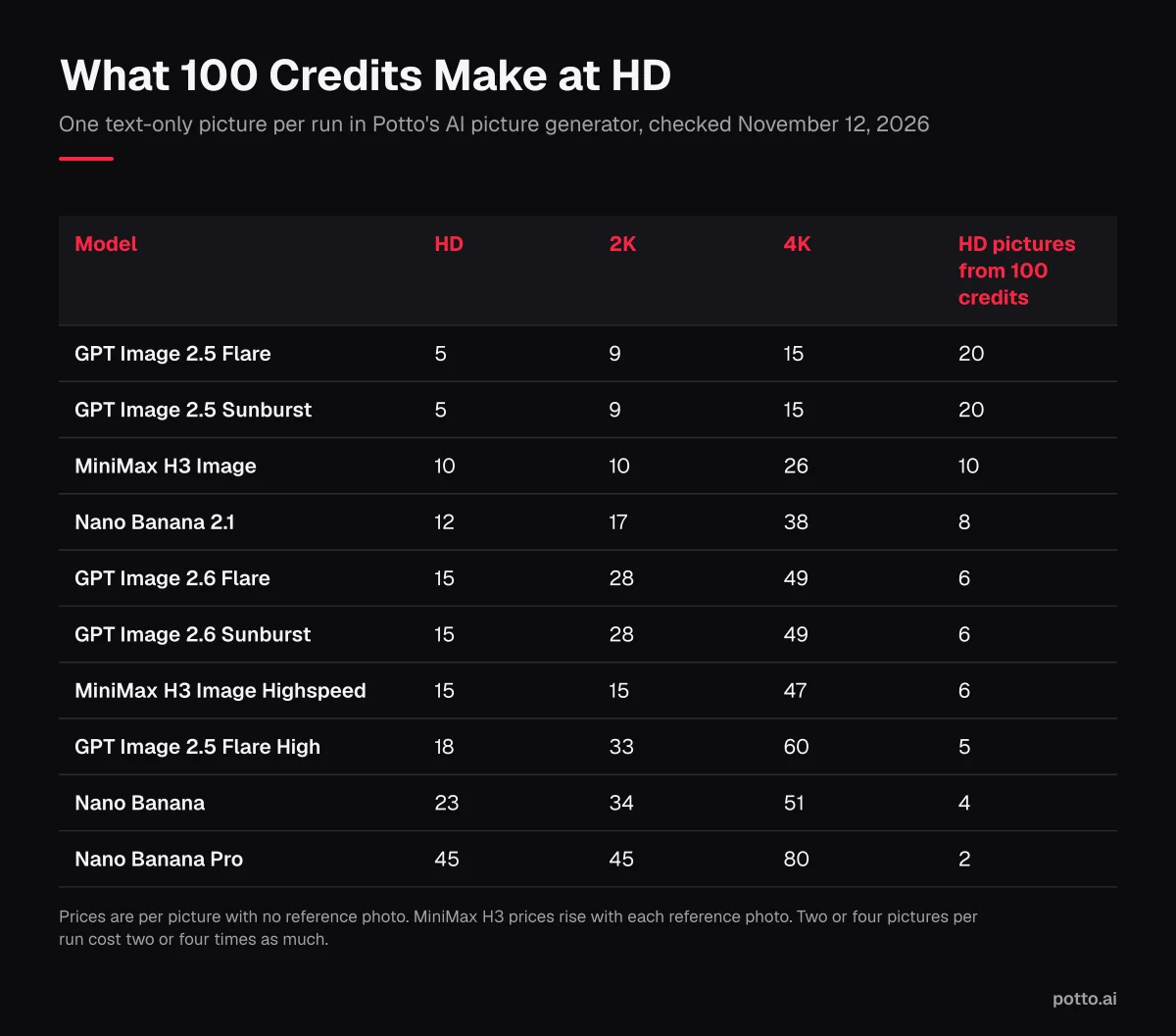
Here is the short version for HD pictures from text, one picture per run. The two GPT Image 2.5 models cost 5 credits per HD picture, so 100 credits make 20 pictures. MiniMax H3 Image costs 10, which makes 10 pictures. Nano Banana 2.1 costs 12, which makes 8. GPT Image 2.6 costs 15, which makes 6. Nano Banana costs 23 credits per HD picture, which makes four. Nano Banana Pro costs 45 credits per HD picture, which makes two.
Nano Banana at 23 credits
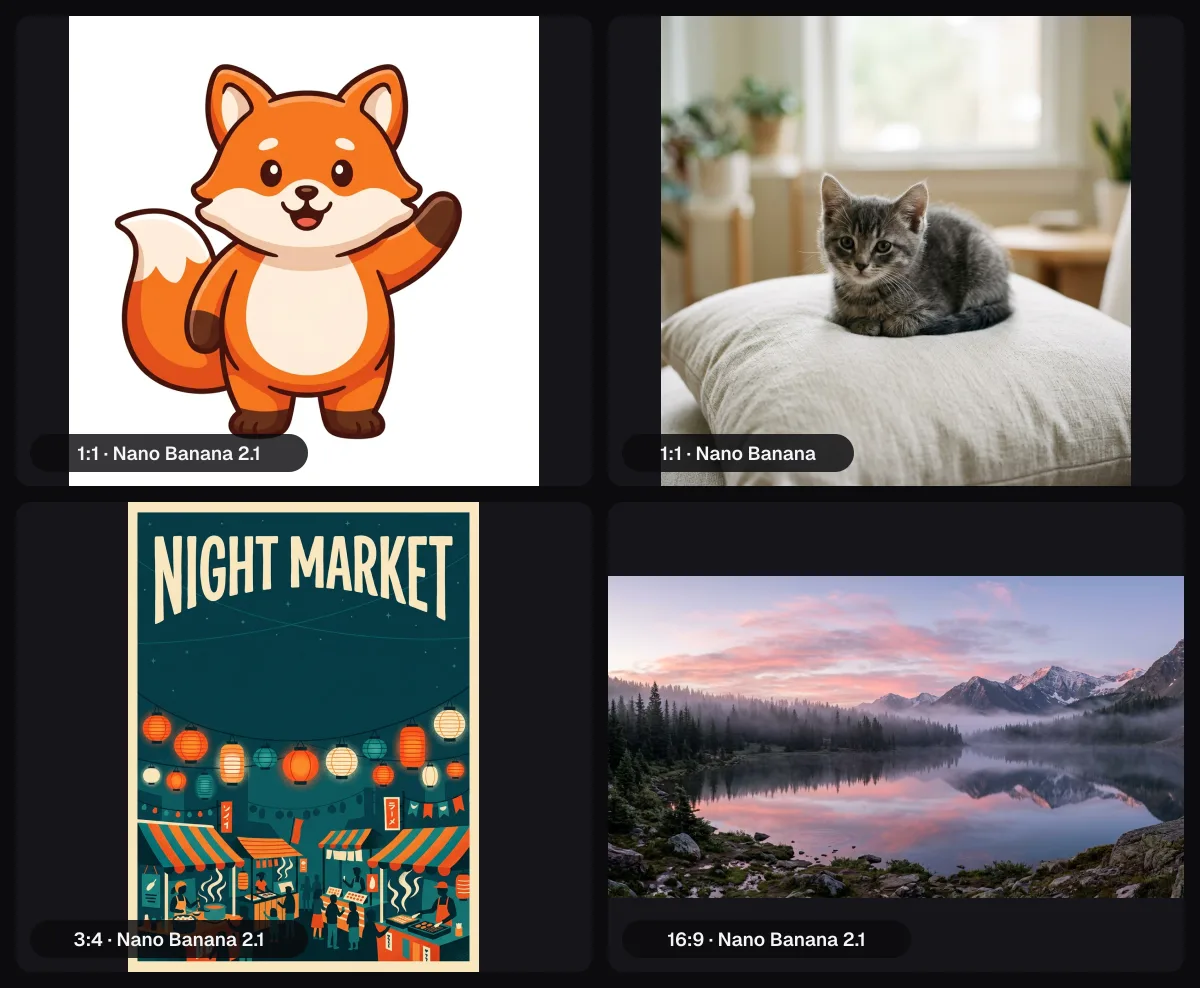
Nano Banana is a good first pick in the free AI picture generator. At 23 credits per HD picture, a new account gets 100 credits and makes four pictures with 8 credits left over in the free AI picture generator. It suits everyday scenes, simple products and pets. The kitten in the gallery below was made with Nano Banana.
Nano Banana Pro at 45 credits
Nano Banana Pro costs 45 credits per HD picture and the same at 2K. A 4K picture with Nano Banana Pro costs 80 credits. Pick it when the picture has many parts, small lettering or a final print size. On the free credits, it makes two HD pictures.
2K and 4K pictures
A bigger size adds pixels, not accuracy. Pick 2K or 4K only when the picture goes on a large screen or a print. A 4K picture with Nano Banana 2.1 costs 38 credits. Nano Banana costs 51 at 4K. MiniMax H3 Image makes a 4K picture for 26 credits from text alone, and its HD and 2K pictures cost the same 10 credits.
When the credits run out
After the free credits, a plan or a one-time credit pack keeps the generator running. The Lite plan is $20 a month for 2,000 credits, which is 86 HD pictures with Nano Banana or 400 with GPT Image 2.5. Pictures made on free credits are for personal use. Paid plans include commercial use, and Potto adds no visible watermark to downloads.
Make an AI Picture From Text, Step by Step
Here is the full path through the free AI picture generator from text, from an empty box to a saved picture. You can write the prompt, add photos and pick settings without an account. Sign-in appears when you press Generate, and your prompt and settings stay in place. When you sign up, the new account gets 100 credits right away.
Write what you want to see. The AI picture generator from text needs a subject first, then a style, the light and the place.
Pick a model. For the most free pictures, start with a 5-credit model. For lettering or a print, pick Nano Banana Pro.
Pick a shape, a size and the number of pictures: one, two or four per run.
Press Generate. The button shows the total first. Cancel stops a running request; closing the page does not.
Check the pictures at full size and download the one you want.
Each run of the picture generator from text is a new request with a new result. Running the same prompt twice gives two different pictures, and both are charged. If an AI picture from text fails to generate, the task says why it stopped and offers a retry, and the reserved credits come back. That keeps the free credits safe while you learn what each model does.
The generator also keeps your pictures in My Creations after you sign in. You can come back to a free picture later, compare it with a new run and download the one you like. Nothing is spent until you press Generate, so you can try prompts and settings in the generator as long as you want.
Write the Prompt
An AI picture generator from text reads four things from your words: the subject, the style, the light and the place. Write them in that order. Open the AI picture generator, type the prompt, and press Generate when the settings look right.
Subject first
Start with one subject and one action. "A small grey kitten sitting on a white pillow" is clearer than "a cozy room with a cat". One subject keeps a picture easy to read, even at a small size. Add details after you see the first result.
Then style
Words like photo, flat vector, pencil or paper cut change the whole picture. Name one style, not five. The fox mascot above is a flat vector example, with bold outlines and a plain background. If you want a matching set, reuse the same style words in every prompt.
Then light and place
Morning window light, a dusk street and a gray hillside all feel different. Name the time of day and the place in plain words. Then check that the shadows agree with the light you asked for.
Keep it short and leave out late text
A prompt can run up to 4,000 characters, but a few clear sentences work better than a long list. Leave out words you will add later in your own layout, such as a headline or a date. For a poster, ask for a quiet band where the headline will go. The night market poster above shows that approach.
Here are two prompts for an AI picture from text that work as starting points:
Phone wallpaper, 9:16: "A still mountain lake at dawn with pink clouds and mist over the pines. Tall phone wallpaper with a calm sky in the upper half where icons will sit. No text."
Round profile picture, 1:1: "A friendly orange fox mascot waving one paw, flat vector style, bold outlines, plain white background. Square picture with the face large and centered."
Pick the Shape and Size
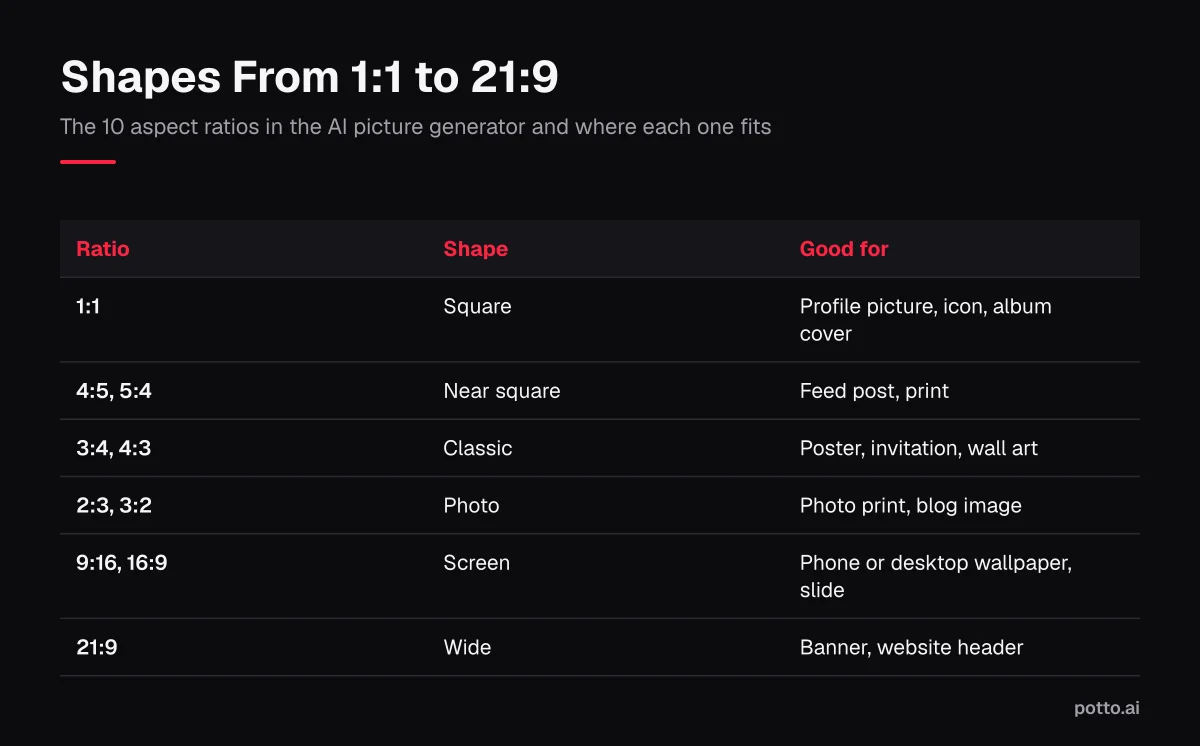
The free AI picture generator offers 10 shapes: 1:1, 2:3, 3:2, 3:4, 4:3, 4:5, 5:4, 9:16, 16:9 and 21:9. Pick the shape for where the picture will go before you generate. Cropping later cuts off parts of the scene.
Square 1:1 fits a profile picture or an album cover. A 4:5 frame fits a feed post. A tall 3:4 fits a poster. A tall 9:16 fits a phone screen, and 16:9 fits a desktop or a slide. The wide 21:9 shape suits a banner.
Size works the same way. HD suits screens and posts. 2K suits a large screen. 4K suits a print. On every model, 4K costs more than HD, so start at HD and only move up for the final picture.
Start From a Photo
You do not have to start from text alone. The AI picture generator from text also accepts reference photos next to the prompt. Most models take up to 14 reference photos, and Nano Banana 2.1 takes up to 10. Each photo should have one job.
Name the job of each photo in the prompt. One photo can give the subject, another the colors, a third the layout. "Use the first photo for the dog and the second for the palette" tells the model what to take from each. The new picture is not an exact copy. Faces, logos and fine texture can shift, so compare the details you care about with each source.
Reference photos add no credits on most models. MiniMax H3 Image is the exception: each reference photo adds a few credits to its price. The price on the Generate button always includes your photos. Use only photos you own or may use.
For edits to a photo you already have, rather than a new picture, our free AI photo editor guide covers that job.
Check the Details
Every AI picture from text is new, because the generator never repeats a picture pixel for pixel. Look at it at full size before you share it.
Hands, paws and faces
Count fingers and paws. Check ears, eyes and whiskers. Hands and paws are where most odd details show up. If one is wrong, run the same prompt again, or add one short line about it, such as "both paws visible, five toes each".
Small text
Read any lettering inside the picture. Small text can come out misspelled or blurred. For a poster, the safest plan is to leave the text out and add it in your own layout. If you need text in the picture, try Nano Banana Pro or Nano Banana 2.1.
Edges and straight lines
Look at door frames, horizons and the edges of objects. A bent line or a doubled edge is easy to miss at a small size. Change one thing in the prompt at a time, so you can tell which change fixed it.
Make an AI Profile Picture
An AI profile picture is a good first job for the free AI picture generator, because it is small and square, and HD pictures cost the least. Use 1:1. Keep the face large and centered, and the background plain. Busy backgrounds turn to noise once the picture shrinks to a small circle.
Describe an original character or a simple icon, like the fox mascot above, which came from a short text prompt. Then view the result in a small circle before you upload it. A good AI profile picture still reads at that size. HD is enough for a profile picture, so there is no reason to pay for 4K.
To make an AI profile picture from your own photo instead, the avatar maker turns a photo into an illustrated avatar. For full control over model, shape and size in one panel, the AI image generator gives you every setting.
FAQs
How many pictures can I make with 100 credits?
You can make up to 20 free HD pictures with GPT Image 2.5 at 5 credits each. With other models the number is lower: 10 with MiniMax H3 Image, 8 with Nano Banana 2.1, 6 with GPT Image 2.6, 4 with Nano Banana and 2 with Nano Banana Pro. You can mix models until the credits run out.
What does free mean on Potto's picture generator?
Free means the sign-up credits: a new account gets 100 credits to spend in the generator. Each picture spends credits, and the price shows before you confirm. When the credits run out, a plan or a pack adds more. There is no unlimited free plan.
How do reference photos change an AI picture?
Reference photos guide the subject, the colors or the layout of a new picture. Name what each photo is for in the prompt. The new picture follows them but does not copy them exactly, so faces, logos and fine texture can shift.
What size should an AI profile picture be?
An AI profile picture should be square, 1:1, at HD. Keep the face large and centered and the background plain. Check it in a small circle before you upload it.
How do I fix a wrong detail in an AI picture?
Run the same prompt again, or change one thing in the prompt at a time. Add one short line about the detail, such as the number of fingers or the text you want left out. A bigger size adds pixels, not accuracy, so it does not fix a wrong detail.
Can I use AI pictures commercially?
Yes, on a paid plan. Pictures made with the free AI picture generator credits are for personal use. Potto adds no visible watermark to downloads on any plan.
Sources
Potto AI, AI picture generator page, model registry and pricing page (checked November 12, 2026).
Potto AI
Make your next launch video.
Take what sparked your interest and turn it into a video or an image of your own. Bring screenshots, a topic or a prompt.