HyperFrames vs Remotion compared: HTML or React scenes, preview, rendering to MP4, skills for Claude Code, licenses for teams, and a route with no code.
HyperFrames and Remotion both turn code into an MP4. HyperFrames describes each video in plain HTML and CSS, with seekable animation. Remotion describes each video as React components that take a frame number. So the real HyperFrames vs Remotion question is HTML or React video. Pick HyperFrames if your team thinks in web pages. Pick Remotion if your team already writes React. This guide compares how each one writes a scene, previews it, renders it, works with Claude Code skills and handles licenses for teams.
Key facts (checked November 12, 2026):
HyperFrames is a free, open-source framework that renders HTML, CSS, media and seekable animation into MP4 files, per its GitHub README.
HyperFrames needs Node.js 22 or newer and FFmpeg, and it ships 9 agent skills.
Remotion builds videos from React components, and its docs list a Remotion Studio preview plus CLI, server and AWS Lambda renders.
Remotion is free for individuals and companies of up to 3 people; a Remotion company license costs $25 per month per seat for Creators, or $0.01 per render for Automators.
Both projects publish official skills for Claude Code, Codex, Cursor and other coding agents.
How HyperFrames and Remotion Differ
HyperFrames and Remotion start from the same idea. A video is a page that changes over time. A headless browser captures each frame, and FFmpeg encodes the frames into a file. The HyperFrames README says HyperFrames was inspired by Remotion, and that both render with headless Chrome and FFmpeg. The difference is how you describe the page.
Writing the scene
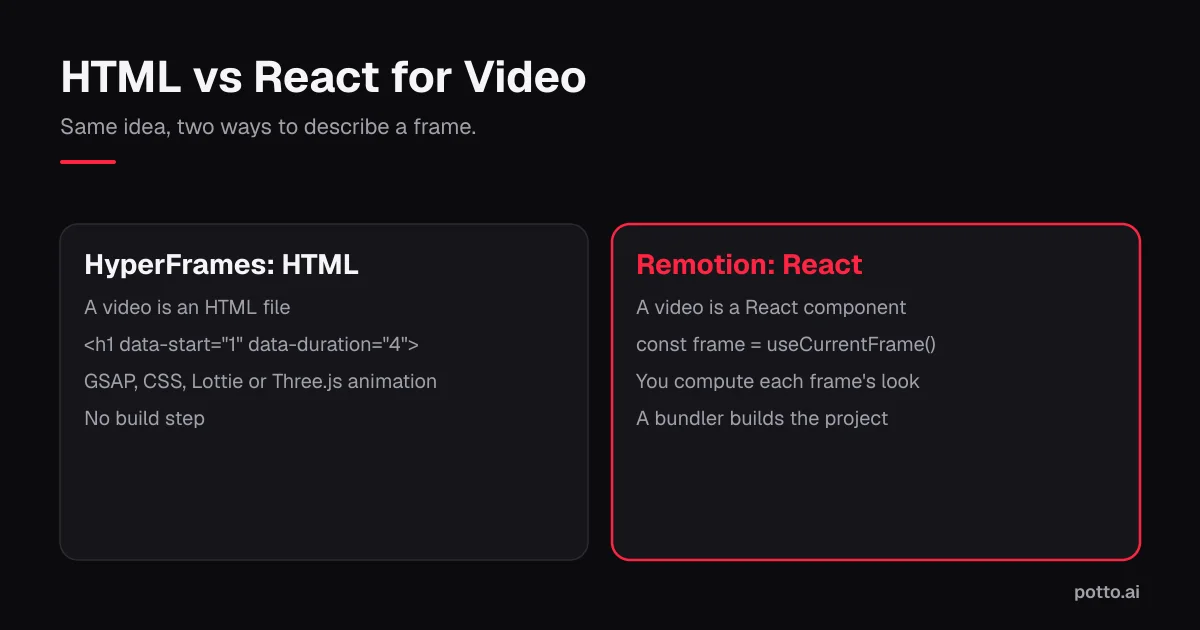
In HyperFrames, a video is an HTML file. Each element gets data attributes for its start time, its duration and its track. A title might start at second 1 and last 4 seconds. Animation comes from a library that can seek to any moment, such as GSAP, CSS animations, Lottie or Three.js. There is no build step. An index.html composition plays as it is in a browser.
In Remotion, a video is a React component. Remotion gives the component the current frame number and a blank canvas. You compute what each element looks like at that frame. Remotion ships components for text, images, video, audio and shapes. You compose a video from React components, and a bundler builds the project.
That is the core of the HTML or React video choice. HyperFrames suits teams that write plain HTML and CSS, landing page code and browser animations. You can turn code into an MP4 without a React rewrite. Remotion suits React components, a design system in React and typed props. Neither side of HTML or React is simpler for everyone. It depends on what your team already reads every day.
Preview
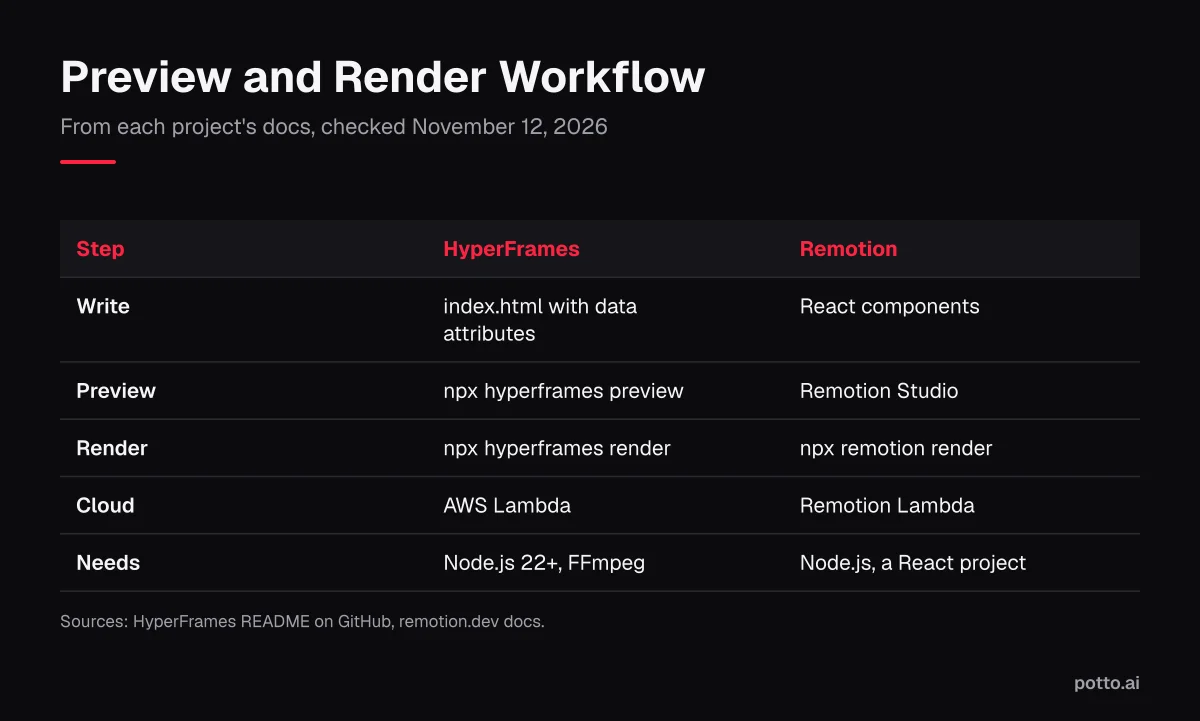
HyperFrames previews in the browser. You run npx hyperframes preview, and the page reloads as you edit. The HyperFrames docs also describe a Studio editor and a desktop app that work on the same page the renderer captures.
Remotion previews in Remotion Studio. Studio plays your React components on a timeline, and you can scrub to any frame. The Remotion docs say you can also deploy Studio to a server, so people without a dev setup can open it from a URL.
Rendering to MP4
HyperFrames renders with npx hyperframes render. The renderer seeks each frame in headless Chrome and encodes with FFmpeg. The README says the same input produces the same video. It lists local renders, Docker and an AWS Lambda path.
Remotion renders from Studio with a Render button, from the CLI with npx remotion render, through a server-side rendering API, on AWS Lambda or in GitHub Actions. It can also output an image sequence or a still. Both tools turn code into an MP4 on your own machine or on cloud functions you set up. In the remotion vs hyperframes debate, rendering is the part where they are most alike.
HyperFrames
Remotion
You write
Plain HTML and CSS, with seekable animation
React components
Build step
None
A bundler
Preview
Browser preview, Studio editor
Remotion Studio
Render
CLI, Docker, AWS Lambda
Studio, CLI, server API, AWS Lambda, GitHub Actions
Requirements
Node.js 22+, FFmpeg
Node.js and a React project
Using Them With Claude Code
HyperFrames and Remotion now expect an AI agent to write much of the code. HyperFrames ships its own skill set, and Remotion publishes official Remotion skills. A skill is a folder with a SKILL.md file that teaches the agent the rules of one job. With the right skill, Claude Code writes valid scenes, previews them and renders them.
The HyperFrames skill for Claude Code
HyperFrames ships 9 skills. The core set covers the main /hyperframes skill, the CLI, a registry of about 450 ready-made blocks, media, rebuilding an existing video, and style sampling. The README marks the last two as HyperFrames Pro. On-demand skills cover Figma, slideshows and moving Remotion code into HyperFrames.
To add the HyperFrames skill for Claude Code, the README gives two routes. You can install the Claude Code plugin with claude plugin marketplace add heygen-com/hyperframes, then claude plugin install hyperframes@hyperframes. Or you can run npx skills add heygen-com/hyperframes for standalone skills. Then you ask the agent for a video, such as a 10-second product intro with a fade-in title. The HyperFrames skill for Claude Code tells the agent to plan, write HTML, add media, lint, preview and render.
People often search for "claude hyperframes" when they mean this pairing. It is not a separate product. It is the HyperFrames skill for Claude Code running inside your own project. You can read the HyperFrames skill page for its inputs, requirements and example videos before you install it.
Remotion skills for Claude Code
Remotion maintains its own Agent Skills, called the Remotion skills. You install the Remotion skills for Claude Code with npx skills add remotion-dev/skills. The Remotion skills docs also list a GitHub CLI route, and new projects offer the skills at setup.
The Remotion skills for Claude cover project creation, React markup, Studio preview, rendering, captions, maps, license lookups and upgrades. The /remotion-best-practices skill covers all of them when you are not sure which to use. So in the HyperFrames vs Remotion choice, skills do not decide the winner. With the HyperFrames skill or the Remotion skills, the agent writes code you can read, and you run the render. For a wider list of agent skills for video, see our guide to Claude Code skills for video.
Moving from Remotion to HyperFrames
HyperFrames ships a /remotion-to-hyperframes skill. It ports Remotion code, including React components, or footage into a HyperFrames project and checks the result frame by frame. The HyperFrames docs say it flags patterns that do not map cleanly, such as React state machines. There is no official skill in the other direction. If HyperFrames vs Remotion is a migration question for you, test a few real scenes first.
Licenses and Team Use
License terms are where HyperFrames vs Remotion differs most for companies. Read the official pages before you ship anything commercial. This section only states what each project says, with the Remotion company license first.
Remotion company license
Remotion's pricing page says Remotion is free for individuals and companies of up to 3 people. The Remotion license FAQ adds non-profits and anyone still evaluating the software. Every feature is included in the free license. Bigger companies need a Remotion company license.
Remotion license
Price (remotion.dev, November 12, 2026)
Meant for
Free License
$0
Individuals and companies of up to 3 people
Company License, Creators
$25 per month per seat
Manual video work, including AI agents and Remotion Studio
Company License, Automators
$0.01 per render, minimum $100 per month
Batch rendering and video products
Enterprise License
From $500 per month
Custom terms and support
A Remotion company license can mix both options. Remotion bills Automators in steps of 1,000 renders, which is $10. The terms define who counts toward the 3 people, so check them if you are close to that limit.
HyperFrames license
The HyperFrames README says the project is released under the Apache 2.0 license. It says there are no per-render fees or commercial-use thresholds. The HyperFrames Studio app is free as well. Its Pro plan adds hosted video, image, voice and music models, and two of the core skills need Pro.
So in remotion vs hyperframes, the cost picture is different. HyperFrames is free for teams of any size, with paid extras for hosted models. Remotion is free for individuals and companies of up to 3 people, and larger companies pay per seat or per render.
Other Ways to Make a Code-Built Video
HyperFrames and Remotion are not the only code-built options. Motion Canvas describes itself as a way to write animations in TypeScript and sync them with audio in a web-based editor. It is a fit for explainer-style animation driven by code.
You can also skip a framework and record a browser page with a screen recorder. That works for a one-off clip. It does not give you the frame-by-frame output that HyperFrames and Remotion produce. For repeatable video, a renderer that captures exact frames is the safer route.
When You Want No Code
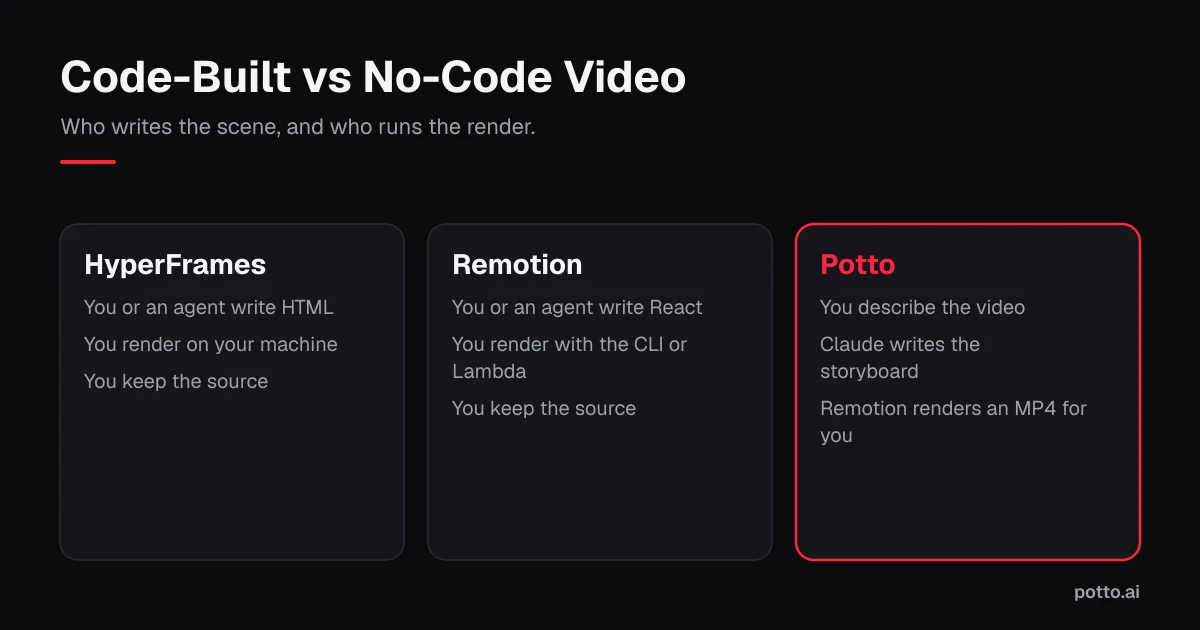
Some teams want the video, not the code. They need a way to make a video without code, and a Remotion alternative without code fits that job. Potto is an AI motion graphics generator that runs in the browser. You describe the video, add a link or upload files. Claude Opus 5.5 or Claude Fable 5.2 writes the outline, the storyboard and the voiceover script. Potto then renders the scenes with Remotion and exports an MP4.
So Potto is a Remotion alternative without code, built on Remotion itself. It is also a HyperFrames alternative for people who do not write plain HTML and CSS. You never see React. You check the storyboard and ask for changes in the chat. Potto's AI motion graphics generator shows the types of scenes, from kinetic text to product screens, charts and 3D scenes. Potto does not take HTML as input, so it does not replace HyperFrames for markup you already wrote.
A Remotion alternative without code still has a price. Potto pricing works in credits. New accounts get 100 credits. Briefs, storyboards, chat edits and previews use no credits. You pay only when you export, at 5 credits per second for a Claude Opus 5.5 project. A silent 30-second export is 150 credits. You get a 1080p MP4 at 30 frames per second in 16:9, 9:16 or 1:1, from 15 to 90 seconds.
This route fits marketers, founders and teams without a developer free for video work. You do not turn code into an MP4 yourself. You turn a description into one, and the scenes are still built from real components. If you want Claude to plan the video, see Claude motion graphics. For other no-code options, our Claude Motion alternative guide compares more tools.
Which One Fits Your Team
The remotion vs hyperframes choice comes down to three questions. Here is the HyperFrames vs Remotion decision in short. What does your team write today? How large is your company? Do you want to own the code at all?
Seats for creators, per-render pricing for automation
Teams that want an agent to write the code
Either, with its official skill
Both ship skills for Claude Code
People who want to make a video without code
A Remotion alternative without code
Describe it, check the storyboard, export an MP4
If you are still unsure, build the same 10-second title card in both. Install the HyperFrames skill for Claude Code in one folder and the Remotion skills for Claude Code in another. Ask for the same brief. Compare the code your team would rather maintain, the preview and the render. A shared brief turns remotion vs hyperframes into a concrete test. It answers the question better than any table. If nobody on the team wants to maintain code, a Remotion alternative without code may be the honest answer to the HTML or React video question.
FAQs
What is HyperFrames?
HyperFrames is a free, open-source framework that turns HTML, CSS, media and seekable animation into MP4 videos. You write each video as an HTML file with timing in data attributes. Its CLI previews the page in a browser and renders it with headless Chrome and FFmpeg.
Is HyperFrames better than Remotion?
Neither is better for every team. Remotion vs HyperFrames is a choice between plain HTML and React components, so the question is HTML or React video. HyperFrames fits web developers and has no build step. Remotion fits React teams that want to reuse their components. Try both with the same short brief.
Does HyperFrames work with Claude Code?
Yes. HyperFrames works with Claude Code through its official plugin or its standalone skills. After you install the HyperFrames skill for Claude Code, you ask for a video in plain words. Claude Code writes the HTML, previews it and runs the render on your machine.
What is the HyperFrames skill?
The HyperFrames skill is the main instruction package that teaches a coding agent to make video with HyperFrames. It holds the render rules and the work loop: plan, write HTML, add media, lint, preview and render. It is one of 9 skills in the official repository. In the remotion vs hyperframes comparison, it plays the same role as the Remotion skills.
Is Remotion free for companies?
Remotion is free for individuals and companies of up to 3 people, and for non-profits. Larger companies need a Remotion company license. It costs $25 per month per seat for Creators, or $0.01 per render with a $100 monthly minimum for Automators, per remotion.dev on November 12, 2026.
Can I make a video with Remotion without code?
Not directly, because Remotion videos are React code. You cannot make a video without code in Remotion itself. An agent with the Remotion skills for Claude Code can write that code for you, but you still run the project. To make a video without code, use a no-code tool that renders with Remotion for you, like the one in the no-code section above.
Sources
HyperFrames README, GitHub, read November 12, 2026.
HyperFrames vs Remotion guide, HyperFrames docs, read November 12, 2026.